Week 12 [Mon, Nov 2nd] - Topics

Detailed Table of Contents


Guidance for the item(s) below:

Previously, you learned about equivalence partitions, a heuristic for dividing the possible test cases into partitions. But which test cases should we pick from each partition? Next, let us learn another heuristic which can help us answer that question.

[W12.1] Boundary Value Analysis

W12.1a

Quality Assurance → Test Case Design → Boundary Value Analysis → What

Boundary Value Analysis (BVA) is a test case design heuristic that is based on the observation that bugs often result from incorrect handling of boundaries of equivalence partitions. This is not surprising, as the end points of boundaries are often used in branching instructions, etc., where the programmer can make mistakes.
Example The markCellAt(int x, int y) operation could contain code such as if (x > 0 && x <= (W-1)) which involves the boundaries of x’s equivalence partitions.

BVA suggests that when picking test inputs from an equivalence partition, values near boundaries (i.e., boundary values) are more likely to find bugs.

Boundary values are sometimes called corner cases.


Exercises:

What BVA recommends


W12.1b

Quality Assurance → Test Case Design → Boundary Value Analysis → How

You should try to test both boundary values and non-boundary values. Give priority to boundary values over non-boundary values. For example, pick one non-boundary value from each partition, or if you can afford more test cases, pick two non-boundary values (e.g., one just below the boundary, and one just above the boundary).

Example Some possible test values for various equivalence partitions:

Equivalence partition Some possible test values (boundaries are in bold)

[1-12]

0,1,2, 11,12,13

[MIN_INT, 0]
(MIN_INT is the minimum possible integer value allowed by the environment)

MIN_INT, MIN_INT+1, -1, 0 , 1

[any non-null String]
(assuming string length is the aspect of interest)

Empty String, a String of maximum possible length

[prime numbers]
[“F”]
[“A”, “D”, “X”]

No specific boundary

[non-empty Stack]
(assuming a fixed size stack)

Stack with: no elements, one element, two elements, no empty spaces, only one empty space


Guidance for the item(s) below:

Earlier, you learned that can improve the test case quality. Even when applying them, the number of test cases can increase when the SUT takes multiple inputs. Let's see how we can deal with such situations.

[W12.2] Combining Multiple Test Inputs

W12.2a

Quality Assurance → Test Case Design → Combining Test Inputs → Why

An SUT can take multiple inputs. You can select values for each input (using equivalence partitioning, boundary value analysis, or some other technique).

Example An SUT that takes multiple inputs and some values chosen for each input:

  • Method to test: calculateGrade(participation, projectGrade, isAbsent, examScore)
  • Values to test:
    Input Valid values to test Invalid values to test
    participation 0, 1, 19, 20 21, 22
    projectGrade A, B, C, D, F
    isAbsent true, false
    examScore 0, 1, 69, 70, 71, 72

Testing all possible combinations is effective but not efficient. If you test all possible combinations for the above example, you need to test 6x5x2x6=360 cases. Doing so has a higher chance of discovering bugs (i.e., effective) but the number of test cases will be too high (i.e., not efficient). Therefore, you need smarter ways to combine test inputs that are both effective and efficient.


W12.2b

Quality Assurance → Test Case Design → Combining Test Inputs → Test input combination strategies

Given below are some basic strategies for generating a set of test cases by combining multiple test inputs.

Example Let's assume the SUT has the following three inputs and you have selected the given values for testing:

SUT: foo(char p1, int p2, boolean p3)

Values to test:

Input Values
p1 a, b, c
p2 1, 2, 3
p3 T, F

The all combinations strategy generates test cases for each unique combination of test inputs.

Example This strategy generates 3x3x2=18 test cases.

Test Case p1 p2 p3
1 a 1 T
2 a 1 F
3 a 2 T
... ... ... ...
18 c 3 F

The at least once strategy includes each test input at least once.

Example This strategy generates 3 test cases.

Test Case p1 p2 p3
1 a 1 T
2 b 2 F
3 c 3 VV/IV

VV/IV = Any Valid Value / Any Invalid Value

The all pairs strategy creates test cases so that for any given pair of inputs, all combinations between them are tested. It is based on the observation that a bug is rarely the result of more than two interacting factors. The resulting number of test cases is lower than the all combinations strategy, but higher than the at least once approach.

Example This strategy generates 9 test cases:

See steps


Test Case p1 p2 p3
1 a 1 T
2 a 2 T
3 a 3 F
4 b 1 F
5 b 2 T
6 b 3 F
7 c 1 T
8 c 2 F
9 c 3 T

A variation of this strategy is to test all pairs of inputs but only for inputs that could influence each other.

Example Testing all pairs between p1 and p3 only while ensuring all p2 values are tested at least once:

Test Case p1 p2 p3
1 a 1 T
2 a 2 F
3 b 3 T
4 b VV/IV F
5 c VV/IV T
6 c VV/IV F

The random strategy generates test cases using one of the other strategies and then picks a subset randomly (presumably because the original set of test cases is too big).

There are other strategies that can be used too.


W12.2c

Quality Assurance → Test Case Design → Combining Test Inputs → Heuristic: Each valid input at least once in a positive test case

Consider the following scenario.

SUT: printLabel(String fruitName, int unitPrice)

Selected values for fruitName (invalid values are underlined):

Values Explanation
Apple Label format is round
Banana Label format is oval
Cherry Label format is square
Dog Not a valid fruit

Selected values for unitPrice:

Values Explanation
1 Only one digit
20 Two digits
0 Invalid because 0 is not a valid price
-1 Invalid because negative prices are not allowed

Suppose these are the test cases being considered.

Case fruitName unitPrice Expected
1 Apple 1 Print round label
2 Banana 20 Print oval label
3 Cherry 0 Error message “invalid price”
4 Dog -1 Error message “invalid fruit”

It looks like the test cases were created using the at least once strategy. After running these tests, can you confirm that the square-format label printing is done correctly?

  • Answer: No.
  • Reason: Cherry -- the only input that can produce a square-format label -- is in a negative test case which produces an error message instead of a label. If there is a bug in the code that prints labels in square-format, these test cases will not trigger that bug.

In this case, a useful heuristic to apply is each valid input must appear at least once in a positive test case. Cherry is a valid test input and you must ensure that it appears at least once in a positive test case. Here are the updated test cases after applying that heuristic.

Case fruitName unitPrice Expected
1 Apple 1 Print round label
2 Banana 20 Print oval label
2.1 Cherry VV Print square label
3 VV 0 Error message “invalid price”
4 Dog -1 Error message “invalid fruit”

VV/IV = Any Invalid or Valid Value VV = Any Valid Value


W12.2d

Quality Assurance → Test Case Design → Combining Test Inputs → Heuristic: Test invalid inputs individually before combining them

To verify the SUT is handling a certain invalid input correctly, it is better to test that invalid input without combining it with other invalid inputs. For example, consider the test case 4 of test cases designed in [Heuristic: each valid input at least once in a positive test case]. After running that test case, can you be sure that the error message “invalid fruit” is caused by the invalid fruitName Dog?

  • Answer: No
  • Reason: Because it could have been (incorrectly) triggered by the other invalid unitPrice of -1 in that test case, due to a bug in the code.

Therefore, if that test case was intended to verify that the invalid fruitName Dog triggers the “invalid fruit” error message, it is better not to include the invalid unitPrice -1 in that test case at the same time. If the invalid value -1 needs to be tested, we should test it in a separate test case.

After applying the above insight to our running example, you get the following test cases.

Case fruitName unitPrice Expected
1 Apple 1 Print round label
2 Banana 20 Print oval label
2.1 Cherry VV Print square label
3 VV 0 Error message “invalid price”
4 VV -1 Error message “invalid price”
4.1 Dog VV Error message “invalid fruit”

VV/IV = Any Invalid or Valid Value VV = Any Valid Value

This is not to say never have more than one invalid input in a test case. In fact, an SUT might work correctly when only one invalid input is given but not when a certain combination of multiple invalid inputs is given. Hence, it is still useful to have test cases with multiple invalid inputs, after you already have confirmed that the SUT works when only one invalid input is given.

Test invalid inputs individually before combining them is the heuristic we learned here. As a test case with multiple invalid inputs by itself does not confirm that the SUT works for each of those invalid inputs, you are better off testing the SUT with one-invalid-input-at-a-time first, and if you can afford more test cases, also testing with combinations of invalid inputs.


Exercises:

Can define test cases precisely


Guidance for the item(s) below:

Testing is the first thing that comes to mind when you hear 'Quality Assurance' but there are other QA techniques that can complement testing. Let's first take a step back and take a look at QA in general, followed by a look at some other QA techniques.

[W12.3] Other QA Techniques

W12.3a

Quality Assurance → Quality Assurance → Introduction → What

Software Quality Assurance (QA) is the process of ensuring that the software being built has the required levels of quality.

While testing is the most common activity used in QA, there are other complementary techniques such as static analysis, code reviews, and formal verification.


W12.3b

Quality Assurance → Quality Assurance → Introduction → Validation versus verification

Quality Assurance = Validation + Verification

QA involves checking two aspects:

  1. Validation: are you building the right system, i.e., are the requirements correct?
  2. Verification: are you building the system right, i.e., are the requirements implemented correctly?

Whether something belongs under validation or verification is not that important. What is more important is that both are done, instead of limiting QA to verification only (i.e., remember that the requirements can be wrong too).


Exercises:

Statements about validation and verification


W12.3c

Quality Assurance → Quality Assurance → Code Reviews → What

Code review is the systematic examination of code with the intention of finding where the code can be improved.

Reviews can be done in various forms. Some examples are:

  • Pull Request reviews

    • Project management platforms such as GitHub and BitBucket allow new code to be proposed as Pull Requests and provide the ability for others to review the code in the PR.
  • In pair programming

    • Because pair programming involves two programmers working on the same code at the same time, there is an implicit review of the code by the other member of the pair.
  • Formal inspections

    • Inspections involve a group of people systematically examining project artifacts to discover defects. Members of the inspection team play various roles during the process, such as:

      • the author - the creator of the artifact
      • the moderator - the planner and executor of the inspection meeting
      • the secretary - the recorder of the findings of the inspection
      • the inspector/reviewer - the one who inspects/reviews the artifact

Advantages of code review over testing:

  • It can detect functionality defects as well as other problems such as coding standard violations.
  • It can verify non-code artifacts and incomplete code.
  • It does not require test drivers or stubs.

Disadvantages:

  • It is a manual process and is therefore error-prone.

Resources:

W12.3d

Quality Assurance → Quality Assurance → Static Analysis → What

Static analysis: Static analysis is the analysis of code without actually executing the code.

Static analysis of code can find useful information such as unused variables, unhandled exceptions, style errors, and statistics. Most modern IDEs come with some inbuilt static analysis capabilities. For example, an IDE can highlight unused variables as you type the code into the editor.

The term static in static analysis refers to the fact that the code is analyzed without executing the code. In contrast, dynamic analysis requires the code to be executed to gather additional information about the code, e.g., performance characteristics.

Higher-end static analysis tools (static analyzers) can perform more complex analysis such as locating potential bugs, memory leaks, and inefficient code structures.
Example Some static analyzers for Java: CheckStyle, PMD, FindBugs

Linters are a subset of static analyzers that specifically aim to locate areas where the code can be made 'cleaner'.


W12.3e

Quality Assurance → Quality Assurance → Formal Verification → What

Formal verification uses mathematical techniques to prove the correctness of a program.

An introduction to Formal Methods


Advantages:

  • Formal verification can be used to prove the absence of errors. In contrast, testing can only prove the presence of errors, not their absence.

Disadvantages:

  • It proves only compliance with the specification, but not the actual utility of the software.
  • It requires highly specialized notations and knowledge, which makes it an expensive technique to administer. Therefore, formal verification is more commonly used in safety-critical software such as flight control systems.

Exercises:

Absence of errors


[W12.4] Secure Software Engineering

W12.4a

Quality Assurance → Secure Software Engineering → What

Software now handles personal information, money, communication, transportation, education, health, and many other parts of daily life. A defect in such software can do more than inconvenience a user: it can expose information, allow unauthorized actions, or make an important service unavailable.

Security is therefore part of software engineering, not a specialist activity added after the software is finished; this approach is called secure by design. Every software engineer needs enough security knowledge to recognize common risks, make safer design and implementation decisions, and know when expert help is needed.

This textbook does not attempt to teach every kind of attack. Instead, it develops one reusable method that applies broadly.

Software security is the protection of a system and its stakeholders from misuse and harm, whether deliberate or accidental. A conventional defect might be triggered accidentally. In contrast, a security weakness may be deliberately searched for and exploited by someone who can choose the inputs, actions, timing, and sequence most favorable to an attack. Security analysis assumes that deliberate case, because an attacker exercises a feature far harder than an accident usually does. Accidental causes still need attention of their own, because a misconfiguration, an operator mistake, or a corrupted record need not resemble an attack.

Example We will use a university event-registration system as the running example throughout the related topics of this textbook. Students can view events and register themselves. Organizers can create events and view attendee lists. The system stores names, email addresses, registrations, and organizer privileges.

Testing whether an ordinary user can register for an event is necessary, but it is not enough. We must also ask whether one student can view another student's registration, whether a non-organizer can obtain an attendee list, and whether an attacker can submit enough costly requests to make registration unavailable to everyone else.

The security mindset

The security mindset means questioning assumptions and considering how a feature could be deliberately misused. When implementing a feature, ask both:

  • Does the intended workflow work?
  • What are we trusting, and what could someone do if that trust is misplaced?

Example Suppose a browser sends the following data when a user requests an attendee list:

eventId = 42
isOrganizer = true

The value eventId identifies the requested event. However, isOrganizer is merely a claim made by software under the user's control. Hiding the attendee-list button from ordinary users does not stop them from constructing the request themselves. A security-minded engineer treats the flag as untrusted and asks where the user's authority is established.

The security mindset is not the belief that every user is malicious. It is the recognition that software must remain safe when inputs are mistaken, unusual, corrupted, or deliberately hostile. The same controls often protect against both accidents and attacks.

Three basic security goals

Security is broader than secrecy. Protecting information from disclosure matters, but so do preventing unauthorized changes, preserving service availability, and ensuring that actions are performed by the right people.

Three of these are security properties, together called the CIA triad. Establishing that actions are performed by the right people is not a fourth property; it is a mechanism used to protect all three. The triad gives three useful questions to ask:

  • Confidentiality asks whether information has been disclosed only to those permitted to see it.
    Example An attendee's email address should not be disclosed to another student without a valid reason and permission.

  • Integrity asks whether information and behavior have remained correct, complete, and free from improper change or destruction.
    Example A student should not be able to cancel another student's registration or grant themselves organizer privileges.

  • Availability asks whether authorized users can obtain the service when they need it.
    Example The registration service should remain usable during a popular event's sign-up period.

A single incident can affect more than one goal.
Example A compromised organizer account might expose attendee details, alter registrations, and delete events.

A small vocabulary

The following terms let a team discuss security precisely:

  • Asset: something worth protecting.
    Example Assets include data, account privileges, service availability, money, physical resources, and reputation.
  • Stakeholder: a person or group that can benefit or suffer from the system's security decisions.
    Example Students, organizers, system operators, and the university are stakeholders in the event system.
  • Threat: a possible way an asset could be harmed.
    Example A student reading another student's registration is a threat to confidentiality.
  • Vulnerability: a weakness that allows a threat to be realized.
    Example Failing to check which student owns a registration is a vulnerability.
  • Attack: an attempt to exploit a vulnerability.
    Example Changing a registration identifier in a request to retrieve someone else's record is an attack.
  • Control or Mitigation: something that reduces the likelihood or impact of a threat.
    Example Checking ownership before returning a registration is a control.
  • Authentication: establishing which identity is making a request.
    Example Signing in as a particular student.
  • Authorization: deciding whether that identity may perform a specific action on a specific resource.
    Example Checking that this student owns the registration they asked to see.
  • Risk: the likelihood of a threat combined with the seriousness of its impact.
    Example A student reading another student's registration is a high risk: it is easy to attempt and it exposes personal data.
  • Misuse case: a short scenario describing how someone could deliberately use the system to cause harm.
    Example A student changes an event identifier to download another event's list.

These terms describe different parts of one situation. A valuable database is not a vulnerability. A possible theft is not an attack until someone attempts it. A control can reduce risk without eliminating it.

Security and privacy

Privacy is related to, but distinct from, security. Security asks whether information and capabilities are protected from unauthorized use. Privacy also asks whether collecting, using, retaining, and sharing personal information is appropriate in the first place.

Data that is never collected cannot later be leaked by that system. Strong access control cannot justify collecting data the system does not need.
Example The event system might need an attendee's name and contact address, but probably not their date of birth.

Security is risk management

Perfect security is not achievable; secure engineering is risk management. A useful security claim must say what is being protected, from whom, under what assumptions, and to what degree.

Example Encrypting database backups, with keys held separately, can reduce the harm caused by someone stealing a backup. It cannot protect attendee data from an organizer who is legitimately permitted to view it. A rate limit can make an automated denial-of-service attack more expensive, but a sufficiently large attack may still overwhelm the system.

Security also has costs. A control can consume development time, reduce performance, make a system harder to use, or create new failure modes. The goal is not to add every possible control. It is to identify important risks and choose controls whose benefits justify their costs.

Some names you will encounter

You do not need to memorize a catalog of vulnerabilities, but a few common labels are useful:

  • Broken access control allows someone to perform an action or access data they are not authorized to use.
  • Injection occurs when a system interprets untrusted data as code or commands.
  • Cross-site scripting (XSS) occurs when a web application causes untrusted content to execute as a script in another user's browser.
  • Vulnerable or outdated components expose a system to known weaknesses in reused software.

Each label has a matching engineering practice, and this textbook covers all four: enforcing authorization on every protected action, keeping untrusted data separate from commands, encoding output for the context it is placed into, and treating dependencies as part of the product.

The OWASP Top 10 is a widely used awareness list for web-application risks. It is a useful pointer for further study, but it is not a complete model of software security and should not replace thinking about the specific system in front of you.


W12.4b

Quality Assurance → Secure Software Engineering → Why

Software can pass its normal tests and still be insecure. Functional tests usually ask whether expected users can perform expected actions. Security also asks what happens when someone deliberately uses unexpected inputs, identities, permissions, sequences, and volumes.

Example Consider a registration page that correctly displays registration 381 to its owner:

/registrations/381

If changing the address to /registrations/382 reveals another student's record, the feature works on its happy path but has broken access control. The server checked that the requester was signed in; it did not check that this record belonged to them.

Authentication and authorization answer different questions: authentication establishes who is making a request, and authorization decides whether that identity may perform this particular action on this particular resource.

A user can be correctly authenticated and still be unauthorized. In most systems, authorization must be checked for every protected action, not just when the user first signs in.

Security failures cause real harm

A security failure can harm people who never chose to accept the risk. Exposed personal data can lead to harassment or fraud. Altered records can cause financial or academic consequences. An unavailable service can exclude users from something time-sensitive. Compromised software can also be used to attack other systems.

The engineer who writes a small part of the program may not see these consequences directly. Nevertheless, a missing permission check, leaked credential, or unsafe library call can bypass otherwise sound requirements, design, and testing.

Security problems also become more expensive after release. Correcting one line of code may be the easy part. The response may also require investigating what happened, recovering data, revoking credentials, updating dependencies, deploying urgently, notifying affected people, and rebuilding trust.

Attackers can exploit any undefended path

An attacker needs one usable path to an asset, while defenders must protect every reachable path that matters.

Example A team may secure the main web page but forget an older API, an import feature, an administrator script, or a default account. The forgotten path can be enough.

That asymmetry is why security work concentrates on reducing the number of paths, covering each of them consistently, and putting more than one control around anything that matters.

Security includes people and processes

A control that people cannot use correctly will often be bypassed.

Example If secure setup is much harder than insecure setup, developers will postpone it. If every harmless action triggers an alarming warning, users will learn to ignore warnings. If a password policy makes passwords impossible to remember, users may record them somewhere unsafe.

Software engineers do not control every human decision, and this textbook does not teach in depth. However, engineers influence interfaces, workflows, defaults, documentation, and operational procedures. Good security makes the safe action understandable and practical.


W12.4c : OPTIONAL

Quality Assurance → Secure Software Engineering → How


W12.4d : OPTIONAL

Quality Assurance → Secure Software Engineering → When


W12.4e : OPTIONAL

Quality Assurance → Secure Software Engineering → Securing AI-assisted code


W12.4f : OPTIONAL

Quality Assurance → Secure Software Engineering → Wrap-up


Guidance for the item(s) below:

In a previous week, you learned about sequential and iterative ways of doing a software. Now, let us take a quick look at a couple of well-known processes used in the industry, both of which fall into a category called agile processes.

[W12.5] SDLC Process Models: XP/Scrum

W12.5a

Project Management → SDLC Process Models → Introduction → Agile models

The agile approaches grew out of lightweight methods that were already in use. In 2001, a group of prominent software engineering practitioners -- among them the authors of several such methods -- met to articulate the values their approaches had in common. They were reacting against the documentation-driven, heavyweight processes used in most large projects at the time. The result was the agile manifesto.

We are uncovering better ways of developing software by doing it and helping others do it.

Through this work we have come to value:

  • Individuals and interactions over processes and tools
  • Working software over comprehensive documentation
  • Customer collaboration over contract negotiation
  • Responding to change over following a plan

That is, while there is value in the items on the right, we value the items on the left more.
-- Extract from the Agile Manifesto

The methods represented at that meeting, and later approaches built on the same values, are collectively called agile processes. Some of the key features of agile approaches are:

  • Requirements are prioritized by user need, clarified with the whole team regularly (sometimes daily), and folded into the development schedule as they change.
  • Planning and design stay light and keep evolving. Instead of a detailed design and a full project plan up front, the team works from a rough plan and a high-level design that evolves as the work goes on.
  • The team shares responsibility for delivering the product, and reports progress openly to each other and to the user.

Many agile processes are in use today. Extreme Programming (XP) and Scrum are two well-known ones.

Agile approaches depend on conditions that are not always present: a customer available to give feedback continuously, and the ability to ship a change cheaply. Where those are missing -- a fixed-price contract with a signed-off scope, or software that must be certified before release -- an agile approach costs more than it returns.


Exercises:

Statements about agile processes


W12.5b

Project Management → SDLC Process Models → Scrum

Scrum is a lightweight agile framework rather than a complete process. It fixes a small set of roles, events, and artifacts, and leaves the team to fill in the rest with practices of its own choosing. The description below follows the Scrum Guide.

A Scrum team has three accountabilities:

  • The Product Owner, who represents the stakeholders and decides what the product needs next
  • The Scrum Master, who is accountable for the team using Scrum well
  • The Developers, a cross-functional group who do the analysis, design, implementation, and testing

A Scrum project is divided into short iterations called Sprints. Sprints are time-boxed (i.e., restricted to a fixed duration) at one month or less, and every Sprint in a project has the same length. One to four weeks is the common choice.

A Sprint contains all the work done in it, together with all its events. It opens with Sprint Planning, where the team selects the work and agrees on a Sprint Goal, and the Developers coordinate daily as the work proceeds. It ends with two distinct meetings: a Sprint Review, where the team and stakeholders inspect the Increment and decide what the product needs next, and a Sprint Retrospective, where the team inspects how it worked and chooses improvements. The next Sprint begins immediately after.

During each Sprint, the team creates a potentially deliverable Increment (for example, working and tested software). The work comes from the Product Backlog, a prioritized set of high-level requirements for the product as a whole. The items selected for the current Sprint form the Sprint Backlog.

Within a Sprint the Sprint Goal stays fixed, but the plan for reaching it does not. The team updates the Sprint Backlog as it learns more, and can renegotiate the scope with the Product Owner as long as the Sprint Goal survives. The Sprint must end on time; work that is not completed returns to the Product Backlog.

Scrum enables self-organizing teams, which rely on frequent and direct communication among all team members and disciplines rather than on documents handed from one to the next.

Scrum assumes that customers will change their minds about what they want (often called requirements churn) and that unforeseen problems cannot be planned for in advance. It therefore takes an empirical approach: instead of trying to define the problem fully up front, it maximizes the team's ability to deliver quickly and respond to requirements as they emerge.
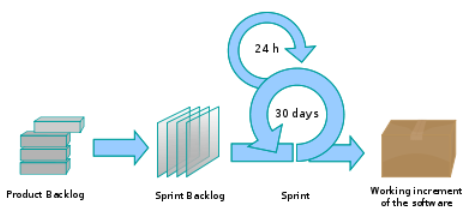
The Daily Scrum is a short daily meeting in which the Developers synchronize their plans, surface whatever is blocking them, and decide what needs to be taken up separately. It is not a problem-solving meeting.
Example A common way to run it is for each member to say what they did since the previous Daily Scrum, what they plan to do next, and what is in their way.

Intro to Scrum in Under 10 Minutes


W12.5c

Project Management → SDLC Process Models → XP

The following description was adapted from the XP home page, emphasis added:

Extreme Programming (XP) stresses customer satisfaction. Instead of delivering everything you could possibly want on some date far in the future, this process delivers the software you need as you need it.

XP aims to empower developers to confidently respond to changing customer requirements, even late in the lifecycle.

XP emphasizes teamwork. Managers, customers, and developers are all equal partners in a collaborative team. The team self-organizes around the problem to solve it as efficiently as possible.

XP aims to improve a software project in five essential ways: communication, simplicity, feedback, respect, and courage. Extreme Programmers constantly communicate with their customers and fellow programmers. They keep their design simple and clean. They get feedback by testing their software starting on day one. With this foundation, Extreme Programmers are able to courageously respond to changing requirements and technology.
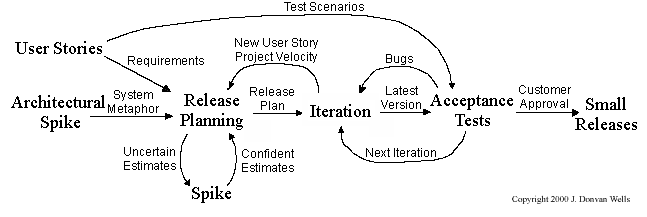
What makes XP 'extreme' is not the practices it uses but how often it uses them. Each one was already considered good; XP pushes each to the point where it happens continuously rather than in a scheduled phase:

  • releases are small and frequent, rather than saved up for a milestone;
  • code is integrated continuously, rather than merged near the end (continuous integration);
  • tests are written before the code they test, rather than after (test-driven development);
  • the design is refactored constantly, rather than in a cleanup phase;
  • two programmers write the code together at one keyboard, so it is reviewed as it is written rather than in a scheduled review (pair programming).

That is the same argument iterative models make about the whole lifecycle, applied to individual development practices instead: shorten the gap between doing something and finding out whether it worked.


W12.5d : OPTIONAL

Project Management → SDLC Process Models → Choosing a model