- Submit final deliverables Tue, Nov 3rd 14:00
- Prepare for the practical exam
- Take part in the practical exam (PE) Fri, Nov 6th 12 noon to Sat, Nov 7th 12 noon
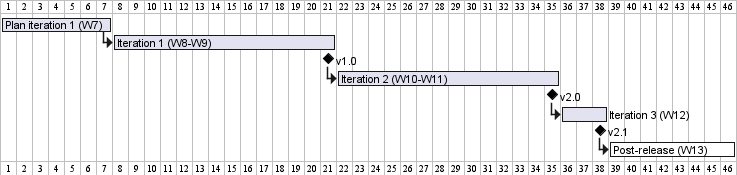
1 Submit final deliverables Tue, Nov 3rd 14:00
Deadline for all v2.1 submissions is Tue, Nov 3rd 14:00:00 unless stated otherwise. Note that 14:00:01 is considered late, as per the Canvas deadline mechanism.
Penalty for late submission (per file):
-1 mark for missing the deadline (up to 2 hours late).
-2 for an extended delay (up to 24 hours late).
Penalty for delays beyond 24 hours is determined on a case-by-case basis.- Even a one-second delay is considered late, irrespective of the reason.
- For submissions done via Canvas, the submission time is the timestamp shown by Canvas.
- When determining the late submission penalty, we take the latest submission even if the exact same file was submitted earlier. Do not submit the same file multiple times if you want to avoid unnecessary late submission penalties.
- The whole team is penalized for problems in team submissions e.g., a -1 penalty for a team submission will be a -1 penalty for each team member.
Only the respective student is penalized for problems in individual submissions.
Submit via the Canvas assignment we have set up.
Follow submission instructions closely. Any non-compliance will be penalized (e.g., wrong file name/format).
Canvas might automatically add a file name suffix (e.g.,*-1.jar,*-2.jar, ...) if you upload a file multiple times. You can safely ignore that suffix.Do not update the code during the 30 days after the deadline. Get our permission first if you need to update the code in the repo during that code-freeze period.
- You can update issues/milestones/PRs even during the code-freeze period.
- You can update the code during the code-freeze period if the change is related to a late submission approved by us.
- You can continue to evolve your repo after the code-freeze period.
Submissions:
The icon indicates team submissions. Only one person needs to submit on behalf of the team, but we recommend that others help verify the submission is in order.
We will not entertain requests to limit late penalties of team submissions to one person even if the delay was one person's fault. That is, the responsibility (and the penalty) for team submissions is to be shared by the whole team rather than borne by one person.
Your team ID:
Your product name:
Note: Type your team ID and product name in the fields above so that we can customize the content below to fit you.
- Product:
- Do a release on GitHub, tagged appropriately e.g.,
v2.1orv2.1b. - Upload the JAR file to Canvas.
File name:[TEAM_ID][ProductName].jare.g., [[[teamId: CS2113-T10-2]]][[[productName: ContactsPro]]].jar
Recommended to avoid spaces and special characters in the product name as they can cause problems when running the JAR file using the command line.
This name requirement is for the JAR file you upload to Canvas only. You may name the JAR file you upload to GitHub in any reasonable way.
- Do a release on GitHub, tagged appropriately e.g.,
- Source Code: Push the code to GitHub and tag it with the version number.
Reminder: double-check to ensure the code attributed to you by RepoSense is correct.
- User Guide:
- Ensure the updated version is available as part of your product website deployed on GitHub Pages.
- Developer Guide:
- submission is similar to that of the UG
- Product Website: Update the website (home page,
AboutUs.mdetc.) on GitHub. Ensure the website is auto-published.
- Project Portfolio Page (PPP):
- HTML version: make available on
github.io - PDF file: submission is similar to that of the UG
File name:[TEAM_ID][Your full Name as Given in Canvas]PPP.pdfe.g., [[[teamId: CS2113-T10-2]]][Leow Wai Kit, John]PPP.pdf
Use-in place of/if your name has it e.g.,Ravi s/o Veegan→Ravi s-o Veegan(reason: Windows does not allow/in file names)
- HTML version: make available on