Detailed Table of Contents
Guidance for the item(s) below:
While architecture is not of high importance to a small project such as the tP, it is good to know a little bit about it in case you are thrown into a larger project in future.
Guidance for the item(s) below:
First, let us learn about multi-level design, a pre-cursor to learning about architecture.
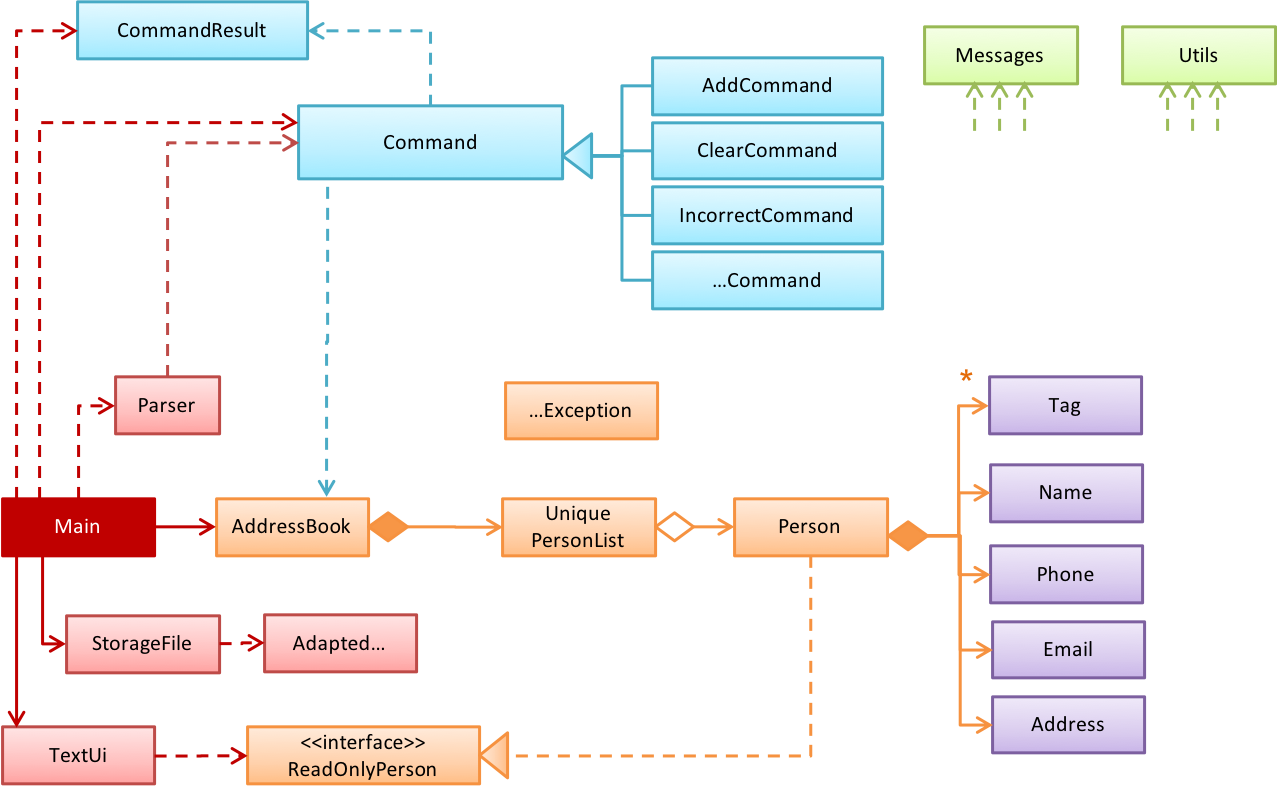
In a smaller system, the design of the entire system can be shown in one place.
Example This class diagram of se-edu/addressbook-level2 depicts the design of the entire software.
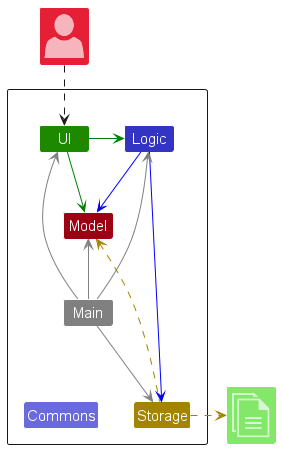
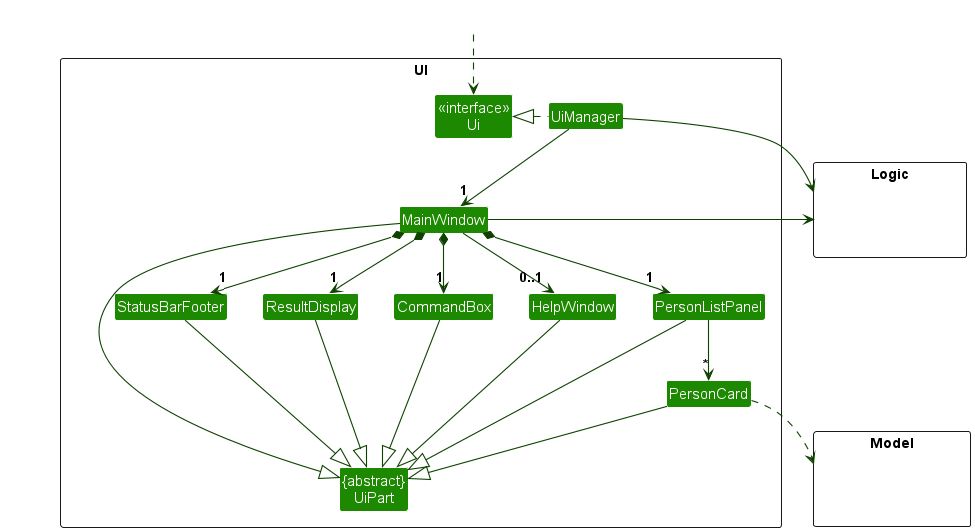
The design of bigger systems needs to be created and shown at multiple levels.
Example This architecture diagram of se-edu/addressbook-level3 depicts the high-level design of the software.
Lower-level designs of some components of the same software:


Guidance for the item(s) below:
Now that we know about multi-level design, let us learn about architecture, which is a special case of multi-level design. We also cover architecture diagrams here.
When you write a small program by yourself, you can hold its structure in your head. You know where each piece of functionality lives, and you can usually predict what a change will affect.
That becomes much harder as the software and its team grow. Several people add code to the same program at once, and none of them has read all of it. Questions that once seemed trivial start to matter:
Software architecture is the set of significant decisions about a system's overall organization. It identifies the major parts, their responsibilities, how they interact, and how they are deployed.
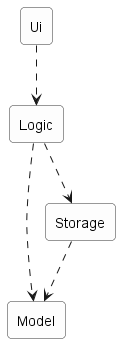
Example Consider a desktop invoice-management application in which users create invoices, set due dates, and mark invoices as paid. A possible architecture has four parts:
Each arrow in the diagram is a dependency: the part at the tail needs the part at the head.
Ui: displays information and receives user inputLogic: interprets user actions and carries out operationsModel: represents invoices and other data while the program runsStorage: reads data from and writes it to persistent storageAn architecture description deliberately leaves out most of what is inside each part. It does not say how many classes are in Logic, which one validates a user command, or which collection holds the invoices. Those are detailed design decisions.
Architecture and detailed design differ in how far a decision reaches, not merely in how big it is. An architectural decision constrains what the other parts can do, shapes the qualities the system can achieve, and is expensive to reverse once the rest of the system is built on it.
Example Deciding that persistent data belongs in a separate Storage component is architecture. Deciding that Storage uses one class per file format is detailed design.
The boundary is not absolute. An internal choice becomes architecturally significant when it strongly affects the rest of the system.
Example A change to the data representation to make the application able to handle a million invoices can be architecturally significant, affecting more than the internals of the Storage component.
Every software system has an architecture, even when nobody designed one deliberately. An unplanned program still has parts and dependencies; they are simply accidental, undocumented, and usually tangled. The value of deciding an architecture on purpose is that the team shares one, understands it, and can reason about it.
An architecture is a shared and evolving technical understanding, not one person's private plan. A team sets an initial architecture early — the decisions are expensive to reverse later — then tests it against real requirements and revises it deliberately when those requirements change. Larger organizations may give one person an architect role to hold the technical vision, but the architecture still has to be understood by everyone building the system.
An architecture is also more than a diagram. Although an architecture is often represented by a diagram (like the one in the example above), a diagram shows one view. The architecture also includes the constraints everyone must work within and the reasons behind the choices.
Example The fact that the application stores data locally because it must work without a network connection is also part of the architecture, although it may not be captured by the architecture diagram.
The software architecture of a program or computing system is the structure or structures of the system, which comprise software elements, the externally visible properties of those elements, and the relationships among them. Architecture is concerned with the public side of interfaces; private details of elements—details having to do solely with internal implementation—are not architectural.
-- Software Architecture in Practice (2nd edition), Bass, Clements, and Kazman
The definition above is widely quoted in the literature. "Externally visible properties" means what promises to do, not how it does it.
Architecture diagrams have no universally adopted notation. Unlike UML class diagrams, there is no rulebook: different teams use different shapes, colors, and arrows. A reader must first work out what the notation means.
Read an architecture diagram by asking four questions in order:
A single diagram need not explain the whole architecture, but it must communicate its chosen view without ambiguity. Judge it against its stated purpose and the documentation it ships with: if the four questions cannot be answered from the diagram, its caption, and the text around it, something is missing — a useful thing to notice when reviewing a teammate's work.
Example Here are two real architecture diagrams, from actual projects, drawn by different teams in different notations. They describe systems unrelated to the invoice-manager example, which is exactly the situation you face when you join an unfamiliar project.
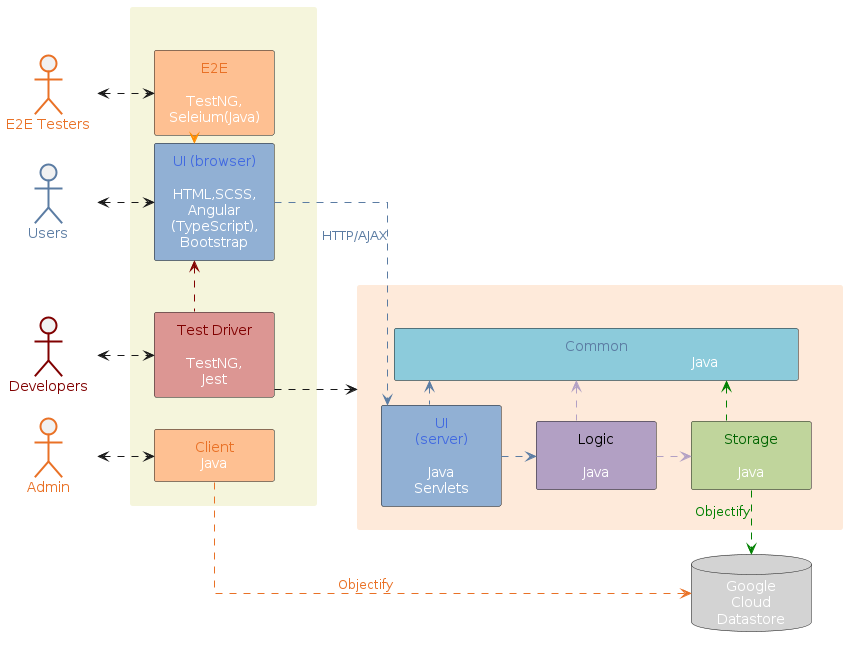

Try the four questions on both. They organize their boxes differently, use different shapes, and label their arrows differently, yet both are legitimate. For each one, work out which of the four questions the diagram answers by itself, and which stay ambiguous until you read the documentation around it — real diagrams often leave some of the four to the accompanying text.
Guidance for the item(s) below:
The next topic is like 'design patterns at architecture level'. In fact, the MVC pattern you saw earlier comes close to this category too.
An architectural style is a reusable way of organizing the major parts of a system (aka architectural pattern), just as building architectures follow recognized styles. Naming a style (e.g., "layered", "client-server") lets developers refer to a familiar arrangement without explaining it from scratch.
Different styles describe different aspects of a system, which is why one system can use several at once. This is the most useful thing to know before learning different architectural styles.
Aspect: This style focuses on how the code inside a program is organized.
In the layered style, the software is divided into layers whose dependencies all point one way — downward. Higher layers use services provided by lower ones; lower layers know nothing about the layers above.
Layered designs differ in how strictly they enforce the separation. In strict (or closed) layering, a layer may use only the layer immediately below it. In the more common relaxed form, a layer may use any lower layer, skipping intermediate ones. What both share, and what actually matters, is that dependencies never point back up. Because a lower layer depends on nothing above it, you can understand, test, and replace it on its own. The moment Storage calls back into Ui to show an error dialog, that property is lost and the two must be understood together.
Example The invoice manager follows relaxed layering, as Logic depends on Storage as well as Model. Operating systems and network communication software are the classic examples of layering.

Layers are not tiers. A layer is a logical division inside the software; a tier is a part that is deployed separately. The two are often confused, partly because the term n-tier is frequently used to mean layered.
Example A desktop invoice manager has several layers but runs as a single tier — one program, one computer. Layering does not require distribution and does not imply it. Another style can split the program across a network, gaining a second tier while keeping much the same layering.
Aspect: This style focuses on which parts request capabilities and which parts provide them.
In the client-server style, a server provides a capability or data, and one or more clients use it.
Sharing data among several installations is the most common reason to reach for client-server, but it is not the only one — clients also use a server for centralized computation, authentication, or coordination. In the shared-data case, the fix is to give the shared data a home of its own: a separate program — the server — becomes the authoritative owner of the invoices, and each desktop application becomes a client, sending a request such as "add this invoice" and receiving a response from the server.
Example Suppose several users need to edit the same set of invoices from their own desktop applications. Local files no longer suffice, because each installation would hold a different copy, and no installation can reach another's hard disk.
Adding a server changes both views of the invoice manager. In the logical view, RemoteStorage now depends on a request handler that owns the shared data; in the deployment view, client and server become separately deployed parts that exchange messages over a network.
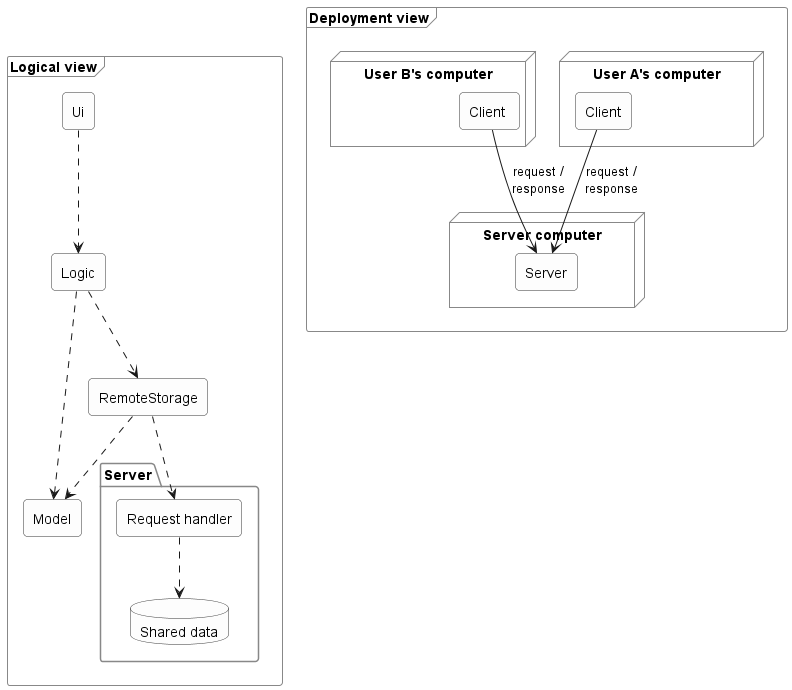
In the logical view, each arrow is a dependency. In the deployment view, each arrow is a message sent between separately deployed parts.
Adding a server changes more than the location of data storage (or whatever else the clients need to share). A real split adds architectural elements and concerns:
A good interface limits the impact of moving to a client-server architecture but does not avoid it entirely.
Example Because Logic depended on what Storage promised rather than on a specific implementation, a RemoteStorage that honors the same interface may spare Logic any change at all — a real payoff from the earlier separation. But the system as a whole has gained communication components that someone must build and maintain.
This is also where tiers appear. The client program is one tier and the server another — a tier being a separately deployed part, not necessarily one physical machine.
A network boundary adds costs that local calls never had:
Example Client-server is extremely common — online games, email, collaborative applications, and web applications all use it, though it is in no way limited to browser-based software.
Aspect: This style focuses on how the system is packaged and deployed.
A monolith is a system deployed as a single unit. You build one artifact and release it as a whole. A typical desktop application is a monolith, as is a great deal of successful commercial software.
Being one deployable unit does not mean one running process. A monolith may be launched as several processes, or run as many identical copies behind a load balancer — but they are all copies of the same thing, released together.
A modular monolith is a single deployable unit organized internally into well-defined components. It is still one artifact, but inside it the parts have clear responsibilities, clear interfaces, and disciplined dependencies.
Example An invoice manager with Ui, Logic, Model, and Storage shipped as one program is a modular monolith.
"Monolith" is not a synonym for "badly structured." This is the most common misunderstanding. The word describes how the system is deployed, not how well it is organized. A tangled ball of mud and a disciplined modular monolith share a deployment shape but differ enormously inside; what separates them is whether the internal components and dependencies are real.
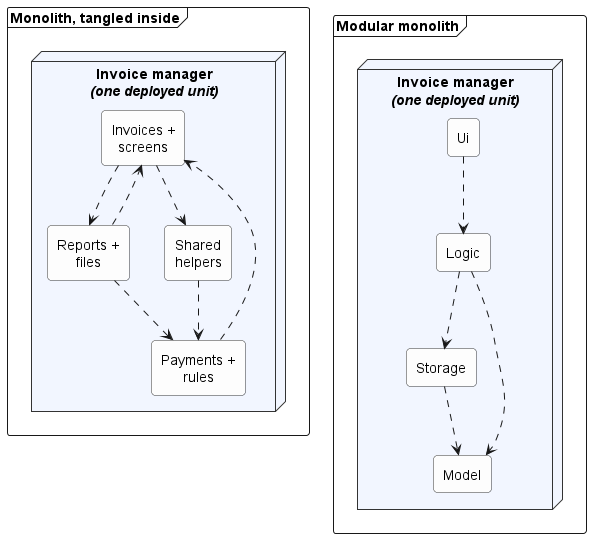
Each arrow is a dependency. Both are monoliths — one deployed unit each, identical from the outside. What differs is inside: on the left, responsibilities are mixed and dependencies point both ways; on the right, each component has one job and the dependencies run one way.
The modular monolith is usually the sensible starting point for one team building one product. It keeps building, testing, and debugging simple while still encouraging clear responsibilities.
Guidance for the item(s) below:
As we approach the last part of the tP, we'll be spending more time learning about software testing. This week, we start off with an overview of different types of software testing.
Unit testing: testing individual units (methods, classes, subsystems, ...) to ensure each piece works correctly.
In OOP code, it is common to write one or more unit tests for each public method of a class.
Example Code skeletons for a Foo class containing two methods and a FooTest class that contains unit tests for those two methods:
class Foo {
String read() {
// ...
}
void write(String input) {
// ...
}
}
class FooTest {
@Test
void read() {
// a unit test for Foo#read() method
}
@Test
void write_emptyInput_exceptionThrown() {
// a unit test for Foo#write(String) method
}
@Test
void write_normalInput_writtenCorrectly() {
// another unit test for Foo#write(String) method
}
}
import unittest
class Foo:
def read(self):
# ...
def write(self, input):
# ...
class FooTest(unittest.TestCase):
def test_read(self):
# a unit test for read() method
def test_write_emptyInput_ignored(self):
# a unit test for write(string) method
def test_write_normalInput_writtenCorrectly(self):
# another unit test for write(string) method
A proper unit test requires the unit to be tested in isolation so that bugs in the cannot influence the test i.e., bugs outside of the unit should not affect the unit tests.
Example If a Logic class depends on a Storage class, unit testing the Logic class requires isolating the Logic class from the Storage class.
Stubs can isolate the from its dependencies.
Stub: A stub has the same interface as the component it replaces, but its implementation is so simple that it is unlikely to have any bugs. It mimics the responses of the component, but only for a limited set of predetermined inputs. That is, it does not know how to respond to any other inputs. Typically, these mimicked responses are hard-coded in the stub rather than computed or retrieved from elsewhere, e.g., from a database.
Example Consider the code below:
class Logic {
Storage s;
Logic(Storage s) {
this.s = s;
}
String getName(int index) {
return "Name: " + s.getName(index);
}
}
interface Storage {
String getName(int index);
}
class DatabaseStorage implements Storage {
@Override
public String getName(int index) {
return readValueFromDatabase(index);
}
private String readValueFromDatabase(int index) {
// retrieve name from the database
}
}
Normally, you would use the Logic class as follows (note how the Logic object depends on a DatabaseStorage object to perform the getName() operation):
Logic logic = new Logic(new DatabaseStorage());
String name = logic.getName(23);
You can test it like this:
@Test
void getName() {
Logic logic = new Logic(new DatabaseStorage());
assertEquals("Name: John", logic.getName(5));
}
However, this logic object being tested is making use of a DatabaseStorage object which means a bug in the DatabaseStorage class can affect the test. Therefore, this test is not testing Logic in isolation from its dependencies and hence it is not a pure unit test.
Here is a stub class you can use in place of DatabaseStorage:
class StorageStub implements Storage {
@Override
public String getName(int index) {
if (index == 5) {
return "Adam";
} else {
throw new UnsupportedOperationException();
}
}
}
Note how the StorageStub has the same interface as DatabaseStorage, but is so simple that it is unlikely to contain bugs, and is pre-configured to respond with a hard-coded response, presumably, the correct response DatabaseStorage is expected to return for the given test input.
Here is how you can use the stub to write a unit test. This test is not affected by any bugs in the DatabaseStorage class and hence is a pure unit test.
@Test
void getName() {
Logic logic = new Logic(new StorageStub());
assertEquals("Name: Adam", logic.getName(5));
}
In addition to Stubs, there are other types of replacements you can use during testing, e.g., Mocks, Fakes, Dummies, Spies.
Guidance for the item(s) below:
Dependency Injection is a technique closely related to stubs. It is not in the syllabus but is given below in case some of you would like to know more about it.
Integration testing: testing whether different parts of the software work together (i.e., integrate) as expected. Integration tests aim to discover bugs in the 'glue code' related to how components interact with each other. These bugs are often the result of misunderstanding what the parts are supposed to do vs what the parts are actually doing.
Example Suppose a class Car uses classes Engine and Wheel. If the Car class assumed a Wheel can support a speed of up to 200 mph but the actual Wheel can only support a speed of up to 150 mph, it is the integration test that is supposed to uncover this discrepancy.
Integration testing is not simply a case of repeating the unit test cases using the actual dependencies (instead of the stubs used in unit testing). Instead, integration tests are additional test cases that focus on the interactions between the parts.
Example Suppose a class Car uses classes Engine and Wheel. Here is how you would go about doing pure integration tests:
a) First, unit test Engine and Wheel.
b) Next, unit test Car in isolation of Engine and Wheel, using stubs for Engine and Wheel.
c) After that, do an integration test for Car by using it together with the Engine and Wheel classes to ensure that Car integrates properly with the Engine and the Wheel.
In practice, developers often use a hybrid of unit+integration tests to minimize the need for stubs.
Example Here's how a hybrid unit+integration approach could be applied to the same example used above:
(a) First, unit test Engine and Wheel.
(b) Next, unit test Car in isolation of Engine and Wheel, using stubs for Engine and Wheel.
(c) After that, do an integration test for Car by using it together with the Engine and Wheel classes to ensure that Car integrates properly with the Engine and the Wheel. This step should include test cases that are meant to unit test Car (i.e., test cases used in the step (b) of the example above) as well as test cases that are meant to test the integration of Car with Wheel and Engine (i.e., pure integration test cases used in the step (c) in the example above).
Note that you no longer need stubs for Engine and Wheel. The downside is that Car is never tested in isolation of its dependencies. Given that its dependencies are already unit tested, the risk of bugs in Engine and Wheel affecting the testing of Car can be considered minimal.
System testing: take the whole system and test it against the system specification.
System testing is typically done by a testing team (also called a QA team).
System test cases are based on the specified external behavior of the system. Sometimes, system tests go beyond the bounds defined in the specification. This is useful when testing that the system fails 'gracefully' when pushed beyond its limits.
Example Suppose the SUT is a browser that is supposedly capable of handling web pages containing up to 5000 characters. Given below is a test case to test if the SUT fails gracefully if pushed beyond its limits.
Test case: load a web page that is too big
* Input: loads a web page containing more than 5000 characters.
* Expected behavior: aborts the loading of the page
and shows a meaningful error message.
This test case would fail if the browser attempted to load the large file anyway and crashed.
System testing includes testing against non-functional requirements too. Here are some examples:
If a software product has a GUI (Graphical User Interface) component, all product-level testing (i.e., the types of testing mentioned above) needs to be done using the GUI. However, testing the GUI is much harder than testing the CLI (Command Line Interface) or API, for the following reasons:
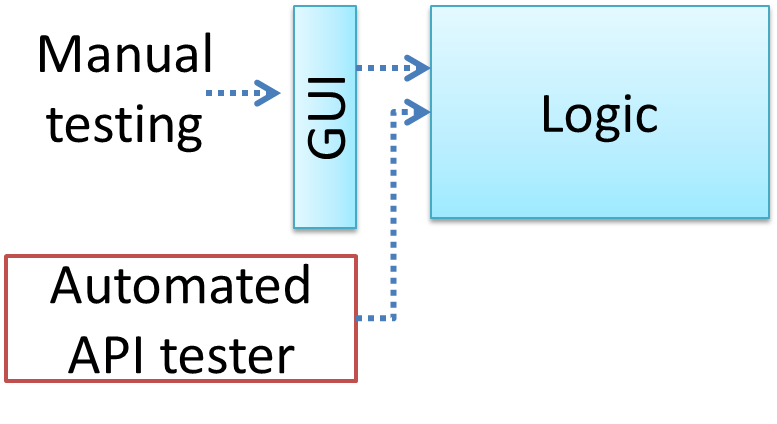
Moving as much logic as possible out of the GUI can make GUI testing easier. That way, you can bypass the GUI to test the rest of the system using automated API testing. While this still requires the GUI to be tested, the number of such test cases can be reduced as most of the system will have been tested using automated API testing.
There are testing tools that can automate GUI testing.
Example Some tools used for automated GUI testing:
TestFX can do automated testing of JavaFX GUIs
Visual Studio supports the ‘record replay’ type of GUI test automation.
Selenium can be used to automate testing of web application UIs
Demo video of automated testing of a web application
Acceptance testing (aka User Acceptance Testing (UAT)): test the system to ensure it meets the user requirements.
Acceptance tests give an assurance to the customer that the system does what it is intended to do. Acceptance test cases are often defined at the beginning of the project, usually based on the use case specification. Successful completion of UAT is often a prerequisite to the project sign-off.
Acceptance testing comes after system testing. Similar to system testing, acceptance testing involves testing the whole system.
Some differences between system testing and acceptance testing:
| System Testing | Acceptance Testing |
|---|---|
| Done against the system specification | Done against the requirements specification |
| Done by testers of the project team | Done by a team that represents the customer |
| Done on the development environment or a test bed | Done on the deployment site or on a close simulation of the deployment site |
| Both negative and positive test cases | More focus on positive test cases |
Note: negative test cases: cases where the SUT is not expected to work normally e.g., incorrect inputs; positive test cases: cases where the SUT is expected to work normally
Requirement specification versus system specification
The requirement specification need not be the same as the system specification. Some example differences:
| Requirements specification | System specification |
|---|---|
| limited to how the system behaves in normal working conditions | can also include details on how it will fail gracefully when pushed beyond limits, how to recover, etc. |
| written in terms of problems that need to be solved (e.g., provide a method to locate an email quickly) | written in terms of how the system solves those problems (e.g., explain the email search feature) |
| specifies the interface available for intended end-users | could contain additional APIs not available for end-users (for the use of developers/testers) |
However, in many cases one document serves as both a requirement specification and a system specification.
Passing system tests does not necessarily mean passing acceptance testing. Some examples:
Alpha testing is performed by the users, under controlled conditions set by the software development team.
Beta testing is performed by a selected subset of target users of the system in their natural work setting.
An open beta release is the release of not-yet-production-quality-but-almost-there software to the general population. For example, Google’s Gmail was in 'beta' for many years before the label was finally removed.
Guidance for the item(s) below:
Previously, we learned how to measure test coverage. This week, we look into how to increase coverage with the least number of test cases.
First, we take a look at test case design in general, different approaches to test case design, and few different categorization of test cases.
Guidance for the item(s) below:
What is test case design, and why should we care?
Except for trivial , is not practical because such testing often requires a massive/infinite number of test cases.
Example Consider the test cases for adding a string object to a :
Exhaustive testing of this operation can take many more test cases.
Program testing can be used to show the presence of bugs, but never to show their absence! --Edsger Dijkstra
Every test case adds to the cost of testing. In some systems, a single test case can cost thousands of dollars e.g. on-field testing of flight-control software. Therefore, test cases need to be designed to make the best use of testing resources. In particular:
Testing should be effective i.e., it finds a high percentage of existing bugs e.g., a set of test cases that finds 60 defects is more effective than a set that finds only 30 defects in the same system.
Testing should be efficient i.e., it has a high rate of success (bugs found/test cases) a set of 20 test cases that finds 8 defects is more efficient than another set of 40 test cases that finds the same 8 defects.
For testing to be , each new test you add should be targeting a potential fault that is not already targeted by existing test cases. There are test case design techniques that can help us improve the E&E of testing.
Here are two alternative approaches to testing software: Scripted testing and Exploratory testing.
Scripted testing: First write a set of test cases based on the expected behavior of the SUT, and then perform testing based on that set of test cases.
Exploratory testing: Devise test cases on-the-fly, creating new test cases based on the results of the past test cases.
Exploratory testing is ‘the simultaneous learning, test design, and test execution’ [source: bach-et-explained] whereby the nature of the follow-up test case is decided based on the behavior of the previous test cases. In other words, running the system and trying out various operations. It is called exploratory testing because testing is driven by observations during testing. Exploratory testing usually starts with areas identified as error-prone, based on the tester’s past experience with similar systems. One tends to conduct more tests for those operations where more faults are found.
Example The thought process behind a segment of an exploratory testing session:
“Hmm... looks like feature x is broken. This usually means feature n and k could be broken too; you need to look at them soon. But before that, you should give a good test run to feature y because users can still use the product if feature y works, even if x doesn’t work. Now, if feature y doesn’t work 100%, you have a major problem and this has to be made known to the development team sooner rather than later...”
Exploratory testing is also known as reactive testing, error guessing technique, attack-based testing, and bug hunting.
Which approach is better – scripted or exploratory? A mix is better.
The success of exploratory testing depends on the tester’s prior experience and intuition. Exploratory testing should be done by experienced testers, using a clear strategy/plan/framework. Ad-hoc exploratory testing by unskilled or inexperienced testers without a clear strategy is not recommended for real-world non-trivial systems. While exploratory testing may allow us to detect some problems in a relatively short time, it is not prudent to use exploratory testing as the sole means of testing a critical system.
Scripted testing is more systematic, and hence, likely to discover more bugs given sufficient time, while exploratory testing would aid in quick error discovery, especially if the tester has a lot of experience in testing similar systems.
In some contexts, you will achieve your testing mission better through a more scripted approach; in other contexts, your mission will benefit more from the ability to create and improve tests as you execute them. I find that most situations benefit from a mix of scripted and exploratory approaches. --[source: bach-et-explained]
A positive test case is when the test is designed to produce an expected/valid behavior. On the other hand, a negative test case is designed to produce a behavior that indicates an invalid/unexpected situation, such as an error message.
Example Consider the testing of the method print(Integer i) which prints the value of i.
i == new Integer(50);i == null; Guidance for the item(s) below:
How much information about the code is being used when designing test cases?
Test case design can be of three types, based on how much of the SUT’s internal details are considered when designing test cases:
Black-box (aka specification-based or responsibility-based) approach: test cases are designed exclusively based on the SUT’s specified external behavior.
White-box (aka glass-box or structured or implementation-based) approach: test cases are designed based on what is known about the SUT’s implementation, i.e., the code.
Gray-box approach: test case design uses some important information about the implementation. For example, if the implementation of a sort operation uses different algorithms to sort lists shorter than 1000 items and lists longer than 1000 items, more meaningful test cases can then be added to verify the correctness of both algorithms.
Black-box and white-box testing
Use cases can be used for system testing and acceptance testing. For example, the main success scenario can be one test case while each variation (due to extensions) can form another test case. However, note that use cases do not specify the exact data entered into the system. Instead, it might say something like user enters his personal data into the system. Therefore, the tester has to choose data by considering equivalence partitions and boundary values. The combinations of these could result in one use case producing many test cases.
To increase the E&E of testing, high-priority use cases are given more attention. For example, a scripted approach can be used to test high-priority test cases, while an exploratory approach is used to test other areas of concern that could emerge during testing.
Guidance for the item(s) below:
Next, a heuristic used for improving the quality of test cases.
Consider the testing of the following operation.
isValidMonth(m) : returns true if m (an int) is in the range [1..12]
It is inefficient and impractical to test this method for all integer values [-MIN_INT to MAX_INT]. Fortunately, there is no need to test all possible input values. For example, if the input value 233 fails to produce the correct result, the input 234 is likely to fail too; there is no need to test both.
In general, most SUTs do not treat each input in a unique way. Instead, they process all possible inputs in a small number of distinct ways. That means a range of inputs is treated the same way inside the SUT. Equivalence partitioning (EP) is a test case design technique that uses the above observation to improve the E&E of testing.
Equivalence partition (aka equivalence class): A group of test inputs that are likely to be processed by the SUT in the same way.
By dividing possible inputs into equivalence partitions you can,
Equivalence partitions (EPs) are usually derived from the specifications of the SUT.
Example These could be EPs for the isValidMonth example:
true (produces false)truetrue (produces false)When the SUT has multiple inputs, you should identify EPs for each input.
Example Consider the method duplicate(String s, int n): String which returns a String that contains s repeated n times.
Example EPs for s:
Example EPs for n:
0An EP may not have adjacent values.
Example Consider the method isPrime(int i): boolean that returns true if i is a prime number.
EPs for i:
Some inputs have only a small number of possible values and a potentially unique behavior for each value. In those cases, you have to consider each value as a partition by itself.
Example Consider the method showStatusMessage(GameStatus s): String that returns a unique String for each of the possible values of s (GameStatus is an enum). In this case, each possible value of s will have to be considered as a partition.
Note that the EP technique is merely a heuristic and not an exact science, especially when applied manually (as opposed to using an automated program analysis tool to derive EPs). The partitions derived depend on how one ‘speculates’ the SUT to behave internally. Applying EP under a glass-box or gray-box approach can yield more precise partitions.
Example Consider the EPs given above for the method isValidMonth. A different tester might use these EPs instead:
truefalseExample Some more specifications and the equivalence partitions derived from them:
| Specification | Equivalence partitions |
|---|---|
| [ |
| [ |
When deciding EPs of OOP methods, you need to identify the EPs of all data participants that can potentially influence the behavior of the method, such as,
Example Consider this method in the DataStack class:
push(Object o): boolean
o to the top of the stack if the stack is not full.true if the push operation was a success.MutabilityException if the global flag FREEZE==true.InvalidValueException if o is null.EPs:
DataStack object: [full] [not full]o: [null] [not null]FREEZE: [true][false] Example Consider a simple Minesweeper app. What are the EPs for the newGame() method of the Logic component?
As newGame() does not have any parameters, the only obvious participant is the Logic object itself.
Note that if the glass-box or the gray-box approach is used, other associated objects that are involved in the method might also be included as participants. For example, the Minefield object can be considered as another participant of the newGame() method. Here, the black-box approach is assumed.
Next, let us identify equivalence partitions for each participant. Will the newGame() method behave differently for different Logic objects? If yes, how will it differ? In this case, yes, it might behave differently based on the game state. Therefore, the equivalence partitions are:
PRE_GAME: before the game starts, minefield does not exist yetREADY: a new minefield has been created and the app is waiting for the player’s first moveIN_PLAY: the current minefield is already in useWON, LOST: let us assume that newGame() behaves the same way for these two values Example Consider the Logic component of the Minesweeper application. What are the EPs for the markCellAt(int x, int y) method? The partitions in bold represent valid inputs.
Logic: PRE_GAME, READY, IN_PLAY, WON, LOSTx: [MIN_INT..-1] [0..(W-1)] [W..MAX_INT] (assuming a minefield size of WxH)y: [MIN_INT..-1] [0..(H-1)] [H..MAX_INT]Cell at (x,y): HIDDEN, MARKED, CLEARED