Week 2 [Mon, Aug 17th] - Topics

Detailed Table of Contents


Guidance for the item(s) below:

Given this is a first course in SE, tradition demands that we start by defining the subject. However, let's not spend a lot of time going through lengthy/formal definitions of SE. Instead, let's take a quick look at the past, the present, and the future of SE. No doubt SE is a field in turmoil, and it is in our best interest to reflect on how things are going and what the future holds.

[W2.1] SE: Intro

W2.1a

Software Engineering → Introduction → Software Engineering: Then, Now, and Next

Software engineering is the application of a systematic, disciplined, quantifiable approach to the development, operation, and maintenance of software. -- IEEE Standard Glossary of Software Engineering Terminology

Simply put, software engineering turns human needs into dependable software while dealing with real-world limits. These limits include time, money, available people, and incomplete information. Software engineering includes programming, but it also covers deciding what to build, checking that it works, and keeping it useful as needs change. To understand the field, it helps to know how it began, how AI is changing it, and where it may go next.

Then: born of a crisis

The term software engineering became well known during the software crisis of the late 1960s. Many early programs were written by one person and were small enough for that person to understand fully. This approach stopped working as software became larger and more important. Projects were late, cost too much, failed after release, or were never finished. These problems became known as the software crisis. In 1968, a NATO conference used the title software engineering to express a hope: building software could become as systematic as other engineering fields. Computers have changed greatly since 1968, but software projects still face late schedules, rising costs, and systems that break easily.

The joys of software engineering still attract people to the field. The Mythical Man-Month by Frederick P. Brooks describes several of them. Engineers can enjoy building things that help other people, solving problems that feel like puzzles, and turning ideas into working software without needing a factory or raw materials. They also keep learning because the field is always changing.

The woes of software engineering also remain. Brooks listed several. Programs must be precise because computers follow instructions, not intentions. Reviews, tests, and fault-tolerant designs help us find or handle the mistakes that will occur. Engineers also depend on people, requirements, and code they do not control. Testing and debugging take careful work, and the last part of a project often costs the most. Products and the technologies used to build them can quickly become outdated. Even so, Brooks concluded that for many people, "the joys far outweigh the woes."

In 1986, Brooks made a famous prediction: no single breakthrough -- no silver bullet -- would transform software development within ten years. In No Silver Bullet, he divided the difficulty of building software into two types. Accidental complexity comes from imperfect tools. Essential complexity comes from the problem being solved. Brooks argued that essential complexity made up most of the remaining work. Therefore, no single new method or tool was likely to make software development ten times more productive, reliable, or simple. He considered several possible breakthroughs, including AI, but rejected them all. His prediction remained true for decades. Then large language models learned to write code. Could they be the silver bullet that Brooks thought was unlikely?

Now: the AI inflection

Software engineering covers the whole life of a system, not only writing its code. Engineers study user needs, design and build the system, test and review it, deploy and secure it, fix failures, and improve it over time. They repeat these activities as needed and work in teams rather than alone. Success is measured by the value delivered, not the amount of code written. Practices such as agile processes, DevOps, and continuous delivery help teams manage this work. The SWEBOK guide gives an overview of the field.

AI now helps with nearly all of these activities. Within a few years, AI coding tools became a normal part of many developers' work. These tools can do much more than complete lines of code. They can explore an unfamiliar codebase, generate and change code, suggest tests, diagnose failures, review changes, and draft documentation. In agentic mode, an AI tool can receive a goal written in natural language, edit several files, run tests, and prepare the changes for a human to review. Accepting generated code without checking it carefully is often called vibe coding.

However, generating code faster does not automatically produce better software. In surveys, developers' most common frustration is AI output that is almost right, but not quite. Finding a small mistake in code that looks correct can require more skill than writing the code. One randomized study found that experienced developers worked more slowly with AI even though they believed they had worked faster. A later study of newer agentic tools found some improvement in speed, but the study could not show clearly how large the improvement was. In short, the benefit depends on the task, codebase, tool, and user's skill. Our impressions alone do not measure that benefit well.

The clearest finding so far is that AI amplifies both the strengths and weaknesses of the engineering process around it. Research involving thousands of professionals supports this view. A team with clear goals, good tests, effective reviews, and fast feedback can turn faster code generation into useful results sooner. A team without these practices may simply create defects sooner. In Brooks' terms, AI may be our strongest tool yet for reducing accidental complexity. It also helps with essential work, such as exploring requirements and drafting designs. However, humans still decide what to build and whether it has been built well. Therefore, AI makes software engineering fundamentals more important, not less.

Engineers are also building more software that uses AI as part of the system. Such systems bring their own concerns, including data quality, unpredictable output, evaluation, privacy, algorithmic bias, and monitoring.

Next: the evolving engineer

Developers are giving AI larger pieces of work: first lines of code, then whole tasks, and perhaps soon larger parts of a project. In controlled tests, AI agents can complete increasingly long tasks. However, real projects that last many years are more complicated than such tests. Giving instructions through natural language, examples, and tests may become as important as writing code by hand.

One possible next step is AI-native software engineering: designing the workflow for ongoing collaboration between humans and AI. This approach goes further than adding an AI assistant to today's process. In AI-assisted software engineering, AI works inside a process directed by humans. In agentic software engineering, humans give AI tasks with several steps. In AI-native engineering, teams redesign the process itself. In this possible future, sometimes called SE 3.0, engineers record goals, constraints, designs, and acceptance criteria in forms that AI agents can use. Agents plan changes, write code, run tests, and review one another's work. Humans set the direction, make difficult choices, and decide what is safe to release. Requirements, tests, architecture records, and security controls will then matter more, not less. They set the limits within which the agents work.

Experts disagree about how far this change will go, so evaluate their predictions carefully. Some predict the end of programming, with most software requested in natural language and generated when needed. Others point out that benchmarks leave out much of real software work, such as unclear goals, knowledge that has not been written down, and long-term maintenance. They also argue that a code change that passes its tests is not necessarily part of a dependable system. Checking whether AI evaluations reflect real software work is itself a software engineering problem.

As it becomes easier to give implementation work to AI, deciding, designing, checking, and taking responsibility become more valuable. Someone must understand the users and the subject area. Someone must decide what should and should not be built, divide the work into clear parts, design a system that can be maintained, spot mistakes in code that looks correct, combine human and AI work, and take responsibility for the released system. AI can help with every one of these activities, but it cannot take responsibility for the result.

Engineers must understand the work before they can direct, evaluate, or fix it. Therefore, software engineering foundations matter more than ever. The world still needs many software engineers, but the skills they use may change. They may spend less time writing code by hand and more time directing, evaluating, and taking responsibility for it.

Software engineering may now be going through its biggest change since 1968, but its future is still unclear. The rewards Brooks described remain. Some old difficulties may be becoming smaller, while new ones appear. We do not yet know whether AI will be the silver bullet that Brooks thought was unlikely, or simply a powerful tool that amplifies both the strengths and weaknesses of software teams.


Guidance for the item(s) below:

Now, let's switch our focus to the project management aspect of SE.

Broadly speaking, there are two approaches to doing a software project. Those two approaches are also highly relevant to the way this course is run, and how it is different from most SE courses elsewhere.

Let's learn about those two approaches early so that we can better understand how this course works.

[W2.2] SDLC Process Models: Basics

W2.2a

Project Management → SDLC Process Models → Introduction → What

The simplest way to build software is to start coding and keep fixing what breaks, with no explicit stages at all. That approach, sometimes called code-and-fix, has no overhead and works well enough for a small program written by one person over a short period. It stops working as the software and the team grow. There is no way to tell how far along the work is, and no way to divide it among several people without them colliding. There is also no record of the decisions already made, so changes become harder and more expensive.

Software development goes through different stages such as requirements, analysis, design, implementation, and testing. These stages are collectively known as the software development lifecycle (SDLC). There are several approaches, known as software development lifecycle models (also called software process models), that describe different ways to go through the SDLC. Each process model prescribes a 'roadmap' for the development effort: the aims of the development stages, the outcome of each stage, and how the stages relate to one another.

Reaching users is not the end of the lifecycle. Deployment, operation, and maintenance are commonly counted as lifecycle activities too, and process models differ in how they partition and name them. Once the software is released, it has to be operated, kept working as its environment changes, and improved. What happens during that time feeds back into development: defects reported by users, the way the software is actually used, and requests for things it cannot yet do all become inputs to later work. Most software spends far longer in this state than it spent being built for the first time.


W2.2b

Project Management → SDLC Process Models → Introduction → Sequential models

The sequential model, also called the waterfall model, views software development as a linear process, with the project progressing through the development stages in order. The name waterfall stems from how the model is drawn to look like a waterfall (see below).
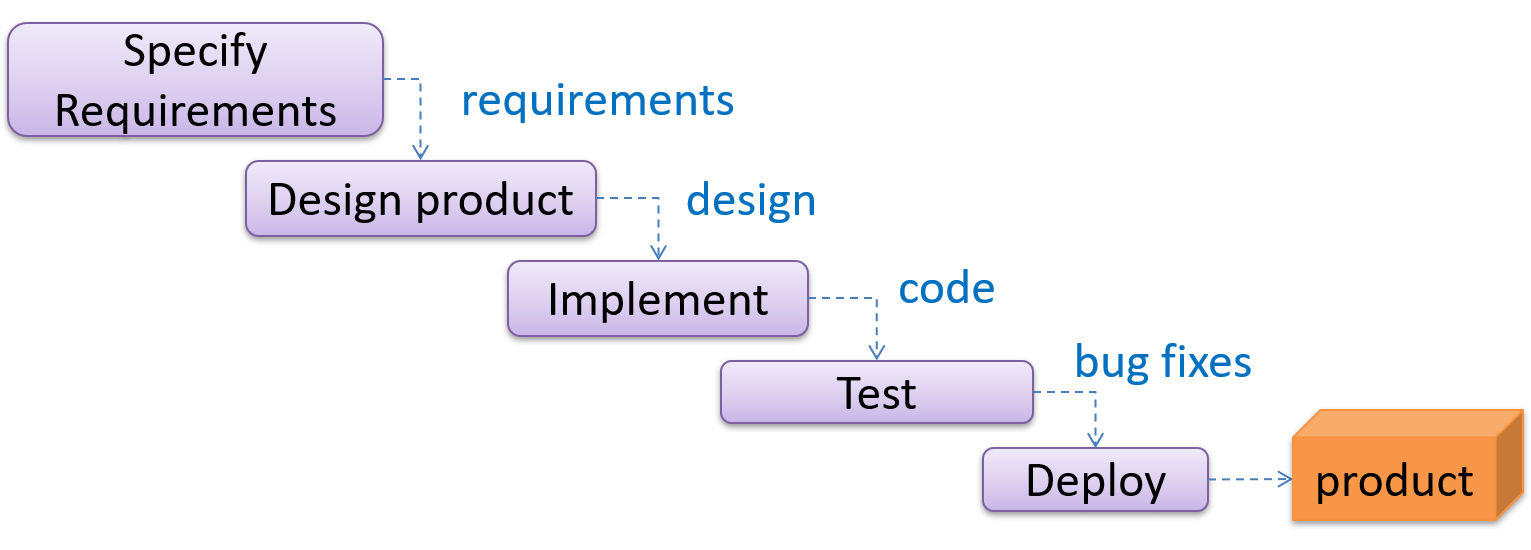
When one stage of the process is completed, it produces some to be used in the next stage. For example, the requirements stage produces a comprehensive list of requirements to be used in the design stage.

A strict sequential model project moves only in the forward direction i.e., each stage is completed before starting the next. For example, once the requirements stage is over, there is no provision for revising the requirements later. In practice the model is often relaxed to let a stage send work back to the one before it, although doing so means redoing work that was already treated as finished.

This model can work well for a project that solves a well-understood problem, in which case the requirements can remain stable and the effort can be estimated accurately. Furthermore, as each stage has a well-defined outcome, progress is easy to track: it is visible from which stage the project is in. Progress within a long stage, which is where an overrun usually builds up, stays much harder to see.

However, real-world projects often tackle problems that are not well-understood at the beginning, which makes those projects unsuitable for this model. For example, target users of a software product may not be able to state their requirements accurately at the start of the project if they have not used a similar product before.

A second weakness is that feedback arrives late. Each stage's output is checked mainly by the stage that follows it, so integration and contact with real users come near the end. A mistake made while gathering requirements or designing therefore tends to surface at the point where going back to completed work costs the most.


W2.2c

Project Management → SDLC Process Models → Introduction → Iterative models

The iterative model advocates producing the software by going through several iterations. Each iteration could go through all the stages of the SDLC, from requirements gathering to deployment.
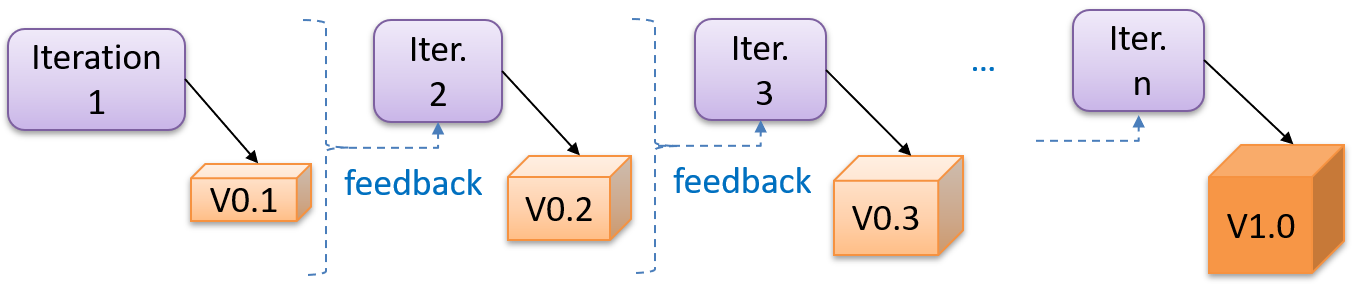
Each iteration produces a new version of the product, building upon the previous version. Feedback from each iteration is factored into the subsequent iterations. For example, if an implementation task took longer than expected, the effort estimate for similar tasks in future iterations can be adjusted. Similarly, if a feature introduced in the current iteration was not well-received by target users, it can be removed or tweaked in the next iteration.

The two models divide a project along different lines. A sequential project is divided by activity: a stage is 'requirements' or 'testing', and it ends when that activity is finished for the whole product. An iterative project is divided into bounded cycles instead: an iteration runs through several activities and ends in a result the team can learn from. What each iteration is for is then a choice -- most often a slice of functionality, 'the part that does X', but it can equally be a component, a risky assumption, or a level of completeness across the whole product.

The iterative model can use a breadth-first or depth-first approach.

  • In the breadth-first approach, an iteration evolves all major components and all functionality areas in parallel, producing a working product at the end of each iteration i.e., most features and most are updated in every iteration.
  • In the depth-first approach, an iteration focuses on fleshing out only some components or some functionality area. Accordingly, early depth-first iterations might not produce a working product.

Iterating and incrementing are two different things, and most projects do both. To iterate is to rework something that already exists, in the light of feedback; to increment is to add to it. That is why the two are usually named together, as an iterative and incremental approach.

What an iteration delivers is called an increment: a usable improvement or addition to the product, not merely a new version of the code.

An iteration is only worth its overhead if it ends in evidence. Before starting one, decide what would show it succeeded -- a condition the result must satisfy, a test that must pass, or a demonstration to a target user -- and what decision the answer will drive. Without that, an iteration produces a new version and no new knowledge.

Example Taking a Minesweeper game as an example:

  • breadth-first iterations will deliver a fully playable version early. These early versions may have primitive functionality, e.g. a rudimentary text-based UI, fixed board size, limited minefield layouts. This functionality (and the corresponding components) will then be improved in later iterations.
  • an early depth-first iteration could deliver the full user interface (UI) but with no game logic at all. Alternatively, an early iteration could focus on just the logic for generating initial layouts of the minefield. Neither is a playable version of the game, but both can collect early feedback -- on the UI in the first case, on the minefield layouts in the second. That feedback then guides later iterations.

A project can be done as a mixture of breadth-first and depth-first iterations i.e., an iteration can contain some breadth-first work as well as some depth-first work, or some iterations can be breadth-first while others are depth-first.

Whichever shape the iterations take, an early one is a chance to find out you were wrong while changing course is still cheap. That makes the assumptions whose failure would cost the most -- an unproven technology, an unfamiliar user need, a performance target nobody has hit yet -- worth putting into an early iteration rather than a late one. Ordering iterations by risk in this way is the central idea of the spiral model.

As AI coding advances, producing a candidate implementation is becoming much cheaper than it used to be; deciding what to build and confirming that the result is correct have not. Within an iteration, that shifts the effort away from writing code and toward specifying and verifying. It does not reduce the value of being precise about what is wanted: a vague requirement that once produced a question from a teammate now produces a confident implementation of the wrong thing, quickly.


Guidance for the item(s) below:

Next, let's get started learning Java. First, a bit about the language itself.

[W2.3] Java: Intro

W2.3a

C++ to Java → About this chapter

This book chapter assumes you are familiar with basic C++ programming. It provides a crash course to help you migrate from C++ to Java.

This chapter borrows heavily from the excellent book ThinkJava by Allen Downey and Chris Mayfield. As required by the terms of reuse of that book, this chapter is released under the Creative Commons Attribution-NonCommercial-ShareAlike 3.0 Unported License and not under the MIT license as the rest of this book.

Some conventions used in this chapter:

icon marks the description of an aspect of Java that works mostly similar to C++

icon marks the description of an aspect of Java that is distinctly different from C++

Other resources used:


W2.3b

C++ to Java → The Java World → What is Java?

Java was conceived by James Gosling and his team at Sun Microsystems in 1991.

Java is directly related to both C and C++. Java inherits its syntax from C. Its object model is adapted from C++. --Java: A Beginner’s Guide, by Oracle

Fun fact: The language was initially called Oak after an oak tree that stood outside Gosling's office. Later the project went by the name Green and was finally renamed Java, from Java coffee. --Wikipedia

Oracle became the owner of Java in 2010, when it acquired Sun Microsystems.

Java has remained the most popular language in the world for several years now (as at July 2018), according to the TIOBE index.


W2.3c

C++ to Java → The Java World → How Java works

Java is both and . Instead of translating programs directly into machine language, the Java compiler generates byte code. Byte code is portable, so it is possible to compile a Java program on one machine, transfer the byte code to another machine, and run the byte code on the other machine. That’s why Java is considered a platform independent technology, aka WORA (Write Once Run Anywhere). The interpreter that runs byte code is called a “Java Virtual Machine” (JVM).

Java technology is both a programming language and a platform. The Java programming language is a high-level object-oriented language that has a particular syntax and style. A Java platform is a particular environment in which Java programming language applications run. --Oracle


W2.3d

C++ to Java → The Java World → Java editions

According to the Official Java documentation, there are four platforms of the Java programming language:

  • Java Platform, Standard Edition (Java SE): Contains the core functionality of the Java programming language.

  • Java Platform, Enterprise Edition (Java EE): For developing and running large-scale enterprise applications. Built on top of Java SE.

  • Java Platform, Micro Edition (Java ME): For Java programming language applications meant for small devices, like mobile phones. A subset of Java SE.

  • JavaFX: For creating applications with graphical user interfaces. Can work with the other three above.

This book chapter uses the Java SE edition unless stated otherwise.


Guidance for the item(s) below:

As with any language, the first step is to install the language on your computer. After that, you write a simple HelloWorld program, and get it running.

Java 25 can be downloaded from here.

[W2.4] Java: HelloWorld

W2.4a

C++ to Java → Getting Started → Installation

To run Java programs, you only need to have a recent version of the Java Runtime Environment (JRE) installed in your device.

If you want to develop applications for Java, download and install a recent version of the Java Development Kit (JDK), which includes the JRE as well as additional resources needed to develop Java applications.


W2.4b

C++ to Java → Getting Started → HelloWorld

In Java, the HelloWorld program looks like this:

public class HelloWorld {

    public static void main(String[] args) {
        // generate some simple output
        System.out.println("Hello, World!");
    }
}

For reference, the equivalent C++ code is given below:

#include <iostream>
using namespace std;

int main() {
    // generate some simple output
    cout << "Hello, World!";
    return 0;
}

This HelloWorld Java program defines one method named main: public static void main(String[] args)

System.out.println() displays a given text on the screen.

Some similarities:

  • Java programs consist of statements, grouped , which are then grouped into classes.
  • Java is “case-sensitive”, which means SYSTEM is different from System.
  • public is an access modifier that indicates the method is accessible from outside this class. Similarly, private access modifier indicates that a method/attribute is not accessible outside the class.
  • static indicates this method is defined as a class-level member. Do not worry if you don’t know what that means. It will be explained later.
  • void indicates that the method does not return anything.
  • The name and format of the main method is special as it is the method that Java executes when you run a Java program.
  • A class is a collection of methods. This program defines a class named HelloWorld.
  • Java uses squiggly braces ({ and }) to group things together.
  • The line starting with // is a comment. You can use // for single line comments and /* ... */ for multi-line comments in Java code.

Some differences:

  • Java uses the term method instead of function. In particular, Java doesn’t have stand-alone functions. Every method should belong to a class. The main method will not work unless it is inside the HelloWorld class.
  • A Java class definition does not end with a semicolon, but most Java statements do.
  • In most cases (i.e., there are exceptions), the name of the class has to match the name of the file it is in, so this class has to be in a file named HelloWorld.java.
  • There is no need for the HelloWorld code to have something like #include <iostream>. The library files needed by the HelloWorld code are available by default without having to "include" them explicitly.
  • There is no need to return 0 at the end of the main method to indicate the execution was successful. It is considered a successful execution unless an error is signalled specifically.

W2.4c

C++ to Java → Getting Started → Compiling a program

To compile the HelloWorld program, open a command console, navigate to the folder containing the file, and run the following command.

>_ javac HelloWorld.java

If the compilation is successful, you should see a file HelloWorld.class. That file contains the byte code for your program. If the compilation is unsuccessful, you will be notified of the compile-time errors.

Notes:

  • javac is the java compiler that you get when you install the JDK.
  • For the above command to work, your console program should be able to find the javac executable (e.g., In Windows, the location of the javac.exe should be in the PATH system variable).
    This page shows how to set PATH in different OS'es.

W2.4d

C++ to Java → Getting Started → Running a program

To run the HelloWorld program, in a command console, run the following command from the folder containing HelloWorld.class file.

>_ java HelloWorld

Notes:

  • java in the command above refers to the Java interpreter installed on your computer.
  • Similar to javac, your console should be able to find the java executable.

When you run a Java program, you can encounter a . These errors are also called "exceptions" because they usually indicate that something exceptional (and bad) has happened. When a run-time error occurs, the interpreter displays an error message that explains what happened and where.

For example, modify the HelloWorld code to include the following line, compile it again, and run it.

System.out.println(5/0);

You should get a message like this:

Exception in thread "main" java.lang.ArithmeticException: / by zero
    at Hello.main(Hello.java:5)

Integrated Development Environments (IDEs) can automate the intermediate step of compiling. They usually have a Run button which compiles the code first and then runs it.

Example IDEs:

  • IntelliJ IDEA
  • Eclipse
  • NetBeans

Exercises:

[Exercise] Run HelloWorld

A. Install Java on your computer, if you haven't done so already. Java 17 is recommended.

Java installation guides for Windows/Mac/Linux can be found in this se-edu/guide.

Ensure the installation is correct, as follows.

  1. Open a command prompt.
  2. Run the command java -version. Confirm that the output indicates that you have Java 17. Sample output:
    C:\Users\john>java -version
    java version "17._._" ...
    ...
    ...
    
  3. Run the command javac and ensure it results in a help message. If it outputs an error message such as javac is not recognized as internal or external command, you need to configure the PATH variable of your OS so that the OS knows where your javac executable is.

B. Write, compile and run a small Java program (e.g., a HelloWorld program) on your computer. You can use any code editor to write the program but use the command prompt to compile and run the program. Here are suggested steps:

  1. Open notepad (or any other text editor)
  2. Copy-paste this code into the editor.
    public class HelloWorld {
    
        public static void main(String[] args) {
            System.out.println("Hello, World!");
        }
    }
    
  3. Save the file in an empty folder as HelloWorld.java (ensure the case matches exactly and there is no .txt at the end).
  4. Open a command prompt, and navigate to the folder where you saved the file.
    c:> cd my-java-code
    c:\my-java-code>
    
  5. Run the command javac HelloWorld.java. Ensure there are no compile errors. Note how a file called HelloWorld.class has been created in that folder.
    c:\my-java-code>javac HelloWorld.java
    
  6. Run the command java HelloWorld (no .java at the end). The output should be Hello, World!.
    c:\my-java-code>java HelloWorld
    Hello, World!
    

C. Modify the code to print something else, save, compile, and run the program again.


[Exercise] ByeWorld

Modify the code below to print "Bye World!".

class Main {
  public static void main(String[] args) {
    // add code here
  }
}


Guidance for the item(s) below:

Now that you know how to write the simplest of Java programs, you can move onto learning about basic language concepts, starting with data types.

At the end of the next section, there is an exercise ([Key Exercise] ByeWorld) that you need to submit on Coursemology. From this point onwards, programming exercises marked as [Key Exercise] need to be submitted on Coursemology.

[W2.5] Java: Data Types

W2.5a

C++ to Java → Data Types → Primitive data types

Java has a number of primitive data types, as given below:

  • byte: an integer in the range -128 to 127 (inclusive).
  • short: an integer in the range -32,768 to 32,767 (inclusive).
  • int: an integer in the range -231 to 231-1.
  • long: An integer in the range -263 to 263-1.
  • float: a single-precision 32-bit IEEE 754 floating point. This data type should never be used for precise values, such as currency. For that, you will need to use the java.math.BigDecimal class instead.
  • double: a double-precision 64-bit IEEE 754 floating point. For decimal values, this data type is generally the default choice. This data type should never be used for precise values, such as currency.
  • boolean: has only two possible values: true and false.
  • char: The char data type is a single 16-bit Unicode character. It has a minimum value of '\u0000' (or 0) and a maximum value of '\uffff' (or 65,535 inclusive).
The String type (a peek)

Java has a built-in type called String to represent strings. While String is not a primitive type, strings are used often. String values are demarcated by enclosing in a pair of double quotes (e.g., "Hello"). You can use the + operator to concatenate strings (e.g., "Hello " + "!").

You’ll learn more about strings in a later section.


W2.5b

C++ to Java → Data Types → Variables

Java is a statically-typed language in that variables have a fixed type. Here are some examples of declaring variables and assigning values to them.

int x;
x = 5;
int hour = 11;
boolean isCorrect = true;
char capitalC = 'C';
byte b = 100;
short s = 10000;
int i = 100000;

You can use any name starting with a letter, underscore, or $ as a variable name but you cannot use Java keywords as variables names. You can display the value of a variable using System.out.print or System.out.println (the latter goes to the next line after printing). To output multiple values on the same line, it’s common to use several print statements followed by println at the end.

int hour = 11;
int minute = 59;
System.out.print("The current time is ");
System.out.print(hour);
System.out.print(":");
System.out.print(minute);
System.out.println("."); //use println here to complete the line
System.out.println("done");

The current time is 11:59.
done

Use the keyword final to indicate that the variable value, once assigned, should not be allowed to change later i.e., act like a ‘constant’. By convention, names for constants are all uppercase, with the underscore character (_) between words.

final double CM_PER_INCH = 2.54;

W2.5c

C++ to Java → Data Types → Operators

Java supports the usual arithmetic operators, given below.

Operator Description Examples
+ Additive operator 2 + 3 5
- Subtraction operator 4 - 1 3
* Multiplication operator 2 * 3 6
/ Division operator 5 / 2 2 but 5.0 / 2 2.5
% Remainder operator 5 % 2 1

The following program uses some operators as part of an expression hour * 60 + minute:

int hour = 11;
int minute = 59;
System.out.print("Number of minutes since midnight: ");
System.out.println(hour * 60 + minute);

Number of minutes since midnight: 719

When an expression has multiple operators, normal operator precedence rules apply. Furthermore, you can use parentheses to specify a precise precedence.

Examples:

  • 4 * 5 - 1 19 (* has higher precedence than -)
  • 4 * (5 - 1) 16 (parentheses ( ) have higher precedence than *)

Java does not allow .

The unary operators require only one operand; they perform various operations such as incrementing/decrementing a value by one, negating an expression, or inverting the value of a boolean.-- Java Tutorial

Operator Description -- Java Tutorial example
+ Unary plus operator; indicates positive value
(numbers are positive without this, however)
x = 5; y = +x y is 5
- Unary minus operator; negates an expression x = 5; y = -x y is -5
++ Increment operator; increments a value by 1 i = 5; i++ i is 6
-- Decrement operator; decrements a value by 1 i = 5; i-- i is 4
! Logical complement operator; inverts the value of a boolean foo = true; bar = !foo bar is false

Relational operators are used to check conditions like whether two values are equal, or whether one is greater than the other. The following expressions show how they are used:

Operator Description example true example false
x == y x is equal to y 5 == 5 5 == 6
x != y x is not equal to y 5 != 6 5 != 5
x > y x is greater than y 7 > 6 5 > 6
x < y x is less than y 5 < 6 7 < 6
x >= y x is greater than or equal to y 5 >= 5 4 >= 5
x <= y x is less than or equal to y 4 <= 5 6 <= 5

The result of a relational operator is a boolean value.

Java has three conditional operators that are used to operate on boolean values.

Operator Description example true example false
&& and true && true true true && false false
|| or true || false true false || false false
! not not false not true

Resources:

W2.5d

C++ to Java → Data Types → Arrays

Arrays are indicated using square brackets ([]). To create the array itself, you have to use the new operator. Here are some example array declarations:

int[] counts;
counts = new int[4]; // create an int array of size 4

int size = 5;
double[] values;
values = new double[size]; //use a variable for the size

double[] prices = new double[size]; // declare and create at the same time
Alternatively, you can use the shortcut syntax to create and initialize an array:
int[] values = {1, 2, 3, 4, 5, 6};

int[] anArray = {
    100, 200, 300,
    400, 500, 600,
    700, 800, 900, 1000
};

-- Java Tutorial

The [] operator selects elements from an array. Array elements .

int[] counts = new int[4];

System.out.println("The first element is " + counts[0]);

counts[0] = 7; // set the element at index 0 to be 7
counts[1] = counts[0] * 2;
counts[2]++; // increment value at index 2

A Java array is aware of its size. A Java array prevents a programmer from indexing the array out of bounds. If the index is negative or not present in the array, the result is an error named ArrayIndexOutOfBoundsException.

int[] scores = new int[4];
System.out.println(scores.length) // prints 4
scores[5] = 0; // causes an exception

4
Exception in thread "main" java.lang.ArrayIndexOutOfBoundsException: 5
    at Main.main(Main.java:6)

It is also possible to create arrays of more than one dimension:

String[][] names = {
    {"Mr. ", "Mrs. ", "Ms. "},
    {"Smith", "Jones"}
};

System.out.println(names[0][0] + names[1][0]); // Mr. Smith
System.out.println(names[0][2] + names[1][1]); // Ms. Jones

-- Java Tutorial

Passing arguments to a program

The args parameter of the main method is an array of Strings containing command line arguments supplied (if any) when running the program.

public class Foo{
    public static void main(String[] args) {
        System.out.println(args[0]);
    }
}

You can run this program (after compiling it first) from the command line by typing:

>_ java Foo abc

abc


Resources:

Exercises:

[Key Exercise] Compare names

Write a Java program that takes two command line arguments and prints true or false to indicate if the two arguments have the same value. Follow the sample output given below.

class Main {
  public static void main(String[] args) {
      // add your code here
  }
}

>_ java Main adam eve

Words given: adam, eve
They are the same: false

>_ java Main eve eve

Words given: eve, eve
They are the same: true

Use the following technique to compare two Strings(i.e., don't use ==). Reason: to be covered in a later topic.

String x = "foo";
boolean isSame = x.equals("bar") // false
isSame = x.equals("foo") // true

Hint


partial solution


Guidance for the item(s) below:

Next up is learning how to control the flow of a Java program.

[W2.6] Java: Control Flow

W2.6a

C++ to Java → Control Flow → Branching

if-else statements

Java supports the usual forms of if statements:

if (x > 0) {
    System.out.println("x is positive");
}
if (x % 2 == 0) {
    System.out.println("x is even");
} else {
    System.out.println("x is odd");
}
if (x > 0) {
    System.out.println("x is positive");
} else if (x < 0) {
    System.out.println("x is negative");
} else {
    System.out.println("x is zero");
}
if (x == 0) {
    System.out.println("x is zero");
} else {
    if (x > 0) {
        System.out.println("x is positive");
    } else {
        System.out.println("x is negative");
    }
}

The braces are optional (but recommended) for branches that have only one statement. So we could have written the previous example this way ( Bad):

if (x % 2 == 0)
    System.out.println("x is even");
else
    System.out.println("x is odd");
switch statements

The switch statement can have a number of possible execution paths. A switch works with the byte, short, char, and int primitive data types. It also works with enums, String.

Here is an example (adapted from -- Java Tutorial):

public class SwitchDemo {
    public static void main(String[] args) {

        int month = 8;
        String monthString;
        switch (month) {
        case 1:  monthString = "January";
            break;
        case 2:  monthString = "February";
            break;
        case 3:  monthString = "March";
            break;
        case 4:  monthString = "April";
            break;
        case 5:  monthString = "May";
            break;
        case 6:  monthString = "June";
            break;
        case 7:  monthString = "July";
            break;
        case 8:  monthString = "August";
            break;
        case 9:  monthString = "September";
            break;
        case 10: monthString = "October";
            break;
        case 11: monthString = "November";
            break;
        case 12: monthString = "December";
            break;
        default: monthString = "Invalid month";
            break;
        }
        System.out.println(monthString);
    }
}

August


Exercises:

Greeter


[Key Exercise] Grade Helper

Write a Java program that takes a letter grade e.g., A+ as a command line argument and prints the CAP (aka GPA) value for that grade.

Use a switch statement in your code.

A+ A A- B+ B B- C Else
5.0 5.0 4.5 4.0 3.5 3.0 2.5 0

Follow the sample output given below.

>_ java GradeHelper B CAP for grade B is 3.5

You can assume that the input is always in the correct format i.e., no need to handle invalid input cases.

Hint


Resources:

W2.6b

C++ to Java → Control Flow → Methods

Defining methods

Here’s an example of adding more methods to a class:

public class PrintTwice {

    public static void printTwice(String s) {
        System.out.println(s);
        System.out.println(s);
    }

    public static void main(String[] args) {
        String sentence = “Polly likes crackers”
        printTwice(sentence);

    }
}

Polly likes crackers

By convention, method names should be named in the camelCase format.

Similar to the main method, the printTwice method is public (i.e., it can be invoked from other classes) static and void.

Parameters

A method can specify parameters. The printTwice method above specifies a parameter of String type. The main method passes the argument "Polly likes crackers" to that parameter.

The value provided as an argument must have the same type as the parameter. Sometimes Java can convert an argument from one type to another automatically. For example, if the method requires a double, you can invoke it with an int argument 5 and Java will automatically convert the argument to the equivalent value of type double 5.0.

Because a variable declared inside a method only exists inside that method, such variables are called local variables. That applies to parameters of a method too. For example, In the code above, s cannot be used inside main because it is a parameter of the printTwice method and can only be used inside that method. If you try to use s inside main, you’ll get a compiler error. Similarly, inside printTwice there is no such thing as sentence. That variable belongs to main.

return statements

The return statement allows you to terminate a method before you reach the end of it:

public static void printLogarithm(double x) {
    if (x <= 0.0) {
        System.out.println("Error: x must be positive.");
        return;
    }
    double result = Math.log(x);
    System.out.println("The log of x is " + result);
}

It can be used to return a value from a method too:

public class AreaCalculator{

    public static double calculateArea(double radius) {
        double result = 3.14 * radius * radius;
        return result;
    }

    public static void main(String[] args) {
        double area = calculateArea(12.5);
        System.out.println(area);
    }
}
Overloading

Java methods can be overloaded. If two methods do the same thing, it is natural to give them the same name. Having more than one method with the same name is called overloading, and it is legal in Java as long as each version has a different method signature (the signature of the method is the method name and ordered list of parameter types) . For example, the following overloading of the method calculateArea is allowed because the method signatures are different (i.e., calculateArea(double) vs calculateArea(double, double)).

public static double calculateArea(double radius) {
    //...
}

public static double calculateArea(double height, double width) {
    //...
}
Recursion

Methods can be recursive. Here is an example in which the nLines method calls itself recursively:

public static void nLines(int n) {
    if (n > 0) {
        System.out.println();
        nLines(n - 1);
    }
}

Resources:

Exercises:

[Key Exercise] getGradeCap Method

Add the following method to the class given below.

  • public static double getGradeCap(String grade): Returns the CAP (aka GPA) value of the given grade. The mapping from grades to CAP is given below.
A+ A A- B+ B B- C Else
5.0 5.0 4.5 4.0 3.5 3.0 2.5 0

Do not change the code of the main method!

public class Main {

    // ADD YOUR CODE HERE

    public static void main(String[] args) {
        System.out.println("A+: " + getGradeCap("A+"));
        System.out.println("B : " + getGradeCap("B"));
    }
}

A+: 5.0
B : 3.5

Hint


W2.6c

C++ to Java → Control Flow → Loops

Java has while and for constructs for looping.

while loops

Here is an example while loop:

public static void countdown(int n) {
    while (n > 0) {
        System.out.println(n);
        n = n - 1;
    }
    System.out.println("Blastoff!");
}
for loops

for loops have the form:

for (initializer; condition; update) {
    statement(s);
}

Here is an example:

public static void printTable(int rows) {
    for (int i = 1; i <= rows; i = i + 1) {
        printRow(i, rows);
    }
}
do-while loops

The while and for statements are pretest loops; that is, they test the condition first and at the beginning of each pass through the loop. Java also provides a posttest loop: the do-while statement. This type of loop is useful when you need to run the body of the loop at least once.

Here is an example (from -- Java Tutorial):

class DoWhileDemo {
    public static void main(String[] args){
        int count = 1;
        do {
            System.out.println("Count is: " + count);
            count++;
        } while (count < 11);
    }
}
break and continue

A break statement exits the current loop.

Here is an example (from -- Java Tutorial):

class Main {
    public static void main(String[] args) {
        int[] numbers = new int[] { 1, 2, 3, 0, 4, 5, 0 };
        for (int i = 0; i < numbers.length; i++) {
            if (numbers[i] == 0) {
                break;
            }
            System.out.print(numbers[i]);
        }
    }
}

123

[Try the above code on Repl.it]

A continue statement skips the remainder of the current iteration and moves to the next iteration of the loop.

Here is an example (from -- Java Tutorial):

public static void main(String[] args) {
    int[] numbers = new int[] { 1, 2, 3, 0, 4, 5, 0 };
    for (int i = 0; i < numbers.length; i++) {
        if (numbers[i] == 0) {
            continue;
        }
        System.out.print(numbers[i]);
    }
}

12345

[Try the above code on Repl.it]

Enhanced for loops

Since traversing arrays is so common, Java provides an alternative for-loop syntax that makes the code more compact. For example, consider a for loop that displays the elements of an array on separate lines:

for (int i = 0; i < values.length; i++) {
    int value = values[i];
    System.out.println(value);
}

We could rewrite the loop like this:

for (int value : values) {
    System.out.println(value);
}

This statement is called an enhanced for loop. You can read it as, “for each value in values”. Notice how the single line for (int value : values) replaces the first two lines of the standard for loop.


Resources:

Exercises:

[Key Exercise] getMultipleGradeCaps Method

Add the following method to the class given below.

  • public static double[] getMultipleGradeCaps(String[] grades): Returns the CAP (aka GPA) values of the given grades. e.g., if the input was the array ["A+", "B"], the method returns [5.0, 3.5]. The mapping from grades to CAP is given below.
A+ A A- B+ B B- C Else
5.0 5.0 4.5 4.0 3.5 3.0 2.5 0

Do not change the code of the main method!

public class Main {

    // ADD YOUR CODE HERE

    public static double getGradeCap(String grade) {
        double cap = 0;
        switch (grade) {
        case "A+":
        case "A":
            cap = 5.0;
            break;
        case "A-":
            cap = 4.5;
            break;
        case "B+":
            cap = 4.0;
            break;
        case "B":
            cap = 3.5;
            break;
        case "B-":
            cap = 3.0;
            break;
        case "C":
            cap = 2.5;
            break;
        default:
        }
        return cap;
    }

    public static void main(String[] args) {
        String[] grades = new String[]{"A+", "A", "A-"};
        double[] caps = getMultipleGradeCaps(grades);
        for (int i = 0; i < grades.length; i++) {
            System.out.println(grades[i] + ":" + caps[i]);
        }
    }
}

A+:5.0
A:5.0
A-:4.5

Hint


Guidance for the item(s) below:

To learn Git and GitHub topics, we'll be using Git-Mastery, a relatively new learning resource and a companion app that help you learn the topics and self-test your knowledge using auto-graded exercises. Git-Mastery is a project based at NUS.
We hope the additional value Git-Mastery provides outweighs the inconvenience of having to navigate to a separate website to learn some topics.

[W2.7] RCS: Getting Started with Git and GitHub

W2.7a

Git-Mastery → Tour 1: Recording the History of a Folder

W2.7b

Git-Mastery → Tour 2: Backing up a Repo on the Cloud

W2.7c

Git-Mastery → Tour 3: Working Off a Remote Repo


Guidance for the item(s) below:

As you are likely to be using an IDE for the iP, let's learn at least enough about IDEs to get you started using one.

[W2.8] IDEs: Basic Features

W2.8a

Implementation → IDEs → What

Professional software engineers often write code using Integrated Development Environments (IDEs). IDEs support most development-related work within the same tool (hence, the term integrated).

An IDE generally consists of:

  • A source code editor that includes features such as syntax coloring, auto-completion, easy code navigation, error highlighting, and code-snippet generation.
  • A compiler and/or an interpreter (together with other build automation support) that facilitates the compilation, linking, running, and deployment of a program.
  • A debugger that allows the developer to execute the program one step at a time to observe the run-time behavior in order to locate bugs.
  • Other tools that aid various aspects of coding, e.g., support for automated testing, drag-and-drop construction of UI components, version management support, simulation of the target runtime platform, modeling support, AI-assisted coding help, and collaborative coding with others.

Examples of popular IDEs:

  • Java: Eclipse, IntelliJ IDEA, NetBeans
  • C#, C++: Visual Studio
  • Swift: Xcode
  • Python: PyCharm
  • Multiple languages: VS Code

Some experienced developers, in particular those with a UNIX background, prefer lightweight yet powerful text editors with scripting capabilities (e.g., Vim or NeoVim) over heavier IDEs.


Exercises:

Which of these are features available in IDEs?


W2.8b

Tools → IDEs → Project setup

Refer to these se-edu guides:


W2.8c

Tools → IDEs → Code navigation


Guidance for the item(s) below:

As you know, one of the objectives of the iP is to raise the quality of your code. We'll be learning about various ways to improve the code quality in the next few weeks, starting with coding standards.

[W2.9] Code Quality: Coding Standards

W2.9a

Implementation → Code Quality → Introduction → What

Always code as if the person who ends up maintaining your code will be a violent psychopath who knows where you live. -- Martin Golding

Production code needs to be of high quality. Given how the world is becoming increasingly dependent on software, poor quality code is something no one can afford to tolerate.


W2.9b

Implementation → Code Quality → Style → Introduction

One essential way to improve code quality is to follow a consistent style. That is why software engineers usually follow a strict coding standard (aka style guide).

The aim of a coding standard is to make the entire codebase look like it was written by one person. A coding standard is usually specific to a programming language and specifies guidelines such as the locations of opening and closing braces, indentation styles and naming styles (e.g., whether to use Hungarian style, Pascal casing, Camel casing, etc.). It is important that the whole team/company uses the same coding standard and that the standard is generally not inconsistent with typical industry practices. If a company's coding standard is very different from what is typically used in the industry, new recruits will take longer to get used to the company's coding style.

IDEs can help to enforce some parts of a coding standard e.g., indentation rules.


Exercises:

What is the recommended approach regarding coding standards?