Week 8 [Mon, Oct 5th] - Project
iP:
- Evaluate two peer iPs Sat, Oct 10th 2359
tP:
- Start implementing v1.0
- Add some JUnit Tests
iP
1 Evaluate two peer iPs Sat, Oct 10th 2359
This activity is worth 2x2=4 participation points.
- The allocation will be sent via email, by Monday 2359.
- Download the latest JAR file for the first iP from the provided link.
- Locate the app's User Guide by following the link provided in that email.
- Open the Canvas survey (the one named
iP Peer Evaluation 1) that you will use to submit your evaluation, and note the items you need to evaluate. - Run the JAR file as follows:
- Put the JAR file in an empty folder
Reason: this prevents data files created by other JAR files you tested earlier from interfering with the current JAR file. - Open a terminal and navigate to the folder where you put the JAR file (e.g.,
cd smoke-test/ip1)
Reason: data files will be created relative to the folder the terminal is currently in. - Run the
java -versioncommand to confirm you are using Java 25. - Run the JAR file using the
java -jar "{file_name}"command (rather than double-clicking) in the same terminal.java -jar "my task manager.jar"
- Put the JAR file in an empty folder
- Do some light testing of the app (no more than 10 minutes) to ensure the claimed features actually exist and there are no obvious bugs.
- Do a quick examination of the code (~ 5 minutes) by following the provided link.
- Submit your evaluation using the survey.
- Repeat the above steps for the second iP allocated to you (use the
iP Peer Evaluation 2survey).
If both iPs crash or fail severely in the same way, the problem may be on your side. Please contact the teaching team to ask how to proceed. - Take note of the effort required for a typical iP: After evaluating two peer iPs, you should be in a better position to estimate the implementation effort expected for the tP (reason: that expectation is estimated with reference to the effort required for a typical iP).
tP: mid-v1.0
Intro to tP Week 8
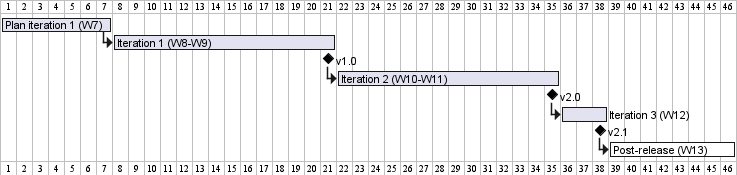
Things to note:
COMMON MISTAKE: Not following the convention for Git commit message subjects.
Caution: This is very hard to rectify later, after the PR containing the commits has been merged. Reason: While Git allows editing past commits, doing so changes their timestamps, which affects your weekly code contribution stats (which are factored into evaluating the consistency of your coding work over the project duration).
COMMON MISTAKE: Not following the required phrasing style for the first sentence of Java method header comments.
COMMON MISTAKE: Forgetting to create each PR from a separate branch of your fork (i.e., sending the PR from the master branch). This error means your PR will not be considered as following the forking workflow correctly.
1 Start implementing v1.0
You may code from any of the below to be used in your tP, provided you give credit to the source (and do not claim such code as yours).
- The iP code of any of your team members, or of any other person in the course.
- Code from AddressBook-Level2 or any code used in course activities e.g., personbook
Start implementing v1.0, by adding code in small steps, while working in parallel, aiming to produce a VERY simple working version after one week, and a bit more functional version at the end of iteration (i.e., after two weeks).
See the panel below the project workflow we prescribe for the tP.
2 Add some JUnit Tests
We recommend that each person adds some JUnit tests to test their tP code.
Some examples from AddressBook-Level2:
seedu.addressbook.common.Utils.java
Tests:seedu.addressbook.common.UtilsTest.java
Note how the test class is in the same package as the SUT (although in a different folder). Advantage: the test class has access to all non-private members of the SUT, including package private members.- SUT:
seedu.addressbook.parser.Parser.java
Tests:seedu.addressbook.parser.ParserTest.java
Note how some of the test methods follow a different naming convention e.g.,parse_emptyInput_returnsIncorrect(). Cross-check the coding standard to confirm if this naming convention is allowed. - SUT:
seedu.addressbook.data.AddressBook.java
Tests:seedu.addressbook.data.AddressBookTest.java