Week 6 [Mon, Sep 14th] - Topics
Detailed Table of Contents
Guidance for the item(s) below:
As usual, we cover a few more Java topics that are relevant to the iP this week. We start with topics related to data structures that you can use to work with collections of objects, as you'll need to be able to manage a collection of task objects in your iP.
But first, let's learn a programming technique called generics (similar to C++ templates) often used in such data structures.
Given below is an extract from the -- Java Tutorial, with some adaptations.
You can use polymorphism to write code that can work with multiple types, but that approach has some shortcomings.
Consider the following Box class. It can be used only for storing Integer objects.
public class BoxForIntegers {
private Integer x;
public void set(Integer x) {
this.x = x;
}
public Integer get() {
return x;
}
}
To store String objects, another similar class is needed, resulting in the duplication of the entire class. As you can see, if you need to store many different types of objects, you could end up writing many similar classes.
public class BoxForString {
private String x;
public void set(String x) {
this.x = x;
}
public String get() {
return x;
}
}
One solution for this problem is to use polymorphism i.e., write the Box class to store Object objects.
public class Box {
private Object x;
public void set(Object x) {
this.x = x;
}
public Object get() {
return x;
}
}
The problem with this solution is, since its methods accept or return an Object, you are free to pass in whatever you want, provided that it is not one of the primitive types. There is no way to verify, at compile time, how the class is used. One part of the code may place an Integer in the box and expect to get Integers out of it, while another part of the code may mistakenly pass in a String, resulting in a runtime error.
Generics enable types (classes and interfaces) to be parameters when defining classes, interfaces and methods. Much like the more familiar , type parameters provide a way for you to re-use the same code with different inputs. The difference is that the inputs to formal parameters are values, while the inputs to type parameters are types.
A generic Box class allows you to define what type of elements will be put in the Box. For example, you can instantiate a Box object to keep Integer elements so that any attempt to put a non-Integer object in that Box object will result in a compile error.
This section includes extract from the -- Java Tutorial, with some adaptations.
The definition of a generic class includes a type parameter section, delimited by angle brackets (<>). It specifies the type parameters (also called type variables) T1, T2, ..., and Tn. A generic class is defined with the following format:
class name<T1, T2, ..., Tn> { /* ... */ }
Here is a generic Box class. The class declaration Box<T> introduces the type variable, T, which is also used inside the class to refer to the same type.
Using Object as the type:
public class Box {
private Object x;
public void set(Object x) {
this.x = x;
}
public Object get() {
return x;
}
}
A generic Box using type parameter T:
public class Box<T> {
private T x;
public void set(T x) {
this.x = x;
}
public T get() {
return x;
}
}
As you can see, all occurrences of Object are replaced by T.
To reference the generic Box class from within your code, you must perform a generic type invocation, which replaces T with some concrete value, such as Integer. It is similar to an ordinary method invocation, but instead of passing an argument to a method, you are passing a type argument enclosed within angle brackets — e.g., <Integer> or <String, Integer> — to the generic class itself. Note that in some cases you can omit the type parameter i.e., <> if the type parameter can be inferred from the context.
Using the generic Box class to store Integer objects:
Box<Integer> integerBox;
integerBox = new Box<>(); // type parameter omitted as it can be inferred
integerBox.set(Integer.valueOf(4));
Integer i = integerBox.get(); // returns an Integer
Box<Integer> integerBox;simply declares thatintegerBoxwill hold a reference to a "Box of Integer", which is howBox<Integer>is read.integerBox = new Box<>();instantiates aBox<Integer>class. Note the<>(an empty pair of angle brackets, also called the diamond operator) between the class name and the parenthesis.
The compiler is able to check for type errors when using generic code.
The code below will fail because it creates a Box<String> and then tries to pass Double objects into it.
Box<String> stringBox = new Box<>();
stringBox.set(Double.valueOf(5.0)); //compile error!
A generic class can have multiple type parameters.
The generic OrderedPair class, which implements the generic Pair interface:
public interface Pair<K, V> {
public K getKey();
public V getValue();
}
public class OrderedPair<K, V> implements Pair<K, V> {
private K key;
private V value;
public OrderedPair(K key, V value) {
this.key = key;
this.value = value;
}
public K getKey() { return key; }
public V getValue() { return value; }
}
The following statements create two instantiations of the OrderedPair class:
Pair<String, Integer> p1 = new OrderedPair<>("Even", 8);
Pair<String, String> p2 = new OrderedPair<>("hello", "world");
The code, new OrderedPair<String, Integer>, instantiates K as a String and V as an Integer. Therefore, the parameter types of OrderedPair's constructor are String and Integer, respectively.
A type variable can be any non-primitive type you specify: any class type, any interface type, any array type, or even another type variable.
By convention, type parameter names are single, uppercase letters. The most commonly used type parameter names are:
E- Element (used extensively by the Java Collections Framework)K- KeyN- NumberT- TypeV- ValueS,U,Vetc. - 2nd, 3rd, 4th types
Guidance for the item(s) below:
Next, we learn about some built-in data structures that can be used to manage a collection of objects.
This section uses extracts from the -- Java Tutorial, with some adaptations.
A collection — sometimes called a container — is simply an object that groups multiple elements into a single unit. Collections are used to store, retrieve, manipulate, and communicate aggregate data.
Typically, collections represent data items that form a natural group, such as a poker hand (a collection of cards), a mail folder (a collection of letters), or a telephone directory (a mapping of names to phone numbers).
The collections framework is a unified architecture for representing and manipulating collections. It contains the following:
Interfaces: These are abstract data types that represent collections. Interfaces allow collections to be manipulated independently of the details of their representation.
Example TheList<E>interface can be used to manipulate list-like collections which may be implemented in different ways such asArrayList<E>orLinkedList<E>.Implementations: These are the concrete implementations of the collection interfaces. In essence, they are reusable data structures.
Example TheArrayList<E>class implements theList<E>interface while theHashMap<K, V>class implements theMap<K, V>interface.Algorithms: These are the methods that perform useful computations, such as searching and sorting, on objects that implement collection interfaces. The algorithms are said to be polymorphic: that is, the same method can be used on many different implementations of the appropriate collection interface.
Example Thesort(List<E>)method can sort a collection that implements theList<E>interface.
A well-known example of collections frameworks is the C++ Standard Template Library (STL). Although both are collections frameworks and the syntax looks similar, note that there are important philosophical and implementation differences between the two.
The following list describes the core collection interfaces:
Collection— the root of the collection hierarchy. A collection represents a group of objects known as its elements. The Collection interface is the least common denominator that all collections implement and is used to pass collections around and to manipulate them when maximum generality is desired. Some types of collections allow duplicate elements, and others do not. Some are ordered and others are unordered. The Java platform doesn't provide any direct implementations of this interface but provides implementations of more specific subinterfaces, such asSetandList. Also see theCollectionAPI.Set— a collection that cannot contain duplicate elements. This interface models the mathematical set abstraction and is used to represent sets, such as the cards comprising a poker hand, the courses making up a student's schedule, or the processes running on a machine. Also see theSetAPI.List— an ordered collection (sometimes called a sequence).Lists can contain duplicate elements. The user of aListgenerally has precise control over where in the list each element is inserted and can access elements by their integer index (position). Also see theListAPI.Queue— a collection used to hold multiple elements prior to processing. Besides basicCollectionoperations, aQueueprovides additional insertion, extraction, and inspection operations. Also see theQueueAPI.Map— an object that maps keys to values. AMapcannot contain duplicate keys; each key can map to at most one value. Also see theMapAPI.Others:
Deque,SortedSet,SortedMap
The ArrayList class is a resizable-array implementation of the List interface. Unlike a normal array, an ArrayList can grow in size as you add more items to it. The example below illustrates some of the useful methods of the ArrayList class using an ArrayList of String objects.
import java.util.ArrayList;
public class ArrayListDemo {
public static void main(String args[]) {
ArrayList<String> items = new ArrayList<>();
System.out.println("Before adding any items:" + items);
items.add("Apple");
items.add("Box");
items.add("Cup");
items.add("Dart");
print("After adding four items: " + items);
items.remove("Box"); // remove item "Box"
print("After removing Box: " + items);
items.add(1, "Banana"); // add "Banana" at index 1
print("After adding Banana: " + items);
items.add("Egg"); // add "Egg", will be added to the end
items.add("Cup"); // add another "Cup"
print("After adding Egg: " + items);
print("Number of items: " + items.size());
print("Index of Cup: " + items.indexOf("Cup"));
print("Index of Zebra: " + items.indexOf("Zebra"));
print("Item at index 3 is: " + items.get(2));
print("Do we have a Box?: " + items.contains("Box"));
print("Do we have an Apple?: " + items.contains("Apple"));
items.clear();
print("After clearing: " + items);
}
private static void print(String text) {
System.out.println(text);
}
}
Before adding any items:[]
After adding four items: [Apple, Box, Cup, Dart]
After removing Box: [Apple, Cup, Dart]
After adding Banana: [Apple, Banana, Cup, Dart]
After adding Egg: [Apple, Banana, Cup, Dart, Egg, Cup]
Number of items: 6
Index of Cup: 2
Index of Zebra: -1
Item at index 3 is: Cup
Do we have a Box?: false
Do we have an Apple?: true
After clearing: []
Exercises:
Add the missing methods to the class given below so that it produces the output given.
Use an ArrayList to store the numbers.
public class Main {
//TODO: add your methods here
public static void main(String[] args) {
System.out.println("Adding numbers to the list");
addNumber(3);
addNumber(8);
addNumber(24);
System.out.println("The total is: " + getTotal());
System.out.println("8 in the list : " + isFound(8) );
System.out.println("5 in the list : " + isFound(5) );
removeNumber(8);
System.out.println("The total is: " + getTotal());
}
}
Adding numbers to the list
[3]
[3, 8]
[3, 8, 24]
The total is: 35
8 in the list : true
5 in the list : false
[3, 24]
The total is: 27
Hint
HashMap is an implementation of the Map interface. It allows you to store a collection of key-value pairs. The example below illustrates how to use a HashMap<String, Point> to maintain a list of coordinates and their identifiers e.g., the identifier x1 is used to identify the point 0,0 where x1 is the key and 0,0 is the value.
import java.awt.Point;
import java.util.HashMap;
import java.util.Map;
public class HashMapDemo {
public static void main(String[] args) {
HashMap<String, Point> points = new HashMap<>();
// put the key-value pairs in the HashMap
points.put("x1", new Point(0, 0));
points.put("x2", new Point(0, 5));
points.put("x3", new Point(5, 5));
points.put("x4", new Point(5, 0));
// retrieve a value for a key using the get method
print("Coordinates of x1: " + pointAsString(points.get("x1")));
// check if a key or a value exists
print("Key x1 exists? " + points.containsKey("x1"));
print("Key y1 exists? " + points.containsKey("y1"));
print("Value (0,0) exists? " + points.containsValue(new Point(0, 0)));
print("Value (1,2) exists? " + points.containsValue(new Point(1, 2)));
// update the value of a key to a new value
points.put("x1", new Point(-1,-1));
// iterate over the entries
for (Map.Entry<String, Point> entry : points.entrySet()) {
print(entry.getKey() + " = " + pointAsString(entry.getValue()));
}
print("Number of keys: " + points.size());
points.clear();
print("Number of keys after clearing: " + points.size());
}
public static String pointAsString(Point p) {
return "[" + p.x + "," + p.y + "]";
}
public static void print(String s) {
System.out.println(s);
}
}
Coordinates of x1: [0,0]
Key x1 exists? true
Key y1 exists? false
Value (0,0) exists? true
Value (1,2) exists? false
x1 = [-1,-1]
x2 = [0,5]
x3 = [5,5]
x4 = [5,0]
Number of keys: 4
Number of keys after clearing: 0
Exercises:
The class given below keeps track of how many people sign up to attend an event on each day of the week. Add the missing methods so that it produces the output given.
Use a HashMap to store the number of entries for each day.
public class Main {
private static HashMap<String, Integer> roster = new HashMap<>();
//TODO: add your methods here
public static void main(String[] args) {
addToRoster("Monday"); // i.e., one person signed up for Monday
addToRoster("Wednesday"); // i.e., one person signed up for Wednesday
addToRoster("Wednesday"); // i.e., another person signed up for Wednesday
addToRoster("Friday");
addToRoster("Monday");
printRoster();
}
}
Monday => 2
Friday => 1
Wednesday => 2
Hint
Guidance for the item(s) below:
Another thing you need to do in your project soon is reading from and writing to files. Let's learn how to do that next.
You can use the java.io.File class to represent a file object. It can be used to access properties of the file object.
This code creates a File object to represent a file fruits.txt that exists in the data directory relative to the current working directory and uses that object to print some properties of the file.
import java.io.File;
public class FileClassDemo {
public static void main(String[] args) {
File f = new File("data/fruits.txt");
System.out.println("full path: " + f.getAbsolutePath());
System.out.println("file exists?: " + f.exists());
System.out.println("is Directory?: " + f.isDirectory());
}
}
full path: C:\sample-code\data\fruits.txt
file exists?: true
is Directory?: false
If you use backslash to specify the file path in a Windows computer, you need to use an additional backslash as an escape character because the backslash by itself has a special meaning. e.g., use "data\\fruits.txt", not "data\fruits.txt". Alternatively, you can use forward slash "data/fruits.txt" (even on Windows).
You can read from a file using a Scanner object that uses a File object as the source of data.
This code uses a Scanner object to read (and print) contents of a text file line-by-line:
import java.io.File;
import java.io.FileNotFoundException;
import java.util.Scanner;
public class FileReadingDemo {
private static void printFileContents(String filePath) throws FileNotFoundException {
File f = new File(filePath); // create a File for the given file path
Scanner s = new Scanner(f); // create a Scanner using the File as the source
while (s.hasNext()) {
System.out.println(s.nextLine());
}
}
public static void main(String[] args) {
try {
printFileContents("data/fruits.txt");
} catch (FileNotFoundException e) {
System.out.println("File not found");
}
}
}
i.e., contents of the data/fruits.txt
5 Apples
3 Bananas
6 Cherries
You can use a java.io.FileWriter object to write to a file.
The writeToFile method below uses a FileWriter object to write to a file. The method is being used to write two lines to the file temp/lines.txt.
import java.io.FileWriter;
import java.io.IOException;
public class FileWritingDemo {
private static void writeToFile(String filePath, String textToAdd) throws IOException {
FileWriter fw = new FileWriter(filePath);
fw.write(textToAdd);
fw.close();
}
public static void main(String[] args) {
String file2 = "temp/lines.txt";
try {
writeToFile(file2, "first line" + System.lineSeparator() + "second line");
} catch (IOException e) {
System.out.println("Something went wrong: " + e.getMessage());
}
}
}
Contents of the temp/lines.txt:
first line
second line
Note that you need to call the close() method of the FileWriter object for the writing operation to be completed.
You can create a FileWriter object that appends to the file (instead of overwriting the current content) by specifying an additional boolean parameter to the constructor.
The method below appends to the file rather than overwrites.
private static void appendToFile(String filePath, String textToAppend) throws IOException {
FileWriter fw = new FileWriter(filePath, true); // create a FileWriter in append mode
fw.write(textToAppend);
fw.close();
}
The java.nio.file.Files is a utility class that provides several useful file operations. It relies on the java.nio.file.Paths file to generate Path objects that represent file paths.
This example uses the Files class to copy a file and delete a file.
import java.io.IOException;
import java.nio.file.Files;
import java.nio.file.Paths;
public class FilesClassDemo {
public static void main(String[] args) throws IOException{
Files.copy(Paths.get("data/fruits.txt"), Paths.get("temp/fruits2.txt"));
Files.delete(Paths.get("temp/fruits2.txt"));
}
}
The techniques above are good enough to manipulate simple text files. Note that it is also possible to perform file I/O operations using other classes.
Guidance for the item(s) below:
At some point, you want to package your code as a single executable file. The next topic covers how to do that.
Java applications are typically delivered as JAR (short for Java Archive) files. A JAR contains Java classes and other resources (icons, media files, etc.).
An executable JAR file can be launched using the java -jar command e.g., java -jar foo.jar launches the foo.jar file.
The IDE or build tools such as Gradle can help you to package your application as a JAR file.
See the tutorial Working with JAR files @se-edu/guides to learn how to create and use JAR files.
Guidance for the item(s) below:
Last week, we had a quick peek at the requirements aspect. Let's study the topic properly this week, starting with an introduction to the topic.
A software requirement specifies a need to be fulfilled by the software product.
A software project may be one of two types:
- a brownfield project, i.e., a project to replace or update an existing software product
Example Adding an online payment option to a university's existing course registration system. - a greenfield project, i.e., a project to develop a new system from scratch
Example Building a new app that lets students swap tutorial slots, where no such system exists yet.
In either case, requirements need to be gathered, analyzed, specified, and managed.
Requirements come from stakeholders.
Stakeholder: An individual or an organization that is involved in or potentially affected by the software project. Examples include users, sponsors, developers, interest groups, government agencies, etc.
Identifying requirements is often not easy.
Example Stakeholders may not be aware of their precise needs, may not know how to communicate their requirements correctly, or may not be willing to spend effort identifying requirements.
Requirements can be divided into two in the following way:
- Functional requirements specify what the system should do.
Example The system should allow a user to search for a book by its title. - Non-functional requirements specify the constraints under which the system is developed and operated.
Example The search should return results within two seconds.
Example Some categories of non-functional requirements:
- Data requirements, e.g., size, , , etc.
- Environment requirements, e.g., the technical environment in which the system would operate or with which it needs to be compatible.
- Performance, Security, Usability, Interoperability, Maintainability, Compliance with regulations, and more ...
Example Some concrete NFRs, drawn from various projects:
- Business/domain rules: the size of the minefield cannot be smaller than five.
- Constraints: system testers are available only during the last month of the project.
- Performance requirements: the system should respond within two seconds.
- Quality requirements: the system should be usable by a novice who has never carried out an online purchase.
- Process requirements: the project is expected to adhere to a schedule that delivers a feature set every month.
You may have to spend extra effort identifying NFRs as early as possible because:
- NFRs are easier to miss.
Example Stakeholders tend to think of functional requirements first. - Sometimes NFRs are critical to the success of the software.
Example A web application that is too slow or that has weak security is unlikely to succeed even if it has all the right functionality.
Requirements can be prioritized based on the importance and urgency, while keeping in mind the constraints of schedule, budget, staff resources, quality goals, and other constraints.
A common approach is to group requirements into priority categories. Note that all such scales are subjective, and stakeholders define the meaning of each level in the scale for the project at hand.
Example One scheme for categorizing requirements:
Essential: The product must fulfill this requirement; otherwise, users will not accept it.Typical: Most similar systems have this feature although the product can survive without it.Novel: New features that could differentiate this product from the rest.
Other schemes:
High,Medium,LowMust-have,Nice-to-have,Unlikely-to-haveLevel 0,Level 1,Level 2, ...
Some requirements can be discarded if they are considered ‘out of ’.
Example The requirement given below is for a Calendar application. Stakeholders of the software (e.g., product designers) might decide it is outside the software's scope.
The software records the actual time taken by each task and shows the difference between the actual and scheduled time for the task.
Here are some characteristics of well-defined requirements [📖 zielczynski]:
- Unambiguous
- Testable (verifiable)
- Clear (concise, terse, simple, precise)
- Correct
- Understandable
- Feasible (realistic, possible)
- Independent
- Necessary
- Implementation-free (i.e., abstract)
Two of these carry most of the weight: a requirement that is unambiguous and testable states an observable result, so evidence can settle whether it has been met. A requirement that states a judgment instead can only be settled by argument. To make one testable, say who is involved, what they are doing, and what result counts as success.
Example Two requirements from the same project, one testable and one not:
- Good
The system should respond within two seconds.You can measure this, and the measurement settles the matter. - Bad
The system should be usable by a novice who has never carried out an online purchase.Two people can disagree about whether the system is 'usable', and neither can show the other is wrong.
The second can be rewritten so that evidence settles it:
- Good
A user who has never carried out an online purchase should be able to complete a purchase unaided, on the first attempt, within five minutes.
Besides these criteria for individual requirements, the set of requirements as a whole should be:
- Consistent
- Non-redundant
- Complete
Requirements are not settled once and then left alone; they keep changing while the product is being built. Three reasons account for most of it:
- Stakeholders work out what they want by seeing something concrete.
Example A user who could not describe the report they needed can say exactly what is wrong with the first version of it. - The world the product lives in changes.
Example A new regulation comes into force, or a competitor ships a feature that users now expect. - The team learns what things actually cost.
Example A requirement turns out to take ten times the effort everyone assumed, which changes whether it is worth having at all.
Two things follow from this.
A specification that is not kept up to date does not become harmless, it becomes misleading, because people keep acting on it. A developer builds the version that was superseded a month ago; a tester reports a defect against behavior nobody wants any more.
Every change is also a decision about what will not be built. Accepting a new requirement late competes with requirements already agreed, so priorities have to be revisited rather than settled once at the start.
Guidance for the item(s) below:
Next, a quick look at techniques used for gathering requirements. They are mostly common-sense but let's go through them for completeness' sake anyway.
Brainstorming: A group activity designed to generate a large number of diverse and creative ideas for the solution of a problem.
In a brainstorming session there are no "bad" ideas. The aim is to generate ideas, not to validate them. Brainstorming encourages you to "think outside the box" and put "crazy" ideas on the table without fear of rejection.
Studying existing products can unearth shortcomings that a new product can address. Product manuals and other forms of documentation can tell us how existing solutions work.
Example When developing a game for a mobile device, a look at a similar PC game can give insight into the kind of features and interactions the mobile game can offer.
Observing users in their natural work environment can uncover product requirements. Usage data from an existing system can also show how that system is being used, which can help in building a better replacement.
Example Usage data can reveal the situations where the user makes mistakes when using the current system.
Interviewing stakeholders and domain experts can produce useful information about project requirements. How much it produces depends far more on how the interview is run than on how long it lasts.
- Find out what the person is responsible for before you meet them, and decide what only they can tell you. An interview spent on things you could have looked up is a wasted one.
- Open with something concrete rather than an abstract question. 'What do you need?' invites a vague answer, or a feature request that hides the need behind it. Walking through a recent situation, a screen of the current system, or a prototype gets you specifics.
- Ask what goes wrong today and what they do instead. Workarounds are where unmet requirements hide: if someone keeps a private spreadsheet, the system is failing them in a way worth understanding.
- Play the answer back in your own words before moving on. It is very common for both sides to leave an interview believing they agreed, having understood different things.
- Confirm your written notes with the interviewee afterwards. They can correct what you misheard while they still remember what they said.
Example Part of an interview with a manager, for a system that handles leave applications:
You: Walk me through the last time someone on your team asked for leave.
Manager: She emailed me, I checked the shared spreadsheet, and I replied saying yes.
You: What were you checking in the spreadsheet?
Manager: Whether anyone else was already away that week. And her leave balance, but that is usually out of date, so I ask the HR office instead.
You: So you don't rely on the balance in the spreadsheet?
Manager: No. I've been caught out by it before.
Two requirements surface that nobody asked for: an approver needs to see who else is away in the same period, and the leave balance has to be current enough to decide on.
Treat what you hear as claims to be checked, rather than requirements to be recorded. People often describe the process they are supposed to follow rather than the one they actually follow, and two stakeholders can want things that cannot both be true.
Example One department wants every leave application approved by a manager; another wants short absences to need no approval at all.

[source]
Focus groups are a kind of informal interview within an interactive group setting. A group of people (e.g. potential users, beta testers) is asked about their understanding of a specific issue, process, product, advertisement, etc.
Prototype: A prototype is a mock-up, a scaled-down version, or a partial system constructed
- to get users’ feedback.
- to validate a technical concept (a "proof-of-concept" prototype).
- to give a preview of what is to come, or to compare multiple alternatives on a small scale before committing fully to one alternative.
- for early field-testing under controlled conditions.
Prototyping can uncover requirements, in particular, those related to how users interact with the system. UI prototypes or mock-ups, also called wireframe diagrams, are often used in brainstorming sessions or in meetings with users to get quick feedback.
Example A mock-up of a dialog box:
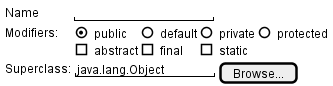
[source: plantuml.com]
Prototyping can be used for discovering as well as specifying requirements e.g. a UI prototype can serve as a specification of what to build.
Gathering requirements tells you what people said; validating requirements tells you whether what you wrote down is what they meant. It is worth distinguishing from the check that comes much later:
- Validating requirements asks whether you have written down the right thing.
- Verifying software asks whether what was built matches what was written down.
A team that only does the second can build exactly the wrong product, correctly.
Three checks are cheap enough to run on a student project:
- Walk the requirement back to the stakeholder in words they would use, and wait for the correction. Reading your own notes aloud to the person who gave them to you finds misunderstandings faster than any amount of rereading them yourself.
- Put something in front of a user instead of describing it. People correct a rough sketch or a mock-up far more readily than they correct a paragraph, because they can see what they would actually be given.
- State the observable result that would settle the requirement. If nobody can say what would count as having met it, the requirement is not yet saying anything a team could build against.
Example A requirement gathered for a learning management system:
Lecturers should be able to see how their students are doing.
Walked back to the lecturer who asked for it, this turns out to mean something much narrower: they want to spot students who have stopped participating, early enough to contact them. 'How students are doing' would have been built as a grade dashboard, which nobody wanted.
A requirement you cannot yet state in observable terms is not wrong, it is not ready. Record it as an open question, or as the next thing to put a prototype in front of. A product vision, an unresolved disagreement between two stakeholders, or a quality concern that nobody has quantified yet are all legitimate inputs at this stage; deleting them because they cannot be phrased as a check yet would throw away the very things most worth resolving.
Guidance for the item(s) below:
As you may have noticed in the section about prototyping, some techniques can be used for both gathering and specifying requirements. The two things often go hand-in-hand any way. For example, you gather some requirements, specify them in some form, and show them to stakeholders to get feedback.
Now, let's look at other techniques used for specifying requirements.Of course, you've seen two of them already.
Prose
A textual description (i.e., prose) can be used to describe requirements. Prose is especially useful when describing abstract ideas such as the vision of a product.
Example The product vision of the TEAMMATES Project, described using prose:
TEAMMATES aims to become the biggest student project in the world (biggest here refers to 'many contributors, many users, large codebase, evolving over a long period'). Furthermore, it aims to serve as a training tool for Software Engineering students who want to learn SE skills in the context of a non-trivial real software product.
Avoid using lengthy prose to describe requirements; they can be hard to follow.
User Stories [Repeated from last week]
User story: User stories are short, simple descriptions of a feature told from the perspective of the person who desires the new capability, usually a user or customer of the system. [Mike Cohn]
A common format for writing user stories is:
User story format: As a {user type/role} I can {function} so that {benefit}
Example User stories from a Learning Management System:
- As a student, I can download files uploaded by lecturers, so that I can get my own copy of the files
- As a lecturer, I can create discussion forums, so that students can discuss things online
- As a tutor, I can print attendance sheets, so that I can take attendance during the class
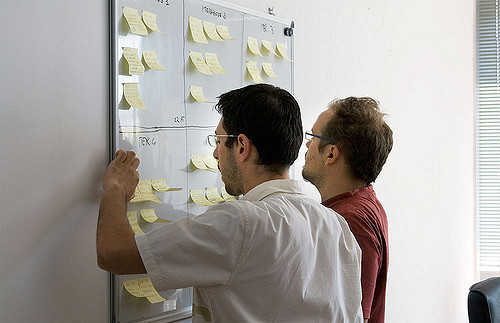
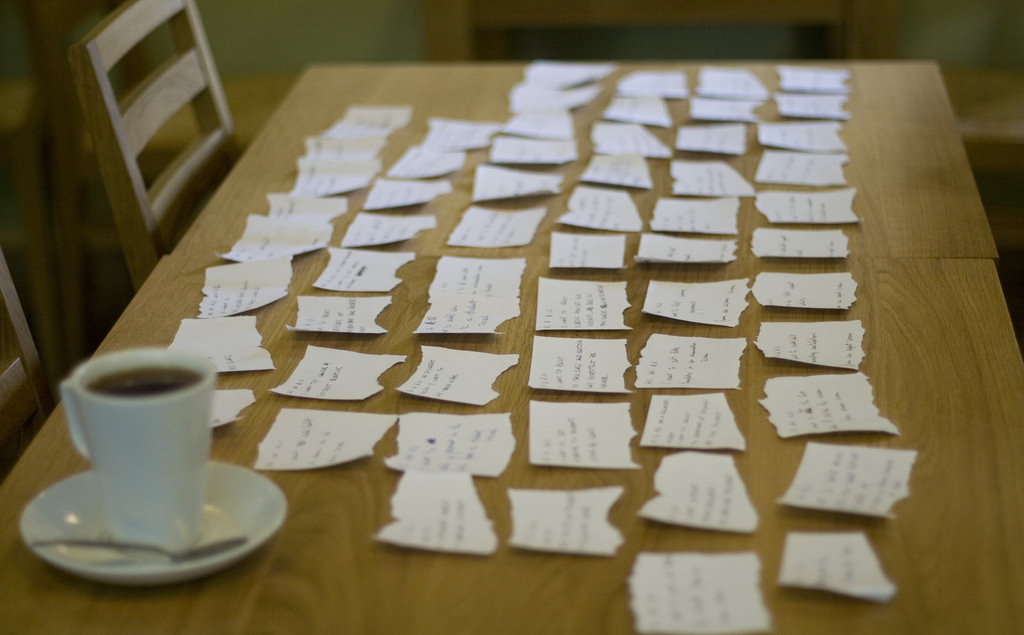
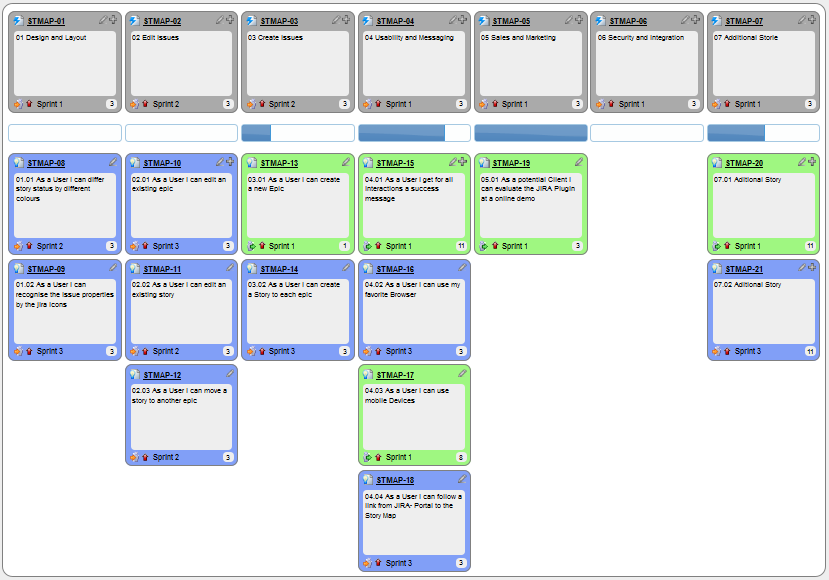
You can write user stories using a physical medium or a digital tool. For example, you can use index cards or sticky notes, and arrange them on walls or tables. Alternatively, you can use software (e.g., GitHub Project Boards, Trello, Google Docs, ...) to manage user stories digitally.
User stories in use
With sticky notes
With paper
With software

The {benefit} can be omitted if it is obvious.
Example A user story with the benefit omitted:
As a user, I can log in to the system so that I can access my data
It is recommended to confirm there is a concrete benefit even if you omit it from the user story. If not, you could end up adding features that have no real benefit.
You can add more characteristics to the {user role} to provide more context to the user story.
Example User stories that add characteristics to the user role:
- As a forgetful user, I can view a password hint, so that I can recall my password.
- As an expert user, I can tweak the underlying formatting tags of the document, so that I can format the document exactly as I need.
You can write user stories at various levels. High-level user stories, called epics (or themes) cover bigger functionality. You can then break down these epics into multiple user stories of normal size.
Example An epic broken down into normal-sized user stories:
[Epic] As a lecturer, I can monitor student participation levels
- As a lecturer, I can view the forum post count of each student
so that I can identify the activity level of students in the forum - As a lecturer, I can view webcast view records of each student
so that I can identify the students who did not view webcasts - As a lecturer, I can view file download statistics of each student
so that I can identify the students who did not download lecture materials
You can add conditions of satisfaction to a user story to specify things that need to be true for the user story implementation to be accepted as ‘done’.
Example A user story with conditions of satisfaction:
As a lecturer, I can view the forum post count of each student so that I can identify the activity level of students in the forum.
Conditions:
Separate post count for each forum should be shown
Total post count of a student should be shown
The list should be sortable by student name and post count
These are more widely known as acceptance criteria. Whatever they are called, they are the part of a story that states an observable result, and therefore the part that survives when the conversation behind the story does not.
Other useful information that can be added to a user story includes (but is not limited to):
- Priority: how important the user story is
- Size: the estimated effort to implement the user story
- Urgency: how soon the feature is needed
More Examples
User stories capture user requirements in a way that is convenient for , , and .
[User stories] strongly shift the focus from writing about features to discussing them. In fact, these discussions are more important than whatever text is written. [Mike Cohn, MountainGoat Software 🔗]
User stories differ from mainly in the level of detail. User stories should only provide enough details to make a reasonably low-risk estimate of how long the user story will take to implement. When the time comes to implement the user story, the developers will meet with the customer face-to-face to work out a more detailed description of the requirements. [more...]
Leaving out detail on purpose relies on the implementer being able to come back and ask. Where asking is slow or does not happen at all — work handed to another team across a time zone, or generated in a single pass by an AI coding assistant with no round of clarification — an unstated detail never surfaces as a question. It gets filled in with a plausible guess, and the guess arrives faster than the question ever would.
Example 'As a user, I can delete a task' leaves open whether deleting is recoverable. Someone who can ask, asks. Someone working from the story alone picks one, and the answer looks finished either way.
The further the implementer sits from the conversation, the more of a story's meaning has to survive in writing — which is the job the acceptance criteria are doing.
User stories can capture non-functional requirements too because even NFRs must benefit some stakeholder.
Example An NFR captured as a user story:
| As a/an ___, | I want to ___, | so that ___. |
|---|---|---|
| impatient user | to be able to experience reasonable response time from the website while up to 1000 concurrent users are using it | I can use the app even when the traffic is at the maximum expected level |
Given their lightweight nature, user stories are quite handy for recording requirements during early stages of requirements gathering.
A recipe for brainstorming user stories
Given below is a possible recipe you can use when writing user stories during the early stages of requirement gathering.
Step 0: Clear your mind of preconceived product ideas
Even if you already have some idea of what your product will look/behave like in the end, clear your mind of those ideas. The product is the solution. At this point, we are still at the stage of figuring out the problem (i.e., user requirements). Let's try to get from the problem to the solution in a systematic way, one step at a time.
Step 1: Define the target user as a persona:
Decide your target user's profile (e.g. a student, office worker, programmer, salesperson) and work patterns (e.g. Does he work in groups or alone? Does he share his computer with others?). A clear understanding of the target user will help when deciding the importance of a user story. You can even narrow it down to a persona. Here is an example:
Jean is a university student studying in a non-IT field. She interacts with a lot of people due to her involvement in university clubs/societies. ...
Step 2: Define the problem scope:
Decide the exact problem you are going to solve for the target user. It is also useful to specify what related problems it will not solve so that the exact scope is clear.
ProductX helps Jean keep track of all her school contacts. It does not cover communicating with contacts.
Step 3: List scenarios to form a narrative:
Think of the various scenarios your target user is likely to go through as she uses your app. Following a chronological sequence as if you are telling a story might be helpful.
A. First use:
- Jean gets to know about ProductX. She downloads it and launches it to check out what it can do.
- After playing around with the product for a bit, Jean wants to start using it for real.
- ...
B. Second use: (Jean is still a beginner)
- Jean launches ProductX. She wants to find ...
- ...
C. 10th use: (Jean is a little bit familiar with the app)
- ...
D. 100th use: (Jean is an expert user)
- Jean launches the app and does ... and ... followed by ... as usual.
- Jean feels some of the data in the app is no longer needed. She wants to get rid of it to reduce clutter.
More examples that might apply to some products:
- Jean uses the app at the start of the day to ...
- Jean uses the app before going to sleep to ...
- Jean hasn't used the app for a while because she was on a three-month training program. She is now back at work and wants to resume her daily use of the app.
- Jean moves to another company. Some of her clients come with her but some don't.
- Jean starts freelancing in her spare time. She wants to keep her freelancing clients separate from her other clients.
Step 4: List the user stories to support the scenarios:
Based on the scenarios, decide on the user stories you need to support. For example, based on the scenario 'A. First use', you might have user stories such as these:
- As a potential user exploring the app, I can see the app populated with sample data, so that I can easily see how the app will look when it is in use.
- As a user ready to start using the app, I can purge all current data, so that I can get rid of sample/experimental data I used for exploring the app.
To give another example, based on the scenario 'D. 100th use', you might have user stories such as these:
- As an expert user, I can create shortcuts for tasks, so that I can save time on frequently performed tasks.
- As a long-time user, I can archive/hide unused data, so that I am not distracted by irrelevant data.
Do not 'evaluate' the value of user stories while brainstorming. Reason: an important aspect of brainstorming is not judging the ideas generated.
Other tips:
- Don't be too hasty to discard 'unusual' user stories: Those might make your product unique and stand out from the rest, at least for the target users.
- Don't go into too much detail:
For example, consider this user story:
As a user, I want to see a list of tasks that need my attention most at the present time, so that I pay attention to them first.
When discussing this user story, don't worry about what tasks should be considered 'needs my attention most at the present time'. Those details can be worked out later. - Don't discuss implementation details or whether you are actually going to implement it: When gathering requirements, your decision is whether the user's need is important enough for you to want to fulfill it. Implementation details can be discussed later. If a user story turns out to be too difficult to implement later, you can always omit it from the implementation plan.
While user stories can be recorded on in the initial stages, an online tool is more suitable for longer-term management of user stories, especially if the team is not .
Tool Examples: How to use some example online tools to manage user stories
Resources:
- This article by Mike Cohn from MountainGoatSoftware explains how to use user stories to capture NFRs.
Feature Lists [Repeated from last week]
Feature list: A list of features of a product grouped according to some criteria such as aspect, priority, order of delivery, etc.
Example A sample feature list from a simple Minesweeper game (only a brief description has been provided to save space):
- Basic play – Single player play.
- Difficulty levels
- Medium levels
- Advanced levels
- Versus play – Two players can play against each other.
- Timer – Additional fixed time restriction on the player.
- ...
Use Cases
Guidance for the item(s) below:
The technique of use cases (don't confuse with user stories) covered below is another widely used technique. However, we only cover it briefly (i.e., you'll learn what it is but not how to use it) to lower to course workload.
Use case: A description of a set of sequences of actions, including variants, that a system performs to yield an observable result of value to an actor [ 📖 : ].
A use case describes an interaction between the user and the system for a specific functionality of the system.
Example The main flow of a 'transfer money' use case for an online banking system:
System: Online Banking System (OBS)
Use case: UC23 - Transfer Money
Actor: User
MSS:
  1. User chooses to transfer money.
  2. OBS requests for details of the transfer.
  3. User enters the requested details.
  4. OBS requests for confirmation.
  5. User confirms.
  6. OBS transfers the money and displays the new account balance.
  Use case ends.
Another Example : 'upload file' use case of an LMS
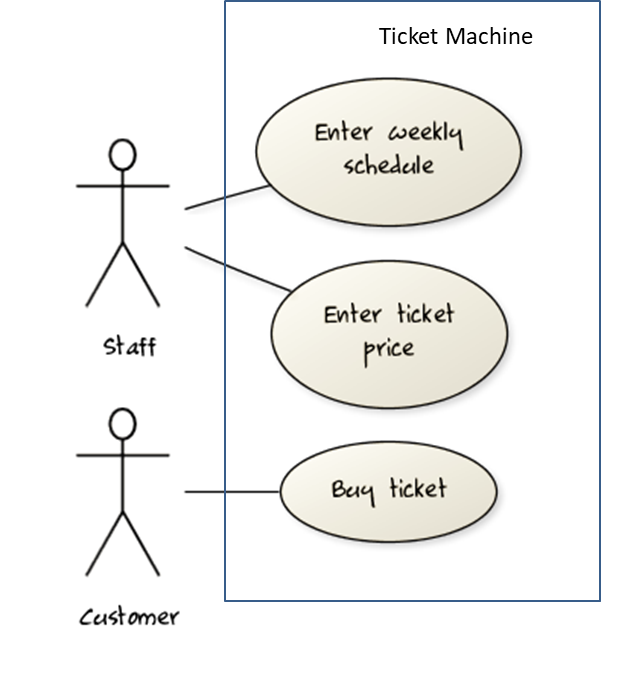
UML includes a diagram type called use case diagrams that can illustrate use cases of a system visually, providing a visual ‘table of contents’ of the use cases of a system.
In the example on the right, note how use cases are shown as ovals and user roles relevant to each use case are shown as stick figures connected to the corresponding ovals.
Use cases capture the functional requirements of a system.
Glossary
Glossary: A glossary serves to ensure that all stakeholders have a common understanding of the noteworthy terms, abbreviations, acronyms etc.
Example A partial glossary from a variant of the Snakes and Ladders game:
- Conditional square: A square that requires a specific face value which a player has to throw before his/her piece can leave the square.
- Normal square: A square that does not have any conditions, snakes, or ladders in it.
Specifying a term in the glossary is useful in the following cases:
- A domain-specific/technical term that may not be known to all stakeholders, to indicate its definition
- When a term has multiple meanings, to indicate which of them is used in the project
- When there are multiple terms used for the same concept, to indicate which of them will be used in the project
Supplementary Requirements
Requirements Documents
Teams package these formats in different ways: some collect them into a single document that says what is to be built, while others keep each format where it is most useful and write down only what needs agreeing.
Where there is such a document, product-led teams usually call it a product requirements document (PRD), or a product brief. It typically carries the product's purpose, who it is for, the scope and the priorities within it, the stories or use cases that matter most, and the quality constraints the product has to meet.
A software requirements specification (SRS) is its more formal counterpart, used where requirements have to be agreed precisely with a customer, audited, or contracted for. An SRS is heavier, more structured, and more stable than a PRD; the two are not interchangeable names for the same thing.
A single document is one common packaging, not a rule. Many teams keep user stories in a tracker, the glossary in a wiki, and prototypes in a design tool, and write down only what needs agreeing in one place.
Each format earns its place by doing a different job:
- Prose frames the problem and the product's purpose.
- A feature list supports scope and delivery discussions.
- A user story records one negotiable slice of user value.
- A use case makes one workflow, and what can go wrong in it, precise.
- A glossary settles what shared terms mean.
- Supplementary requirements capture what cuts across all of the above.
Choosing between them is a question of what you need to be precise about, not of which notation is better.
Working from such a document has a name: specification-driven development means starting from a specification that is clear, versioned, and testable, and using it both to direct the implementation and to judge what comes back. The second half is the part that is easy to skip. A specification that only ever directs work, and is never used to check the result against, is a wish list.
This matters more as producing a candidate implementation gets cheaper. An assistant can draft questions, propose alternatives, or write code, but it cannot establish what stakeholders actually want, and it cannot decide a trade-off between things two of them both want. Those stay with the people accountable for the product, which is why writing the specification, and the judgment that goes into it, is the part of this work that does not get handed off.
The debugging topics of this textbook draw substantially on The Debugging Book by Andreas Zeller et al., in particular its terminology of defects, infections, and failures, and its treatment of debugging as an application of the scientific method. Further material was adapted from the debugging readings of MIT 6.102, UC Berkeley CS61B, Stanford CS107, UW CSE 332, and CMU 15-213.
Debugging is the process of finding the cause of a known problem in a program, and fixing it. It starts after you know something is wrong — whether a test, a user, or monitoring exposed it; finding that the problem exists is a separate activity. The hard part is usually the diagnosis rather than the correction: once you understand why a program misbehaves, the edit itself is often a single character — though choosing which edit is a decision in its own right.
To debug well, distinguish four things that beginners tend to lump together as 'the bug':
- A mistake is the human (or AI) act that started it all.
Example You misremembered that list indices start at1. - A defect is the resulting error in the code. This is what most people mean by 'a bug'.
Example A loop that starts counting from the wrong index. - An infection is the resulting error in the program state at run time. When the defective line executes, some variable now holds a wrong value.
- A failure is the externally visible wrong behavior.
Example A total shown to the user that is too small, or a crash.
These four form a chain, and each link can be far from the next:
mistake → defect → infection → infection → ... → failure
(code) (state) (state) (behavior)
Debugging is therefore a search, not a lookup: you observe the failure but must fix the defect. The infection spreads as the wrong value is passed on, stored in a field, or used to compute another wrong value, so where the program crashed is usually not where the mistake was made. The chain also explains why bugs hide: a defect infects the state only when that line executes, and an infection becomes a failure only if it propagates out to something observable. A defect can sit in daily-executed code for months unnoticed.
The chain assumes the fault lies in code — the common case, but not the only one. A failure can equally originate in configuration, in data left by an earlier version, in a dependency, in the deployment, or in a requirement that was wrong to begin with. Sometimes the program is right while the test is wrong — the test may hold its own defect, or the expectation it encodes may never have been correct. Only an error in the code is a defect; where the fault lies elsewhere, call it the cause. Either way the search is the same: locate whatever has to change.
Example A running example, reused throughout the related debugging topics of this textbook. A shopping cart prints the correct total, but then appears empty.
class Cart {
private final List<Item> items = new ArrayList<>();
void add(Item item) {
items.add(item);
}
List<Item> getItems() {
return items;
}
int computeTotal() {
int total = 0;
List<Item> pending = getItems();
while (!pending.isEmpty()) {
total += pending.remove(0).price();
}
return total;
}
}
Take the cart's intended contracts to be these: computing a total must not change the cart, and getItems() lets callers read the items without owning the list.
- Mistake: the programmer assumed
getItems()hands back a copy. - Defect:
getItems()hands out the live internal list, whichcomputeTotal()then empties — breaking both contracts at once. - Infection: after
computeTotal()returns, the cart's ownitemslist is empty. - Failure: the next attempt to display the cart shows nothing.
A debugger stopped at the failure would be pointing at the display code, which is correct.
Why debugging is hard
Debugging consumes a large share of real development effort, and a single stubborn defect routinely costs more than writing the code it hides in. Beginners tend to read time spent debugging as evidence that they are bad at programming. It is not; debugging is a distinct and learnable engineering skill.
Three things make it hard:
- The distance between defect and failure: the crash site is not the crime scene, so the instinct to study the code around the error message is often the least productive move available.
- You cannot inspect everything — a running program holds an enormous amount of state, changing at every step, and choosing which small part to look at is most of the skill.
- Your mental model of the code is exactly the thing that is wrong: had you understood it correctly you would not have written the defect, so re-reading with the same assumptions reproduces the same blind spot. Hence debugging must be driven by evidence from the running program, not by reasoning alone.
Debugging time is therefore not proportional to the size of the fix. A one-character correction can cost an afternoon. The cost lives in the search, and every debugging technique aims at making that search cheaper.
How not to debug
Most unproductive debugging comes from having no method, rather than from using the wrong tool.
- Bad Stare and hope — reading the code and waiting for the bug to reveal itself. This inspects the code but not the state, using the mental model that wrote the defect. Fine as a 30-second first try; a poor plan for the next two hours.
- Bad Shotgun debugging — changing whatever looks suspicious and re-running to see whether it helped. Each run teaches you nothing: a change that does not fix the problem has neither confirmed nor eliminated any explanation, and unrelated edits accumulate.
- Bad Debugging into existence — mutating the code until the symptom disappears. The symptom often vanishes because a second defect cancels the first, leaving two bugs and a harder problem later. The difference from shotgun debugging is the stopping rule: here you stop when the symptom goes away, having never identified a cause.
- Bad Fixing the symptom instead of the cause. The failure goes away and the defect stays.
Example Special-casing the input that fails, or wrapping the crash in an emptycatchblock. - Bad Keeping no record of what you tried. Without notes you will re-test explanations you already eliminated, lose your place when interrupted, and be unable to hand the problem over.
Adding temporary print statements is not necessarily bad; doing so without a hypothesis is — that is shotgun debugging in another form. A few prints chosen to answer a specific question are legitimate, and in production, embedded, or concurrent settings they are sometimes the only tool available.
What these have in common is that they produce activity without producing information. A productive debugging step is one that rules something out.
Guidance for the item(s) below:
Now that you know how to use IDE basic features, it's worth looking at even more ways of leveraging their power. In particular, the debugging feature can be indispensable at times.
Refer to these se-edu guides:
Guidance for the item(s) below:
When working with Git, sooner or later you will face a problem called merge conflict. Let's learn how to deal with them.
See Git-Mastery → Lesson T6L3. Resolving Merge Conflicts
Guidance for the item(s) below:
Another step in our journey to improve code quality: Let's learn some legit but unsafe practices we should avoid.
Always include a default branch in case statements. This ensures that all possible outcomes have been considered at the branching point.
Furthermore, use the default branch for the intended default action and not just to execute the last option. If there is no default action, you can use the default branch to detect errors (i.e., if execution reached the default branch, raise a suitable error). This also applies to the final else of an if-else construct. That is, the final else should mean 'everything else', and not the final option. Do not use else when an if condition can be explicitly specified, unless there is absolutely no other possibility.
Example A final else used as the last option, and used for 'everything else':
Bad | | Good |
- Use one variable for one purpose. Do not reuse a variable for a purpose other than its intended one, just because the data type is the same.
- Do not reuse formal parameters as local variables inside the method.
Example Reusing a parameter as a local variable, and the alternative:
Bad
double computeRectangleArea(double length, double width) {
length = length * width; // parameter reused as a variable
return length;
}
def compute_rectangle_area(length, width):
length = length * width
return length
Good
double computeRectangleArea(double length, double width) {
double area;
area = length * width;
return area;
}
def compute_rectangle_area(length, width):
area = length * width
return area
}
Avoid empty catch statements, as they are a way to ignore errors silently (which is not a good thing). In cases when it is unavoidable, at least give a comment to explain why the catch block is left empty.
Get rid of unused code the moment it becomes redundant. You might feel reluctant to delete code you have painstakingly written, even if you have no use for that code anymore ("I spent a lot of time writing that code; what if I need it again?"). Consider all code as baggage you have to carry. If you need that code again, simply recover it from the revision control tool you are using. Deleting code you wrote previously is a sign that you are improving.
Minimize global variables. Global variables may be the most convenient way to pass information around, but they create implicit links between code segments that use the global variable. Avoid them as much as possible.
Define variables in the least possible scope. For example, if the variable is used only within the if block of the conditional statement, it should be declared inside that if block.
The most powerful technique for minimizing the scope of a local variable is to declare it where it is first used. -- Effective Java, by Joshua Bloch
Code duplication, especially when you copy-paste-modify code, often indicates a poor quality implementation. While it may not be possible to have zero duplication, always think twice before duplicating code; most often there is a better alternative.
This guideline is closely related to the DRY Principle.