Week 4 [Mon, Aug 31st] - Project
iP:
- Create a PR to the upstream repo Mon, Aug 31st 2359
- Add Increments:
Level-4,A-CodeQuality - Get ready to review PRs before the tutorial
- Review some peer PRs during the tutorial
tP:
- Start weekly project meetings
- Start a collaborative document for project notes before the tutorial
- Decide on an overall project direction (user profile, value proposition) before the tutorial
iP
1 Create a PR to the upstream repo Mon, Aug 31st 2359
- Create a pull request (PR) from your fork to the upstream repo. Note the following:
- Create the PR from the
masterbranch of your fork to themasterbranch of the upstream repo (https://github.com/NUS-CS2113-AY2627-S1/ip) - Set the PR name as
[{Your full/partial name or your GitHub username}] iP
e.g.,[Richard Mathews Chee] iPor[Rich ... hee] iPor[TheRichMat] iP
Note that the PR name will be publicly visible.
You may leave the description empty.
You may leave theAllow edits by maintainersbox unchecked. If checked, maintainers of the upstream repo can push small fixes to your PR (for example, to resolve minor issues before merging). - If you created the PR correctly, it should appear in the list of PRs here.
- Steps for creating a PR are given in Git-Mastery → Lesson: T9L1. Creating Pull Requests (omit the 'preparation' step):
- Create the PR from the
There is no need to create new PRs every time you update the code in your fork. The PR will update automatically to reflect the latest code of the branch it was sent from (i.e., when you push changes to the master branch of your fork).
3 Get ready to review PRs before the tutorial
- Do the following to prepare for the PR review exercise you will be doing in the coming tutorial.
- Recall how to review PRs (related lesson: Git-Mastery → Lesson: T9L2. Reviewing Pull Requests).
- Read the Best practices for reviewing PRs @SE-EDU/guides. You are expected to follow all of them.
4 Review some peer PRs during the tutorial
This task is worth 2x2=4 participation points.
Learn how you should review PRs in this task (related lesson: Git-Mastery → Lesson: T9L2. Reviewing Pull Requests):
Step 1 Note these additional guidelines:
- Read the Best practices for reviewing PRs @SE-EDU/guides. You are expected to follow all of them.
- Make sure you add 'review comments' (not regular comments) as only those are counted for participation. See step 4 in the panel above to find out how to add 'review comments'.
- If the PR has received some review comments already, feel free to confirm/complement/question those comments in your review. Also, look for things the previous reviewers may have missed.
- At the end of the review, choose
Comment(i.e., notApproveorRequest changes).
Step 2 Do the first PR review as follows.
- Comment only on issues related to the coding standard.
Review comments don't always have to be about problems in the code. Other things you can do:- compliment the author on not making a common mistake
- ask questions
- suggest alternatives
- The review allocation is given in the panel below.
- Comment only on issues related to the coding standard.
If the student you have been allocated to review has not created a PR (or the PR has a trivial amount of code), you can review the Backup PR to review provided in the allocation table. Failing both, review another PR allocated to another student in your own tutorial but not in your team.
Tip for future reference: GitHub allows you to filter PRs/Issues using various criteria such as author:AuthorUsername (example -- see the filters text box in the target page).
Alternatively, you can use PR labels (if any) to filter PRs/Issues.
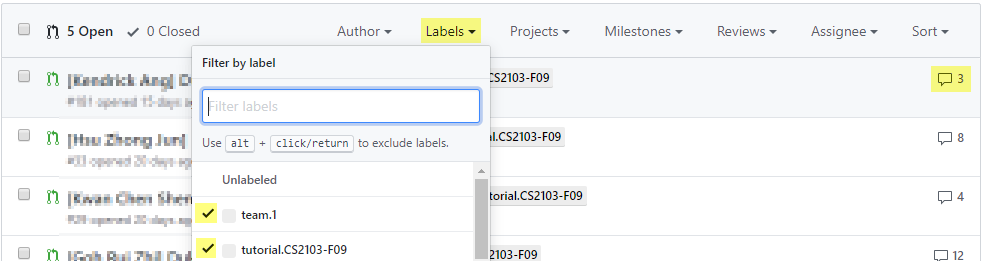
FAQ: How many comments should I add? Answer: Depends on the code being reviewed, but we expect most PRs would warrant at least 4-5 comments. If the PR is huge, you can stop when you think you've put in a fair amount of time on the job (~15 minutes) and added enough comments for the PR author to receive some value.
- Step 3 Do the second PR review as follows.
- Comment on other code quality guidelines (see the sections on Naming and Readability in this textbook chapter) you have learned so far. It's optional to comment on coding standard violations in this PR review.
- The review allocation is given in the panel below.
If the allocated PR is not suitable, use the same strategy as before to find an alternative PR to review.
- Step 4 [When you receive reviews for your own PR] Respond to comments received. You are recommended to (but not obliged to) respond to comments received from peers, especially if the PR reviewer asked you for more info. As mentioned in these guidelines, do not get into arguments with PR reviewers/authors.
tP: Set Direction

1 Start weekly project meetings
- We recommend you start weekly project meetings now. You can use these meetings to do tP tasks, but also to help each other do iP tasks. On a related note, it is also acceptable to discuss the weekly Canvas quiz (if any) together with team members as you do the quiz, i.e., discuss and decide the answers collectively, but you should not give away your answers to someone who was not part of that discussion.
2 Start a collaborative document for project notes before the tutorial
- Keep project notes in an easy-to-use collaborative doc (Recommended: use a Google Doc). This document will be checked by the instructors at various points.
Remember to choose a tool that allows public view access, e.g., a Google Doc can be shared via a public link so that the document can be viewed by others. You'll be asked to submit this link to us next week.
Make sure all your current and future project notes (if split into multiple documents) are reachable via links given in this document and are viewable by the public.
3 Decide on an overall project direction (user profile, value proposition) before the tutorial
- Decide the target user profile and value proposition, as described in the panels below (tip: you can use your first project meeting for this):
As we are still in the early stages of identifying a problem to solve, do not think of the product (i.e., the solution) yet. That is, do not discuss the product features, UI, command format, implementation details, etc. unless they are pertinent to the user profile or the problem addressed.
Pick a CLI-friendly product domain: Given Recommendation-CLI-First and Constraint-Typing-Preferred mentioned in the panels above, it makes sense to pick a product domain that is more suitable for CLI interactions, i.e., a product that deals with easy-to-type textual data, needs a small number of data fields, and has short data fields. For example, a blog editor is an unsuitable product domain because it also deals with non-text data (e.g., images, videos) and some data fields are quite long (i.e., paragraphs of text). Similarly, keeping track of extensive employee records may be an unsuitable domain if there are many data fields per employee.
- Submission: Submit via TEAMMATES.
- Details to submit:
- Product name (plain text only) e.g., ClientContactsPro
We recommend using English characters only. Special or accented characters (e.g., è) might feel 'cute' now, but you will regret using them later when you need to use the product name in submission file names, etc. - Target user profile (plain text only) e.g., freelance event photographers
This is a general description of the target user, not the 'persona' you defined (the latter serves as a concrete representation of the target user, for your internal use only).
No need to mention 'who prefer a CLI' here, as that is given. - Value proposition, i.e., what problem does the product solve? (plain text paragraph, no more than 50 words) e.g., provide fast access to client contact details, optimized for users who prefer a CLI
This is not a list of features -- you should not think about exact features yet.
No need to explain why this app is better than other similar apps -- just explain what it does for the target user. - Link to the project notes document:
This should be an online document/page (not a folder) -- e.g., a GoogleDoc (not a Google Drive location) -- that is publicly accessible. If your project notes are in multiple locations/files, this one document should contain links to the other documents with guidance on what each link is for.
This should be a link with 'view' permissions only, not an 'edit' link. (reason: if the latter, anybody will be able to edit your project notes after we publish the link on the course website)
- Product name (plain text only) e.g., ClientContactsPro
- You'll receive an email from TEAMMATES with the submission link. Only one member needs to submit on behalf of the team. All members can view/update the submission. If you can't find the submission link, you can go to the TEAMMATES link recovery page and enter your NUSNET email address
e_______@u.nus.eduto get TEAMMATES to resend the link.
- Details to submit: