What
A textual description (i.e., prose) can be used to describe requirements. Prose is especially useful when describing abstract ideas such as the vision of a product.
Example The product vision of the TEAMMATES Project, described using prose:
TEAMMATES aims to become the biggest student project in the world (biggest here refers to 'many contributors, many users, large codebase, evolving over a long period'). Furthermore, it aims to serve as a training tool for Software Engineering students who want to learn SE skills in the context of a non-trivial real software product.
Avoid using lengthy prose to describe requirements; they can be hard to follow.
What
Feature list: A list of features of a product grouped according to some criteria such as aspect, priority, order of delivery, etc.
Example A sample feature list from a simple Minesweeper game (only a brief description has been provided to save space):
- Basic play – Single player play.
- Difficulty levels
- Medium levels
- Advanced levels
- Versus play – Two players can play against each other.
- Timer – Additional fixed time restriction on the player.
- ...
Introduction
User story: User stories are short, simple descriptions of a feature told from the perspective of the person who desires the new capability, usually a user or customer of the system. [Mike Cohn]
A common format for writing user stories is:
User story format: As a {user type/role} I can {function} so that {benefit}
Example User stories from a Learning Management System:
- As a student, I can download files uploaded by lecturers, so that I can get my own copy of the files
- As a lecturer, I can create discussion forums, so that students can discuss things online
- As a tutor, I can print attendance sheets, so that I can take attendance during the class
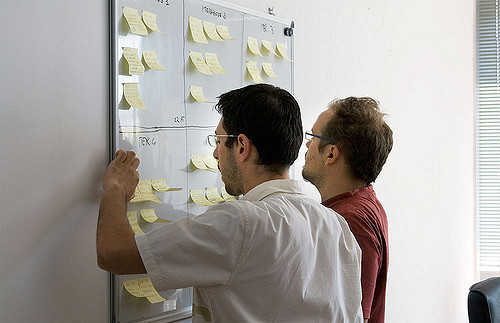
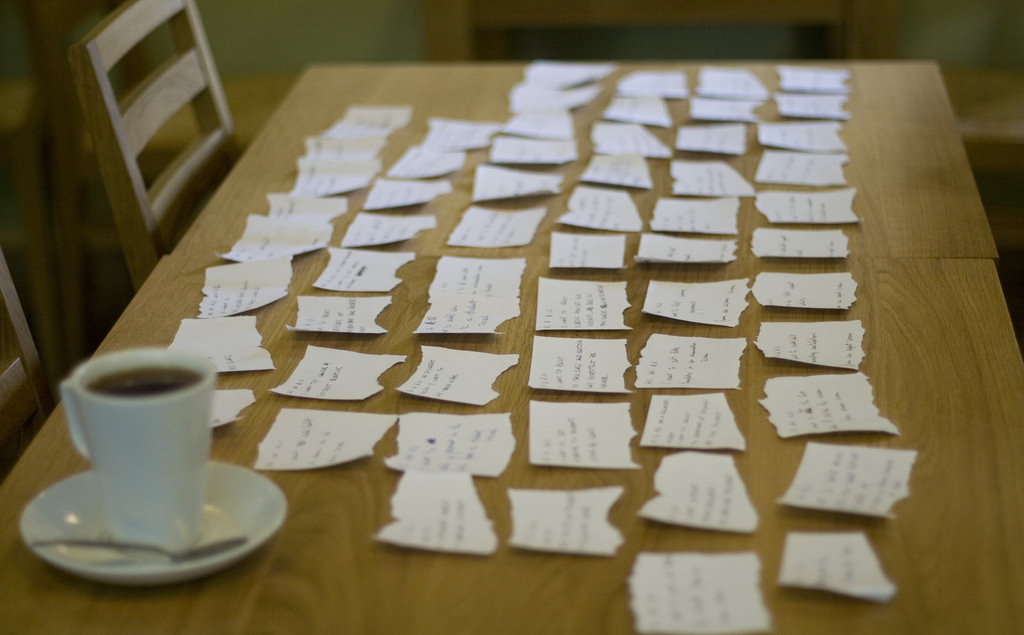
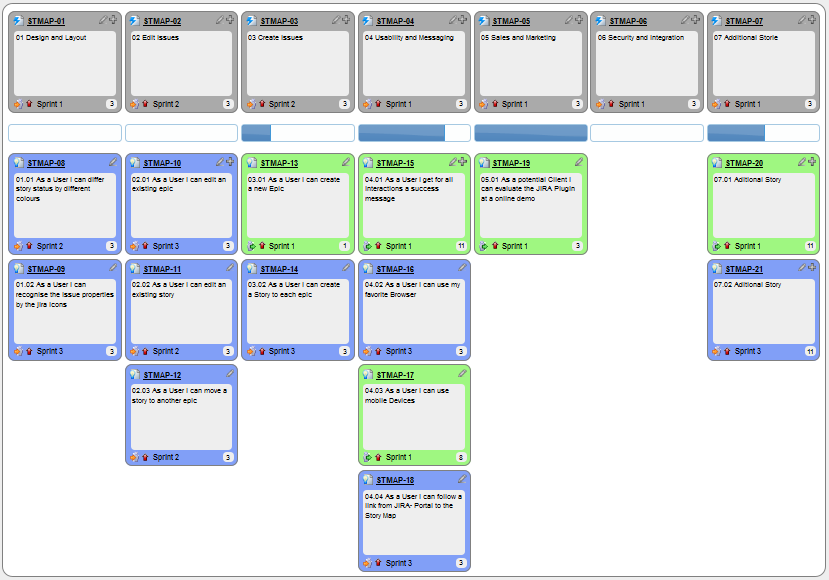
You can write user stories using a physical medium or a digital tool. For example, you can use index cards or sticky notes, and arrange them on walls or tables. Alternatively, you can use software (e.g., GitHub Project Boards, Trello, Google Docs, ...) to manage user stories digitally.
User stories in use
With sticky notes
With paper
With software

Details
The {benefit} can be omitted if it is obvious.
Example A user story with the benefit omitted:
As a user, I can log in to the system so that I can access my data
It is recommended to confirm there is a concrete benefit even if you omit it from the user story. If not, you could end up adding features that have no real benefit.
You can add more characteristics to the {user role} to provide more context to the user story.
Example User stories that add characteristics to the user role:
- As a forgetful user, I can view a password hint, so that I can recall my password.
- As an expert user, I can tweak the underlying formatting tags of the document, so that I can format the document exactly as I need.
You can write user stories at various levels. High-level user stories, called epics (or themes) cover bigger functionality. You can then break down these epics into multiple user stories of normal size.
Example An epic broken down into normal-sized user stories:
[Epic] As a lecturer, I can monitor student participation levels
- As a lecturer, I can view the forum post count of each student
so that I can identify the activity level of students in the forum - As a lecturer, I can view webcast view records of each student
so that I can identify the students who did not view webcasts - As a lecturer, I can view file download statistics of each student
so that I can identify the students who did not download lecture materials
You can add conditions of satisfaction to a user story to specify things that need to be true for the user story implementation to be accepted as ‘done’.
Example A user story with conditions of satisfaction:
As a lecturer, I can view the forum post count of each student so that I can identify the activity level of students in the forum.
Conditions:
Separate post count for each forum should be shown
Total post count of a student should be shown
The list should be sortable by student name and post count
These are more widely known as acceptance criteria. Whatever they are called, they are the part of a story that states an observable result, and therefore the part that survives when the conversation behind the story does not.
Other useful information that can be added to a user story includes (but is not limited to):
- Priority: how important the user story is
- Size: the estimated effort to implement the user story
- Urgency: how soon the feature is needed
Usage
User stories capture user requirements in a way that is convenient for , , and .
[User stories] strongly shift the focus from writing about features to discussing them. In fact, these discussions are more important than whatever text is written. [Mike Cohn, MountainGoat Software 🔗]
User stories differ from mainly in the level of detail. User stories should only provide enough details to make a reasonably low-risk estimate of how long the user story will take to implement. When the time comes to implement the user story, the developers will meet with the customer face-to-face to work out a more detailed description of the requirements. [more...]
Leaving out detail on purpose relies on the implementer being able to come back and ask. Where asking is slow or does not happen at all — work handed to another team across a time zone, or generated in a single pass by an AI coding assistant with no round of clarification — an unstated detail never surfaces as a question. It gets filled in with a plausible guess, and the guess arrives faster than the question ever would.
Example 'As a user, I can delete a task' leaves open whether deleting is recoverable. Someone who can ask, asks. Someone working from the story alone picks one, and the answer looks finished either way.
The further the implementer sits from the conversation, the more of a story's meaning has to survive in writing — which is the job the acceptance criteria are doing.
User stories can capture non-functional requirements too because even NFRs must benefit some stakeholder.
Example An NFR captured as a user story:
| As a/an ___, | I want to ___, | so that ___. |
|---|---|---|
| impatient user | to be able to experience reasonable response time from the website while up to 1000 concurrent users are using it | I can use the app even when the traffic is at the maximum expected level |
Given their lightweight nature, user stories are quite handy for recording requirements during early stages of requirements gathering.
A recipe for brainstorming user stories
Given below is a possible recipe you can use when writing user stories during the early stages of requirement gathering.
Step 0: Clear your mind of preconceived product ideas
Even if you already have some idea of what your product will look/behave like in the end, clear your mind of those ideas. The product is the solution. At this point, we are still at the stage of figuring out the problem (i.e., user requirements). Let's try to get from the problem to the solution in a systematic way, one step at a time.
Step 1: Define the target user as a persona:
Decide your target user's profile (e.g. a student, office worker, programmer, salesperson) and work patterns (e.g. Does he work in groups or alone? Does he share his computer with others?). A clear understanding of the target user will help when deciding the importance of a user story. You can even narrow it down to a persona. Here is an example:
Jean is a university student studying in a non-IT field. She interacts with a lot of people due to her involvement in university clubs/societies. ...
Step 2: Define the problem scope:
Decide the exact problem you are going to solve for the target user. It is also useful to specify what related problems it will not solve so that the exact scope is clear.
ProductX helps Jean keep track of all her school contacts. It does not cover communicating with contacts.
Step 3: List scenarios to form a narrative:
Think of the various scenarios your target user is likely to go through as she uses your app. Following a chronological sequence as if you are telling a story might be helpful.
A. First use:
- Jean gets to know about ProductX. She downloads it and launches it to check out what it can do.
- After playing around with the product for a bit, Jean wants to start using it for real.
- ...
B. Second use: (Jean is still a beginner)
- Jean launches ProductX. She wants to find ...
- ...
C. 10th use: (Jean is a little bit familiar with the app)
- ...
D. 100th use: (Jean is an expert user)
- Jean launches the app and does ... and ... followed by ... as usual.
- Jean feels some of the data in the app is no longer needed. She wants to get rid of it to reduce clutter.
More examples that might apply to some products:
- Jean uses the app at the start of the day to ...
- Jean uses the app before going to sleep to ...
- Jean hasn't used the app for a while because she was on a three-month training program. She is now back at work and wants to resume her daily use of the app.
- Jean moves to another company. Some of her clients come with her but some don't.
- Jean starts freelancing in her spare time. She wants to keep her freelancing clients separate from her other clients.
Step 4: List the user stories to support the scenarios:
Based on the scenarios, decide on the user stories you need to support. For example, based on the scenario 'A. First use', you might have user stories such as these:
- As a potential user exploring the app, I can see the app populated with sample data, so that I can easily see how the app will look when it is in use.
- As a user ready to start using the app, I can purge all current data, so that I can get rid of sample/experimental data I used for exploring the app.
To give another example, based on the scenario 'D. 100th use', you might have user stories such as these:
- As an expert user, I can create shortcuts for tasks, so that I can save time on frequently performed tasks.
- As a long-time user, I can archive/hide unused data, so that I am not distracted by irrelevant data.
Do not 'evaluate' the value of user stories while brainstorming. Reason: an important aspect of brainstorming is not judging the ideas generated.
Other tips:
- Don't be too hasty to discard 'unusual' user stories: Those might make your product unique and stand out from the rest, at least for the target users.
- Don't go into too much detail:
For example, consider this user story:
As a user, I want to see a list of tasks that need my attention most at the present time, so that I pay attention to them first.
When discussing this user story, don't worry about what tasks should be considered 'needs my attention most at the present time'. Those details can be worked out later. - Don't discuss implementation details or whether you are actually going to implement it: When gathering requirements, your decision is whether the user's need is important enough for you to want to fulfill it. Implementation details can be discussed later. If a user story turns out to be too difficult to implement later, you can always omit it from the implementation plan.
While user stories can be recorded on in the initial stages, an online tool is more suitable for longer-term management of user stories, especially if the team is not .
Introduction
Use case: A description of a set of sequences of actions, including variants, that a system performs to yield an observable result of value to an actor [ 📖 : ].
A use case describes an interaction between the user and the system for a specific functionality of the system.
Example The main flow of a 'transfer money' use case for an online banking system:
System: Online Banking System (OBS)
Use case: UC23 - Transfer Money
Actor: User
MSS:
  1. User chooses to transfer money.
  2. OBS requests for details of the transfer.
  3. User enters the requested details.
  4. OBS requests for confirmation.
  5. User confirms.
  6. OBS transfers the money and displays the new account balance.
  Use case ends.
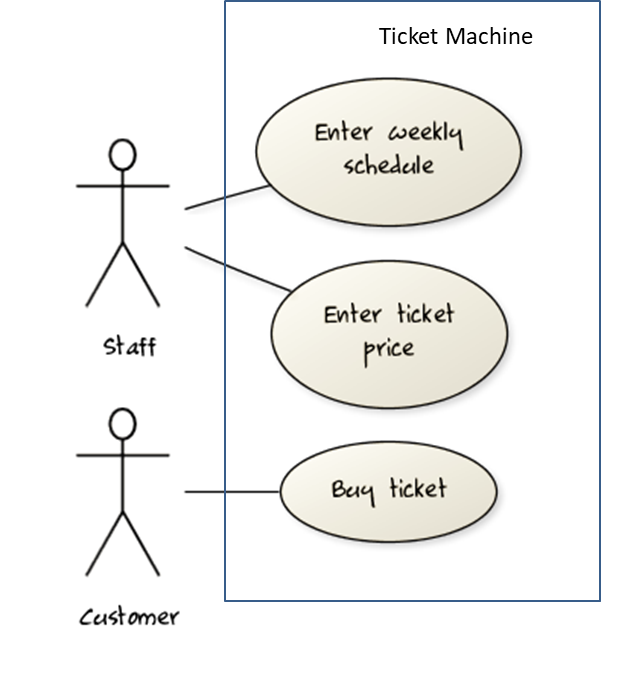
UML includes a diagram type called use case diagrams that can illustrate use cases of a system visually, providing a visual ‘table of contents’ of the use cases of a system.
In the example on the right, note how use cases are shown as ovals and user roles relevant to each use case are shown as stick figures connected to the corresponding ovals.
Use cases capture the functional requirements of a system.
What
Glossary: A glossary serves to ensure that all stakeholders have a common understanding of the noteworthy terms, abbreviations, acronyms etc.
Example A partial glossary from a variant of the Snakes and Ladders game:
- Conditional square: A square that requires a specific face value which a player has to throw before his/her piece can leave the square.
- Normal square: A square that does not have any conditions, snakes, or ladders in it.
Specifying a term in the glossary is useful in the following cases:
- A domain-specific/technical term that may not be known to all stakeholders, to indicate its definition
- When a term has multiple meanings, to indicate which of them is used in the project
- When there are multiple terms used for the same concept, to indicate which of them will be used in the project
What
Teams package these formats in different ways: some collect them into a single document that says what is to be built, while others keep each format where it is most useful and write down only what needs agreeing.
Where there is such a document, product-led teams usually call it a product requirements document (PRD), or a product brief. It typically carries the product's purpose, who it is for, the scope and the priorities within it, the stories or use cases that matter most, and the quality constraints the product has to meet.
A software requirements specification (SRS) is its more formal counterpart, used where requirements have to be agreed precisely with a customer, audited, or contracted for. An SRS is heavier, more structured, and more stable than a PRD; the two are not interchangeable names for the same thing.
A single document is one common packaging, not a rule. Many teams keep user stories in a tracker, the glossary in a wiki, and prototypes in a design tool, and write down only what needs agreeing in one place.
Each format earns its place by doing a different job:
- Prose frames the problem and the product's purpose.
- A feature list supports scope and delivery discussions.
- A user story records one negotiable slice of user value.
- A use case makes one workflow, and what can go wrong in it, precise.
- A glossary settles what shared terms mean.
- Supplementary requirements capture what cuts across all of the above.
Choosing between them is a question of what you need to be precise about, not of which notation is better.
Working from such a document has a name: specification-driven development means starting from a specification that is clear, versioned, and testable, and using it both to direct the implementation and to judge what comes back. The second half is the part that is easy to skip. A specification that only ever directs work, and is never used to check the result against, is a wish list.
This matters more as producing a candidate implementation gets cheaper. An assistant can draft questions, propose alternatives, or write code, but it cannot establish what stakeholders actually want, and it cannot decide a trade-off between things two of them both want. Those stay with the people accountable for the product, which is why writing the specification, and the judgment that goes into it, is the part of this work that does not get handed off.