What
Developer-to-developer documentation can be in one of two forms:
- Documentation for developer-as-user: Software components are written by developers and reused by other developers, which means there is a need to document how such components are to be used. Such documentation can take several forms:
- API documentation: APIs expose functionality in small, independent, easy-to-use chunks, each of which can be documented systematically.
- Tutorial-style instructional documentation: In addition to explaining functions/methods independently, some higher-level explanations of how to use an API can be useful.
Example API documentation: String API
Example Tutorial-style documentation: Java Internationalization Tutorial
Example API documentation: string API
Example Tutorial-style documentation: How to use Regular Expressions in Python
- Documentation for developer-as-maintainer: There is a need to document how a system or a component is designed, implemented and tested so that other developers can maintain and evolve the code. Writing documentation of this type is harder because of the need to explain complex internal details. However, given that readers of this type of documentation usually have access to the source code itself, only some information needs to be included in the documentation, as code (and code comments) can also serve as a complementary source of information.
Example se-edu/addressbook-level4 Developer Guide
Another view proposed by Daniele Procida in this article is as follows:
There is a secret that needs to be understood in order to write good software documentation: there isn’t one thing called documentation, there are four. They are: tutorials, how-to guides, explanation and technical reference. They represent four different purposes or functions, and require four different approaches to their creation. Understanding the implications of this will help improve most software documentation - often immensely. ...
TUTORIALS
A tutorial:
- is learning-oriented
- allows the newcomer to get started
- is a lesson
Analogy: teaching a small child how to cook
HOW-TO GUIDES
A how-to guide:
- is goal-oriented
- shows how to solve a specific problem
- is a series of steps
Analogy: a recipe in a cookery book
EXPLANATION
An explanation:
- is understanding-oriented
- explains
- provides background and context
Analogy: an article on culinary social history
REFERENCE
A reference guide:
- is information-oriented
- describes the machinery
- is accurate and complete
Analogy: a reference encyclopedia article
Software documentation (applies to both user-facing and developer-facing) is best kept in a text format for ease of version tracking. A writer-friendly source format is also desirable because non-programmers (e.g., technical writers) may need to author/edit such documents. As a result, formats such as Markdown, AsciiDoc, and PlantUML are often used for software documentation.
What
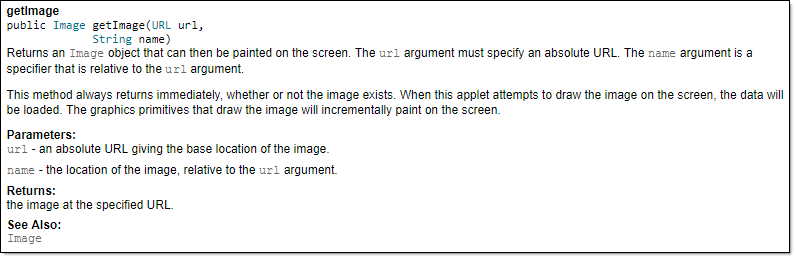
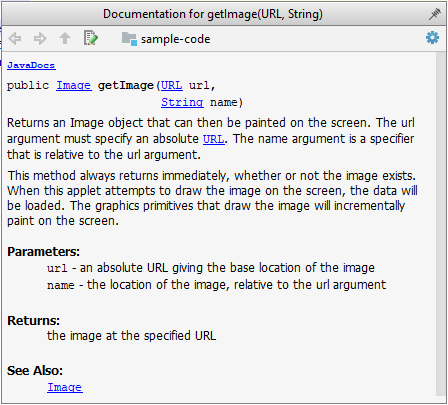
JavaDoc is a tool for generating API documentation in HTML format from comments in the source code. In addition, modern IDEs use JavaDoc comments to generate explanatory tooltips.
Example A method header comment in JavaDoc format:
/**
* Returns an Image object that can then be painted on the screen.
* The url argument must specify an absolute {@link URL}. The name
* argument is a specifier that is relative to the url argument.
* <p>
* This method always returns immediately, whether or not the
* image exists. When this applet attempts to draw the image on
* the screen, the data will be loaded. The graphics primitives
* that draw the image will incrementally paint on the screen.
*
* @param url An absolute URL giving the base location of the image.
* @param name The location of the image, relative to the url argument.
* @return The Image at the specified URL.
* @see Image
*/
public Image getImage(URL url, String name) {
try {
return getImage(new URL(url, name));
} catch (MalformedURLException e) {
return null;
}
}
Generated HTML documentation:
Tooltip generated by IntelliJ IDE:
How
In the absence of more extensive guidelines (e.g., given in a coding standard adopted by your project), you can follow the two examples below in your code.
A minimal JavaDoc comment example for methods:
/**
* Returns lateral location of the specified position.
* If the position is unset, NaN is returned.
*
* @param x X coordinate of position.
* @param y Y coordinate of position.
* @param zone Zone of position.
* @return Lateral location.
* @throws IllegalArgumentException If zone is <= 0.
*/
public double computeLocation(double x, double y, int zone)
throws IllegalArgumentException {
// ...
}
A minimal JavaDoc comment example for classes:
package ...
import ...
/**
* Represents a location in a 2D space. A <code>Point</code> object corresponds to
* a coordinate represented by two integers e.g., <code>3,6</code>
*/
public class Point {
// ...
}