What
When you write a small program by yourself, you can hold its structure in your head. You know where each piece of functionality lives, and you can usually predict what a change will affect.
That becomes much harder as the software and its team grow. Several people add code to the same program at once, and none of them has read all of it. Questions that once seemed trivial start to matter:
- Where does this new code belong?
- Where does each part run?
- How do the parts communicate?
- Which qualities matter most — ease of change, speed, reliability, security?
Software architecture is the set of significant decisions about a system's overall organization. It identifies the major parts, their responsibilities, how they interact, and how they are deployed.
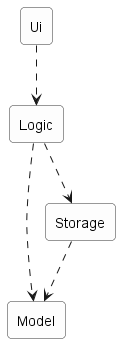
Example Consider a desktop invoice-management application in which users create invoices, set due dates, and mark invoices as paid. A possible architecture has four parts:
Each arrow in the diagram is a dependency: the part at the tail needs the part at the head.
Ui: displays information and receives user inputLogic: interprets user actions and carries out operationsModel: represents invoices and other data while the program runsStorage: reads data from and writes it to persistent storage
An architecture description deliberately leaves out most of what is inside each part. It does not say how many classes are in Logic, which one validates a user command, or which collection holds the invoices. Those are detailed design decisions.
Architecture and detailed design differ in how far a decision reaches, not merely in how big it is. An architectural decision constrains what the other parts can do, shapes the qualities the system can achieve, and is expensive to reverse once the rest of the system is built on it.
Example Deciding that persistent data belongs in a separate Storage component is architecture. Deciding that Storage uses one class per file format is detailed design.
The boundary is not absolute. An internal choice becomes architecturally significant when it strongly affects the rest of the system.
Example A change to the data representation to make the application able to handle a million invoices can be architecturally significant, affecting more than the internals of the Storage component.
Every software system has an architecture, even when nobody designed one deliberately. An unplanned program still has parts and dependencies; they are simply accidental, undocumented, and usually tangled. The value of deciding an architecture on purpose is that the team shares one, understands it, and can reason about it.
An architecture is a shared and evolving technical understanding, not one person's private plan. A team sets an initial architecture early — the decisions are expensive to reverse later — then tests it against real requirements and revises it deliberately when those requirements change. Larger organizations may give one person an architect role to hold the technical vision, but the architecture still has to be understood by everyone building the system.
An architecture is also more than a diagram. Although an architecture is often represented by a diagram (like the one in the example above), a diagram shows one view. The architecture also includes the constraints everyone must work within and the reasons behind the choices.
Example The fact that the application stores data locally because it must work without a network connection is also part of the architecture, although it may not be captured by the architecture diagram.
The software architecture of a program or computing system is the structure or structures of the system, which comprise software elements, the externally visible properties of those elements, and the relationships among them. Architecture is concerned with the public side of interfaces; private details of elements—details having to do solely with internal implementation—are not architectural.
-- Software Architecture in Practice (2nd edition), Bass, Clements, and Kazman
The definition above is widely quoted in the literature. "Externally visible properties" means what promises to do, not how it does it.
Reading
Architecture diagrams have no universally adopted notation. Unlike UML class diagrams, there is no rulebook: different teams use different shapes, colors, and arrows. A reader must first work out what the notation means.
Read an architecture diagram by asking four questions in order:
- What view is this? Code organization, deployment, communication, or something else — each shows different information.
- What are the major parts? Usually the boxes. Expect a handful, not thirty.
- What is each part responsible for? Names, labels, and nearby text should make this clear.
- What do the relationships mean? Follow each arrow's direction, and check the legend for what an arrow means.
A single diagram need not explain the whole architecture, but it must communicate its chosen view without ambiguity. Judge it against its stated purpose and the documentation it ships with: if the four questions cannot be answered from the diagram, its caption, and the text around it, something is missing — a useful thing to notice when reviewing a teammate's work.
Example Here are two real architecture diagrams, from actual projects, drawn by different teams in different notations. They describe systems unrelated to the invoice-manager example, which is exactly the situation you face when you join an unfamiliar project.
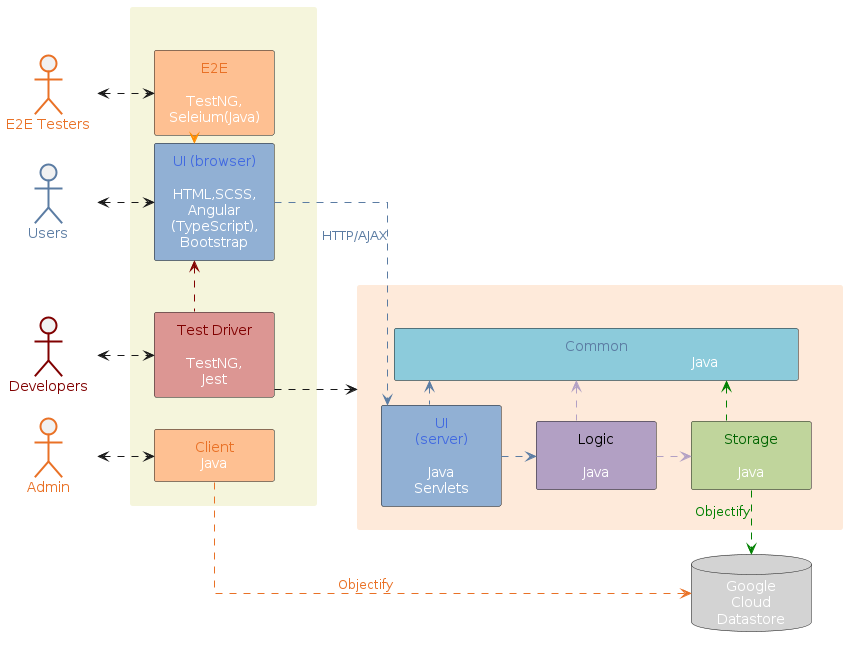
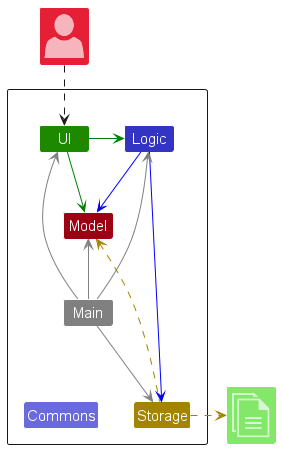
Try the four questions on both. They organize their boxes differently, use different shapes, and label their arrows differently, yet both are legitimate. For each one, work out which of the four questions the diagram answers by itself, and which stay ambiguous until you read the documentation around it — real diagrams often leave some of the four to the accompanying text.
Drawing
While architecture diagrams have no standard notation, follow these guidelines when drawing them.
- State the view and what the arrows mean. Put the meaning in a legend or caption. If you need two kinds of arrow, make them visually different and label both.
- Name each component by its responsibility, not its current implementation.
ExampleStoragestays accurate if the implementation changes;JsonFileHandlerbecomes a lie the day you switch to a database. - Show only what is architecturally relevant. If a box maps one-to-one onto a single class, the diagram has drifted into detailed design. A crowded diagram is usually a sign that it has slipped to a lower level of abstraction than it claims.
- Minimize the variety of symbols, and prefer familiar ones e.g., a drum shape is widely understood to represent a database. Explain any symbol whose meaning may not be obvious.
- Avoid the indiscriminate use of double-headed arrows.
Example Consider the two architecture diagrams of the same software given below. Because Diagram 2 uses double-headed arrows everywhere, the important fact that GUI has a genuinely bidirectional dependency with the Logic component is no longer visible — it looks like every other connection.

What
An architectural style is a reusable way of organizing the major parts of a system (aka architectural pattern), just as building architectures follow recognized styles. Naming a style (e.g., "layered", "client-server") lets developers refer to a familiar arrangement without explaining it from scratch.
Different styles describe different aspects of a system, which is why one system can use several at once. This is the most useful thing to know before learning different architectural styles.
What
Aspect: This style focuses on how the code inside a program is organized.
In the layered style, the software is divided into layers whose dependencies all point one way — downward. Higher layers use services provided by lower ones; lower layers know nothing about the layers above.

Layered designs differ in how strictly they enforce the separation. In strict (or closed) layering, a layer may use only the layer immediately below it. In the more common relaxed form, a layer may use any lower layer, skipping intermediate ones. What both share, and what actually matters, is that dependencies never point back up. Because a lower layer depends on nothing above it, you can understand, test, and replace it on its own. The moment Storage calls back into Ui to show an error dialog, that property is lost and the two must be understood together.
Example The invoice manager follows relaxed layering, as Logic depends on Storage as well as Model. Operating systems and network communication software are the classic examples of layering.

Layers are not tiers. A layer is a logical division inside the software; a tier is a part that is deployed separately. The two are often confused, partly because the term n-tier is frequently used to mean layered.
Example A desktop invoice manager has several layers but runs as a single tier — one program, one computer. Layering does not require distribution and does not imply it. Another style can split the program across a network, gaining a second tier while keeping much the same layering.
What
Aspect: This style focuses on how the system is packaged and deployed.
A monolith is a system deployed as a single unit. You build one artifact and release it as a whole. A typical desktop application is a monolith, as is a great deal of successful commercial software.
Being one deployable unit does not mean one running process. A monolith may be launched as several processes, or run as many identical copies behind a load balancer — but they are all copies of the same thing, released together.
A modular monolith is a single deployable unit organized internally into well-defined components. It is still one artifact, but inside it the parts have clear responsibilities, clear interfaces, and disciplined dependencies.
Example An invoice manager with Ui, Logic, Model, and Storage shipped as one program is a modular monolith.
"Monolith" is not a synonym for "badly structured." This is the most common misunderstanding. The word describes how the system is deployed, not how well it is organized. A tangled ball of mud and a disciplined modular monolith share a deployment shape but differ enormously inside; what separates them is whether the internal components and dependencies are real.
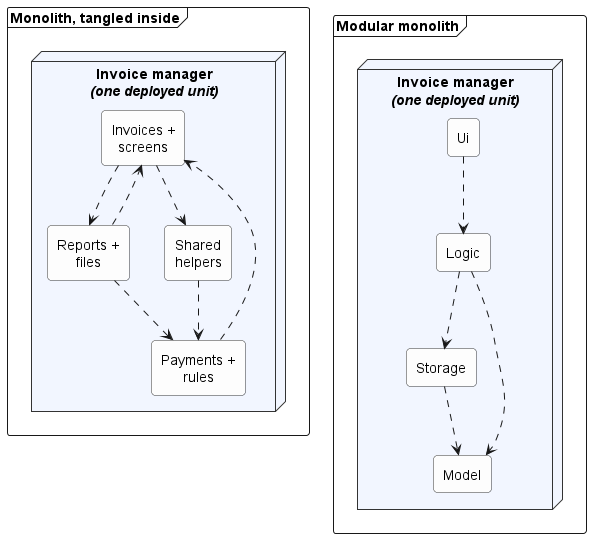
Each arrow is a dependency. Both are monoliths — one deployed unit each, identical from the outside. What differs is inside: on the left, responsibilities are mixed and dependencies point both ways; on the right, each component has one job and the dependencies run one way.
The modular monolith is usually the sensible starting point for one team building one product. It keeps building, testing, and debugging simple while still encouraging clear responsibilities.
What
Aspect: This style focuses on which parts request capabilities and which parts provide them.
In the client-server style, a server provides a capability or data, and one or more clients use it.

Sharing data among several installations is the most common reason to reach for client-server, but it is not the only one — clients also use a server for centralized computation, authentication, or coordination. In the shared-data case, the fix is to give the shared data a home of its own: a separate program — the server — becomes the authoritative owner of the invoices, and each desktop application becomes a client, sending a request such as "add this invoice" and receiving a response from the server.
Example Suppose several users need to edit the same set of invoices from their own desktop applications. Local files no longer suffice, because each installation would hold a different copy, and no installation can reach another's hard disk.
Adding a server changes both views of the invoice manager. In the logical view, RemoteStorage now depends on a request handler that owns the shared data; in the deployment view, client and server become separately deployed parts that exchange messages over a network.
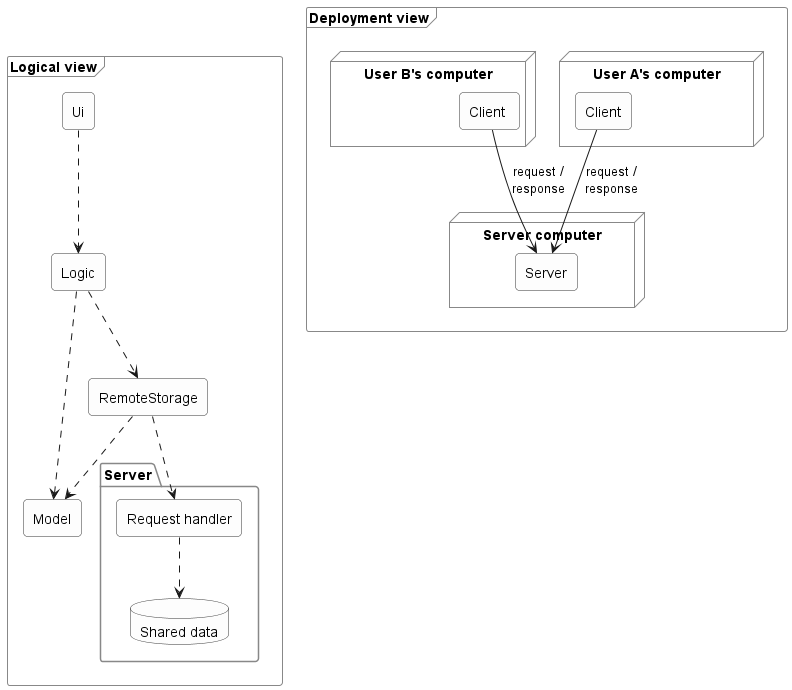
In the logical view, each arrow is a dependency. In the deployment view, each arrow is a message sent between separately deployed parts.
Adding a server changes more than the location of data storage (or whatever else the clients need to share). A real split adds architectural elements and concerns:
- a client-side component that sends requests;
- a server-side component that receives and handles them;
- an agreed request and response format, so both sides read messages the same way; and
- handling for timeouts, failures, and version mismatches — concerns that the purely local design did not have.
A good interface limits the impact of moving to a client-server architecture but does not avoid it entirely.
Example Because Logic depended on what Storage promised rather than on a specific implementation, a RemoteStorage that honors the same interface may spare Logic any change at all — a real payoff from the earlier separation. But the system as a whole has gained communication components that someone must build and maintain.
This is also where tiers appear. The client program is one tier and the server another — a tier being a separately deployed part, not necessarily one physical machine.
A network boundary adds costs that local calls never had:
- Requests take far longer, and less predictably. A method call inside a program is orders of magnitude faster than a request that crosses a network, and unlike a local call, a network request takes a different amount of time on each attempt. Users notice both.
- Failures can be partial. A timeout does not reveal whether the server failed before or after doing the work. Retrying carelessly can perform the operation twice.
- Versions must stay compatible. A new server may still receive requests from an old client.
- Security becomes prominent. The server must decide who may read or change the shared data.
Example Client-server is extremely common — online games, email, collaborative applications, and web applications all use it, though it is in no way limited to browser-based software.
